What's new

4 pictures for CC

RichardsTPF

TPF Noob!
Joined
Jul 19, 2011
Messages
445
Reaction score
14
Location
Houston, TX
Can others edit my Photos
Photos OK to edit
Shoot a lot of water falls pictures during my trip in china. Here are a few of my favorites. C&C are appreciated.
In another thread, some experienced members talk about CPL. I bought a 50mm f1.4G before the trip and should have spend little bit extra on a CPL.
None of them are pp. I used spot metering for the shots. #4 was handheld.

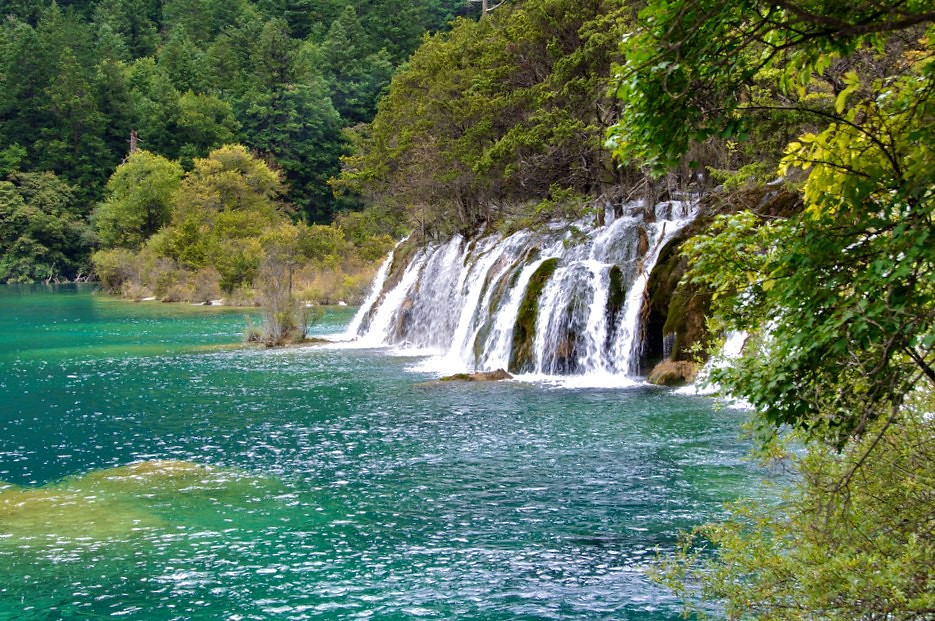
#1 The tree in the background are washed out.
35mm, f8, 1/60s, iso200.

6307936343_4c22836b22_b.jpg
[/URL] DSC_0317 by RichardsFlik, on Flickr[/IMG]

#2 The sky is too flare. If I crop out the sky, the top would be too tight. For vertical water falls like this, shall I use wider aperture (f6) to get faster speed since less DOF is required?
18mm, f11, 1/40s, iso200

6308450212_6648372d2f_b.jpg
[/URL] DSC_0285 by RichardsFlik, on Flickr[/IMG]

#3 31mm, f8, 1/10s, iso200
No sky, better saturation. Better shutter speed control than #2?

6307918451_26d51e9fca_b.jpg
[/URL] DSC_0232 by RichardsFlik, on Flickr[/IMG]

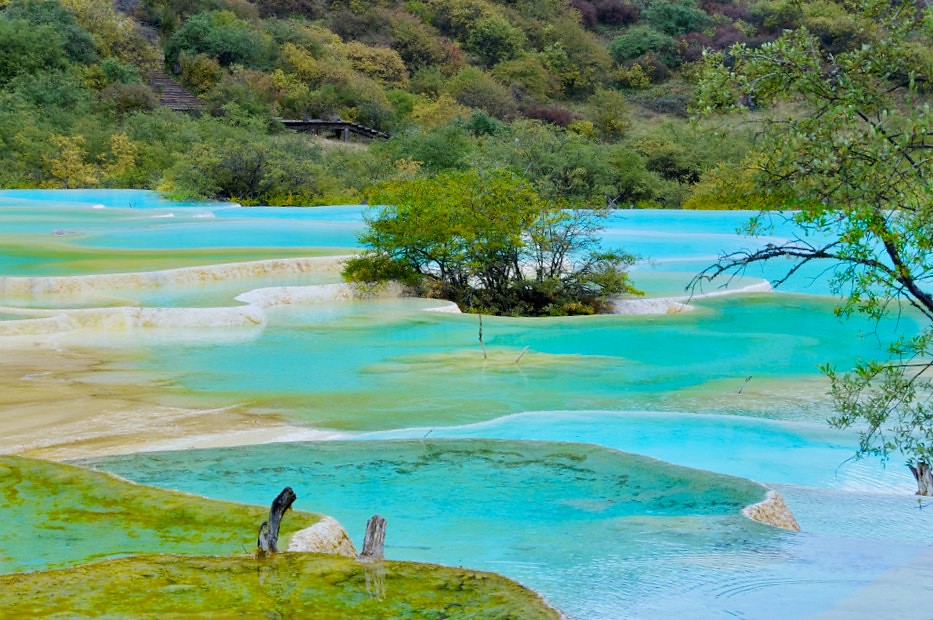
#4 A CPL will make the water more saturate. Shall I crop out the mountain & people in the back?

6308433468_1af1f7ee4f_b.jpg
[/URL] DSC_0180 by RichardsFlik, on Flickr[/IMG]
 
My 0.02¢ for what it's worth...just curious to know if these were shot in raw?

#1. The washed out trees should be fixable in post processing - not sure what editing package you have, but this "problem" should be fixable. This image is also a good example of why you probably shouldn't post images without PP, I mean, after all, shouldn't you be posting your "best efforts" for C &;C.

#2. You have just encountered the problem of photographing a scene which is a bit dark relative to the sky and your camera shooting for the 18% grey "standard", has washed out the sky. Only way to fix this is by the use of a soft ND Grad, or by taking one image exposed for the waterfalls and scenery as you have here and then one for the sky, then merging them in Photoshop.

#3. I like this one, not sure what I would do to it, if anything...

#4. Not bad. Don't know what you mean by "the mountain in the back...", the people I would get rid of by cloning, or if you have access to Photoshop, by using the "content aware" functionality - I also might be tempted to get rid of those two "branches" in the foreground of the picture

Cheers,

WesternGuy
 

helpwaterfall by franklinrabon, on Flickr

here's what I did to #1 (all edits made in Aperture): First, I felt that it was a little tilted, so I straightened it 3.7 degrees. In the original, it was in that just so slightly off territory that it kind of gives you that undefinable sense of being uncomfortable. Next, I burned (darkened) the trees in the background and above the waterfall with a brush. Then I added a very small amount of contrast and vibrancy to the overall image (.11 and .34 respectively).

I probably would have used a polarizing filter for the shot originally, as that's hard to fix in PP software. It would have made the water in the foreground not have as much glare, which distracts from the subject (I"m assuming the waterfall).

I also would have probably tried to take a few with a shallower depth of field and to see how that would work. It's hard to say for sure if it would have just looked awkward if the background and foreground were more out of focus, or even if it could have been pulled off effectively, but I would have tried it. Potentially it could have made the waterfall sharper and more obviously the subject of the shot.
 
This image is also a good example of why you probably shouldn't post images without PP, I mean, after all, shouldn't you be posting your "best efforts" for C &;C.
I am a noob want to learn both exposure and PP skills. The fresh original pics without PP will receive more accurate CC on my exposure setting. The best way to take good pics is to get first thing right:lmao:.
One of the biggest advantages of DSLR is PP. I am brand new to this world, and definitely will learn it. I just bought a photoshop CS5. How would you edit it?

#2 ND Grad filter will work on this pic. HDR is a very useful method too. I will get my hand on it when the software arrived.

content aware" functionality
Will check that out too.
 
Damn you have a good location to learn at, that place looks beautiful. You may save yourself a lot of time getting the right filter for your camera if you plan on taking a lot of shots like these. #4 has most potential for me but it needs to be leveled. #3 is a really cool solid shot but I'm a blue water type guy so 4 is the picture I'd prefer to look at.
 
I shoot in RAW. These images are converted to JEPG and posted on flick.

Fjrabon, good edit. Never notice the tilted problem until you point it out. What makes the trees so washed out? Did I overexposure this pic?

I also would have probably tried to take a few with a shallower depth of field and to see how that would work.
You mean #2?
 
I shoot in RAW. These images are converted to JEPG and posted on flick.

Fjrabon, good edit. Never notice the tilted problem until you point it out. What makes the trees so washed out? Did I overexposure this pic?

I also would have probably tried to take a few with a shallower depth of field and to see how that would work.
You mean #2?

It was maybe a touch overexposed, but part of it is that it's a difficult image to nail perfectly correct out of the camera. It's images like these that make PP such a wonderful thing. It's virtually impossible to get the whole image correctly exposed. Also, there really is little reason to shoot in RAW unless you're going to be doing PP edits. I didn't really mess with the exposure much, when I added the contrast, and burnt the background trees, it looked more or less correct to me. I think the issue with the background trees is that they were in more direct sunlight than anything else in the picture, which makes them virtually impossible to nail right out of the camera without underexposing the rest of the image.

What I was talking about with the trying multiple depths of field was on image one, same exact shot from the same exact spot, with the same exact zoom. decrease your f/stop some, if possible, and either adjust the ISO or shutter speed to properly compensate for the exposure. It may not have worked at all, but it's something I would have tried.

While learning, I've found something that is extremely helpful is taking the same shot with a lot of varied settings, then when I'm looking over them, it allows me to really see how the various aspects I changed really affected the shot. I think this is the best way to learn how to get the image you want. Whereas if you just take single shots from a lot of varied spots, it's hard to really get a good feel for what changing your settings does exactly. Even if, in the abstract, you know what changing certain settings will do, nothing replaces visually seeing what changing your f/stop from f/5.6 to f/2.5 exactly does. Then when you gain more experience, you can look at a potential shot and your brain will know "hey, I want a pretty open aperture, medium ISO on this shot, I may want a ND gradient filter and/or a polarizing filter."
 

helppool - Version 2 by franklinrabon, on Flickr


Here's what I did to #4: Most obviously used 'retouch' to remove the people. Because the background was mostly indistinct trees, aperture nailed this more or less with just a brush. If you were going to blow it up, of course you'd probably more carefully want to use something like photoshop or pixelmator for the details, but as is, just burshing them out with retouch I think achieved the desired effect. It was background anyway. This allows the geometric lines of the walkway to be preserved in the image, which I kind of like din juxtaposition to the natural lines of the pools.

Next, I again added some contrast and vibrancy. This is needed almost 100% of the time if you shoot in raw. In fact, if you shoot in JPEG, most cameras do this step for you automagically anyway. I then lowered the temp of the picture a little bit to make the blues pop. If I wanted to be more precise with this, I would have just adjusted the colors on the pool area, but again, for the purposes of this photo, I felt like a small temp adjustment would be enough.

I also straightened it, using the straight line of the background walkway as a cheat guide. Leveled it until that was perfectly horizontal.
 
Mmmm....., IMO the tree in the middle and the foreground green are overcooked. Like the way you retouch the people out. Does Photoshop SC5 have this function?

Which way do you use most for cloning out stuffs such as power line, people, tree branch?
 
Mmmm....., IMO the tree in the middle and the foreground green are overcooked. Like the way you retouch the people out. Does Photoshop SC5 have this function?

Which way do you use most for cloning out stuffs such as power line, people, tree branch?

yeah, the middle tree is definitely over cooked a little, probably could have been more precise with that, but I just wanted to give the basic feel. The middle tree is also a little awkward to deal with, because of it's location in the picture, if you really wanted to nail this image, you'd have to zoom way in, since parts of the pool are 'inside' the area of the tree, meaning you'd have to be very delicate with adjusting the tone of the pool to make it pop, and be consistent with the rest of the pool, while not applying the effect to the tree. As was, I just applied the same effect to the tree as I did the pool, which overcooked it, but probably saved 30 minutes of delicate, tedious processing, when I really was just trying to show the feel of what, in my newbie opinion, would help make the image stand out.

I'm not really familiar with photoshop, though I am sure it has the same, if not a better retouch tool as Aperture. With aperture there is a 'retouch' brush that works well when the background is mostly indistinct, like the trees there. You literally just click 'retouch' from the brush menu, select the size of the brush, 'brush over' what you want gone and bam, it's gone. It's not the most delicate of tools, but like I said, it's usually good enough when your background is indistinct already.
 
one thing, composition wise with #4, there really isn't a focal point of it, though the middle tree almost tries to be. But it's such a boring, and frankly ugly, tree that it is just kind of weird. You have these beautiful pools with brilliant color, and an ordinary shrub looking tree is dominating the image. Just an opinion.
 
Shootermcgavin, thank you for your comments. I joined a tour during my vacation in China. I realized the importance of a CPL when I start shooting. I read a few threads and asked some questions about the filter two month ago. Just didn't know how handy it could be for picture like this. So no urgent to buy a filter at that time.

Because it was heavy cloudy, I never expected the tree and background would be washed out.
 
What do you think about this picture? Handheld, the softness kills it. I like the color and composition.
A, F32, 1/8s, iso200

6307940903_1b281fd066_b.jpg
[/URL] DSC_0130 by RichardsFlik, on Flickr[/IMG]
 

Create an account or login to comment

You must be a member in order to leave a comment

Create account

Create an account on our community. It's easy!

Log in

Already have an account? Log in here.

Back
Top Bottom