What's new

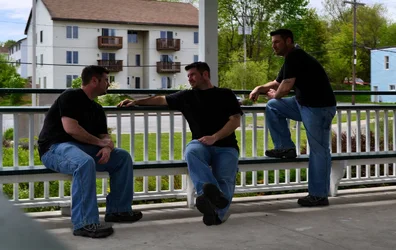
A few of me, in one pic. :-)

Ernicus

TPF Noob!
Joined
May 18, 2012
Messages
2,689
Reaction score
337
Location
Old Town, ME
Can others edit my Photos
Photos OK to edit
I shot this the other day while doing some practice with my tripod and such. That guy on the left is pretty cool...but the one in the middle...not too sure about that guy.
$manymeees.webp
 
  • Thread Starter 🔹
  • Banned
  • #3
in more ways than one
 
You did a pretty good job making yourself (I am assuming) look natural, like you're having a conversation with yourself and everyone could be involved. As Traveler mentioned, you are a bit underexposed. Supplementary fill light could have been used to brighten up each exposure of yourself. The other thing that I noticed was that the background appears to have some serious ghosting going on. Did you layer the 3 stills over one another, and lower the opacity on some of the layers? If you have one layer that's sharply focused, eliminating the others that contribute to the jitter would make for a sharper image.

This type of thing is also easier to do indoors, where the light is a bit more diffused and even.
 
  • Thread Starter 🔹
  • Banned
  • #5
Honestly, I did it very fast to see how much would be involved. In the original file, you can see crazy doubling in the background etc...I am going to do this for real on my next go round and this time I will be playing cards with myself, indoors, with different clothing even. I will take my time and, hopefully, do it right so there is no blemishes in the merge. The shoot took me all of ten minutes and the merger maybe 20. So I did not spend much time on it, as you can tell. ;-)
 
  • Thread Starter 🔹
  • Banned
  • #6
You did a pretty good job making yourself (I am assuming) look natural, like you're having a conversation with yourself and everyone could be involved

Thanks for noticing, that is what I was going for.

Did you layer the 3 stills over one another, and lower the opacity on some of the layers? If you have one layer that's sharply focused, eliminating the others that contribute to the jitter would make for a sharper image.

I was going to do that with adobe and it seemed pretty involved for the time I wanted to spend on it at the moment, so I used Photo Merge in Paintshop Pro instead. It was much quicker but much messier which would involve much more after merge editing. For the real attempt i will use adobe and spend the time learning how to do it.

and yeah, it's me. ;-)
 

Create an account or login to comment

You must be a member in order to leave a comment

Create account

Create an account on our community. It's easy!

Log in

Already have an account? Log in here.

New Topics

Back
Top Bottom