What's new

A lot of noice at 100ISO

shootermcgavin

TPF Noob!
Joined
Sep 22, 2011
Messages
939
Reaction score
77
Location
Midwest
Can others edit my Photos
Photos OK to edit
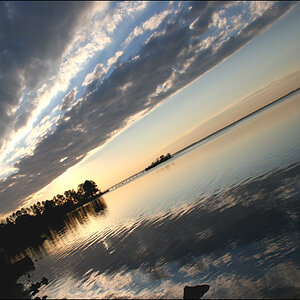
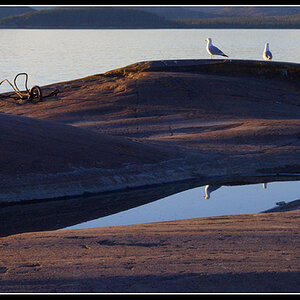
I was just going over some landscape images I took a couple weeks ago and they have a lot of noise, it was a sunny day at 100ISO so something is wrong. I was in the sweet spot of my focal length but my aperture was f/32, can being maxed out on the low side of the aperture cause that noise? The only other thing I could think of was maybe I didn't turn of VC, I know what that would make the image look like at night but I've never forgot to do it in the daytime.
 
Can we see an example? And no, having such a small aperture will not increase noise, but it will increase the amount of diffraction.
 
Having a small aperture won't make more dirt on your sensor, but it will make that dust more visible on your shot. I'm not sure why, but I'd guess it's because of some depth of field stuff.
 
lake.jpg


here's the image
 
Noise will be more visible in the under exposed portions of that, or any, photo, which is most of it. Investigate ETTR (Expose To The Right). ETTR

The focus is very soft because of the f/32 aperture you used. As focus point distance gets further from the camera a larger lens aperture can be used while still maintaining a far DOF limit of Infinity.

Your 60D at 77 mm with the focus point 1000 feet away still gives a far DOF limit of infinity even at f/2.8. Online Depth of Field Calculator

When the focus point is far from the camera what changes is the DOF near focus limit distance.
 
Last edited:
So basically if I'm focusing on something far away then I don't need a small aperture? I guess that's the one thing that changed was the day I took this the camera store guy said to open up aperture to max for landscape photos to increase sharpness... not good advice I guess. Thanks for the help!
 
I can't see any noise in that image....but I'm not zoomed into 300% and pixel peeping.

As mentioned, noise is more prevalent in darker / underexposed areas...and if you try to lighten your photo in post, that will really bring out the noise.
So the way to get the least amount of noise is to expose properly and even Expose to the Right, as mentioned above.
 
Almost all lenses are at their sharpest with a mid range aperture (F8 or so)... so that is usually optimal for landscapes, when using Hyperfocal distance focusing.
 
F32 at 1/100 needs a lot of light, has this been brightened ? because it must have been under exposed. At the weekend i was shooting F22 at 1/8 so i would say yours was way under exposed
 
F32 at 1/100 needs a lot of light, has this been brightened ? because it must have been under exposed. At the weekend i was shooting F22 at 1/8 so i would say yours was way under exposed
That's my bet. It looks like the photo has been brightened a lot in post.
 
Sorry gsgary good call I was taking these pictures for an HDR shot and that was an underexposed one I didn't notice the exposure was cranked up in raw... I think it's a combination of bad photography that caused this, I was able to tell my VC was on also, I'm having trouble finding my over exposed images from that shoot so that's probably part of the problem, and f/32 aperture, so all that combines made for some crappy photos...
 
the camera store guy said open up aperture for max DOF. You need to stop down, which what it would appear you did at f32, which as others have already stated is not going to be helpful in this case. ALso, sharpness is a function of shutter speed not fstop
 
ALso, sharpness is a function of shutter speed not fstop

I will agree that shutter speed helps with killing motion blur on a moving subject... but if the subject is not moving, and the camera / lens is not moving.. shutter speed will neither increase or decrease sharpness.

On a non-moving subject.. try shooting wide open aperture (probably soft i.e NON SHARP)... and also try shooting the subject at F32 (obviously will be soft due to diffraction). Then try a mid range aperture (wow.. sharp image). Now leave it it set at F8.. and change the shutter speed (assuming variable light so it doesn't over or underexpose) and the image will be sharp at ANY shutter speed (again assuming no movement on the part of the subject or the camera).

Sharpness is actually caused by a combination of factors.... proper aperture, good light, proper ISO, good tripod, shutter speed fast enough to compensate for any movement on either end, remote actuation, mirror lockup, etc... (and probably some others also i.e.. how much you drank last night! lol!)

In this thread.. the context was the aperture as being the cause of the noise / softness....
 
Sorry gsgary good call I was taking these pictures for an HDR shot and that was an underexposed one I didn't notice the exposure was cranked up in raw... I think it's a combination of bad photography that caused this, I was able to tell my VC was on also, I'm having trouble finding my over exposed images from that shoot so that's probably part of the problem, and f/32 aperture, so all that combines made for some crappy photos...

The key here is that all cameras on all settings produce noise, only the signal to noise ratio changes. Even at ISO100 if you dramatically underexpose the image you're lowering the signal but the noise remains the same. When you then go and boost the brightness back up you boost both the signal and the noise.

Hence the method of "shooting to the right" or making the picture as bright as practical in digital to ensure maximum signal to noise. A picture that is too bright (but not blown out) which is made darker in post will have lower noise than an image shot correctly, which will have lower noise still than a picture that was underexposed and brightened in post.
 

Create an account or login to comment

You must be a member in order to leave a comment

Create account

Create an account on our community. It's easy!

Log in

Already have an account? Log in here.

Back
Top Bottom