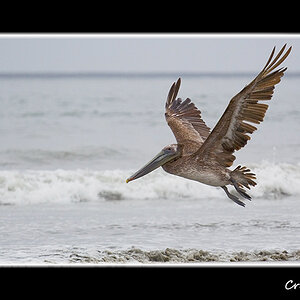
Composition is nice but the image looks very, very harsh to me. Did the file come out of the camera like this or did you edit it?
According to the EXIF data you shot it wide open and applied "hard" sharpening to it. Contrast is also set to "high". That tells me that you let the JPEG engine of the camera do the work.
No idea what these settings essentually mean in terms of image quality because I am a Nikon user, but what i see here are extremely harsh contrasts and very harshly sharpened borders and details.
I would highly suggest that you change these settings inside your camera or look into editing RAW files instead of shooting JPEG. That way you have full control over sharpness and contrasts which usually results in much cleaner and more pleasing images.
Edit: If there was a different reason why you chose these settings then feel free to ignore me ;D



![[No title]](/data/xfmg/thumbnail/32/32983-e979bc0c64090f2693d7fae6b3cc425c.jpg?1734162936)
![[No title]](/data/xfmg/thumbnail/39/39657-59afb9b38e439b33906e81e4952470ac.jpg?1734173973)
![[No title]](/data/xfmg/thumbnail/42/42484-fe2beb05d743deaf21681664722538d4.jpg?1734177008)
![[No title]](/data/xfmg/thumbnail/34/34072-be456691237ae73cb2936416e2e9e8c0.jpg?1734164508)