What's new

Canes

Frequency

Been spending a lot of time on here!
Joined
Oct 17, 2010
Messages
8,864
Reaction score
683
Location
Calicut, Kerala,India
Can others edit my Photos
Photos OK to edit
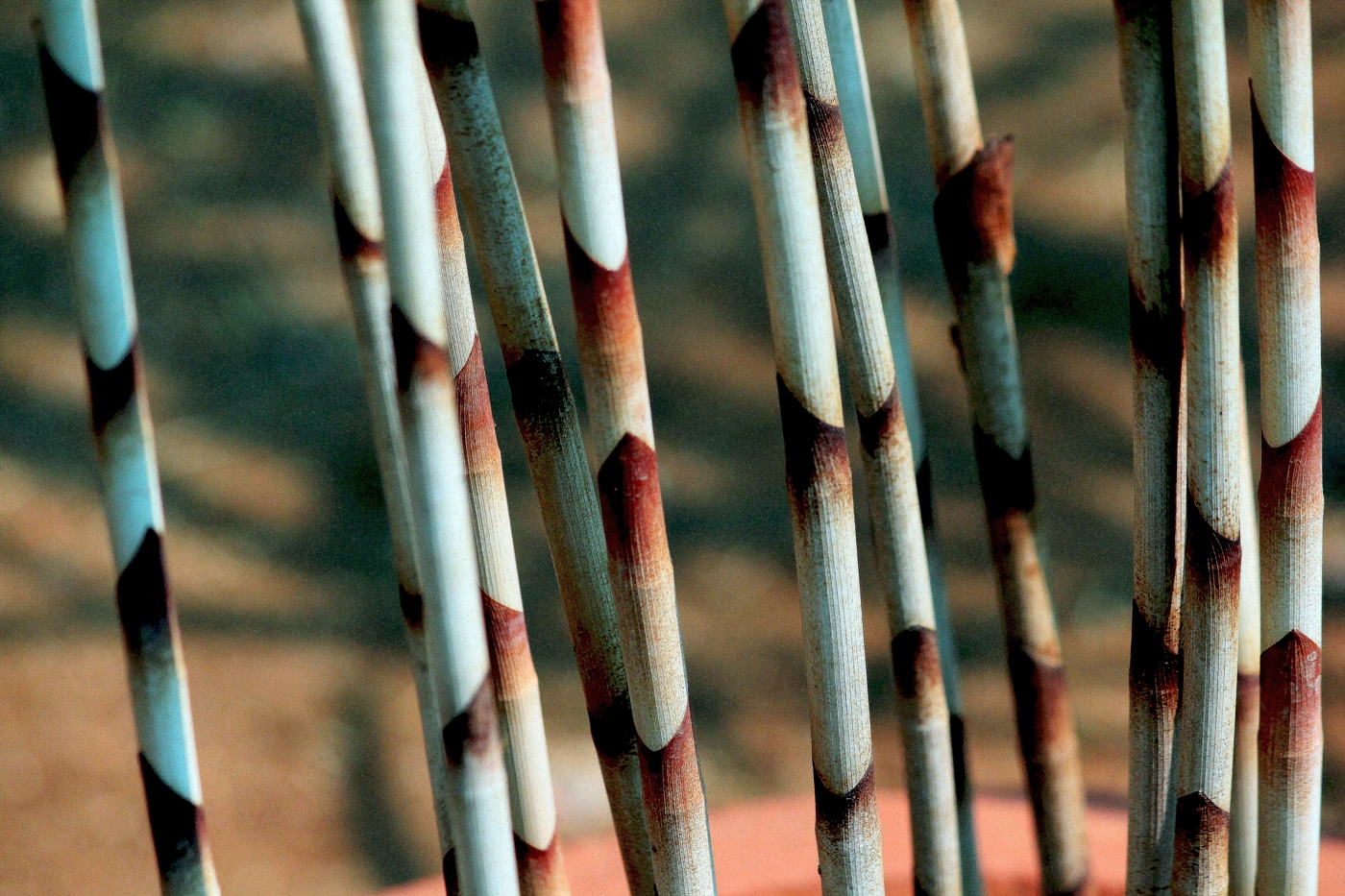
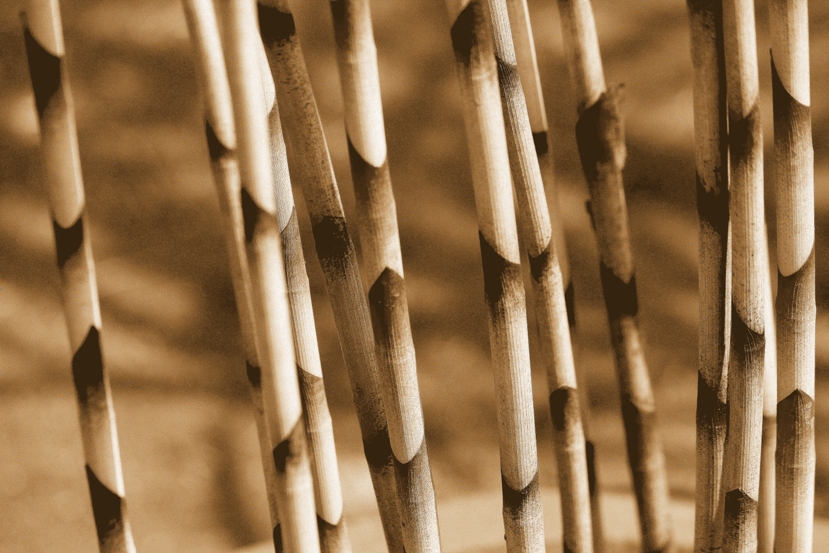
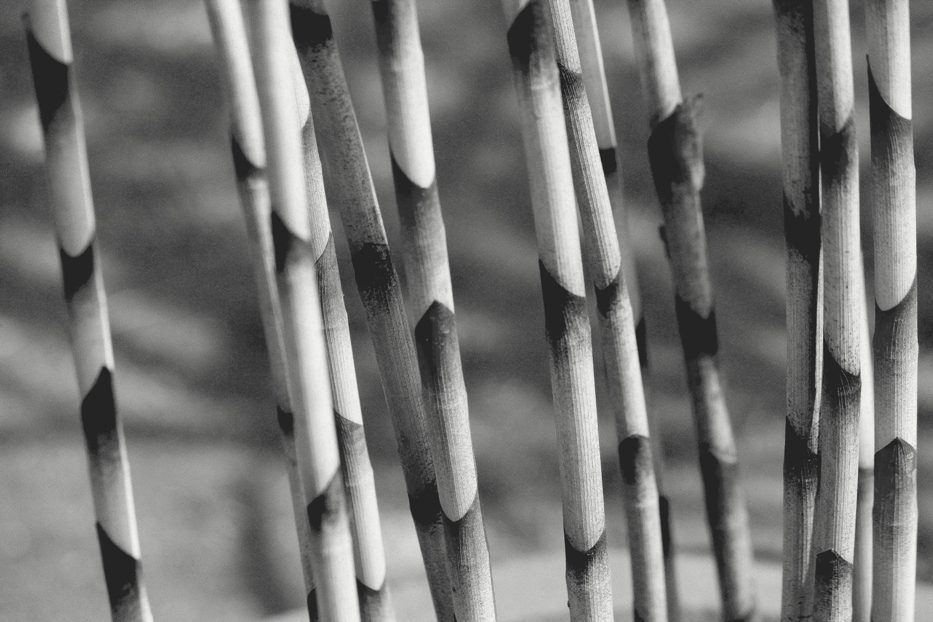
Please let me know, which one is your choice?

#1


#2


#3


Regards :D
 
#2 works best for me. I like the shadow pattern against the canes, which stands out better in the last two than in the color shot. You also lose the pink ring in the lower right. However, the OOF cane about a third of the way into the image from the left bothers me. I'd either darken it or crop it out.
 
Thank you KenC; it too feel disturbed by the one prominently OOF stem there; i kept it there to maintain the size of the image; further i am not good in any of selective alterations; actually i am very bad at that :grumpy:
I have a doubt regarding multi AF points; are these points at the same distance from the camera? What do they mean when say "cross type AF points"? what is the other type?

Regards :D
 
Thank you KenC; it too feel disturbed by the one prominently OOF stem there; i kept it there to maintain the size of the image; further i am not good in any of selective alterations; actually i am very bad at that :grumpy:
I have a doubt regarding multi AF points; are these points at the same distance from the camera? What do they mean when say "cross type AF points"? what is the other type?

Regards :D

I don't know much about autofocus, but for something like this I'd focus manually just behind the closest cane. This would keep the closest one pretty sharp and most of the others sharp, and at worst, you would have a couple of the furthest that were soft, but that wouldn't detract as much.

As far as selective alterations, the more you try it the better you get. My preference is to use a brightness adjustment layer to darken by some amount (perhaps about -20 here), add a layer mask filled with black, and then paint white or gray selectively on the mask to allow the darkening effect to "pass through". You can undo any of the painting you do not like and you will see the effect instantly.

 
I like #2 the most of all three. Something about the sepia toning just makes it feel "right" to me.
 
Thank you KenC; it too feel disturbed by the one prominently OOF stem there; i kept it there to maintain the size of the image; further i am not good in any of selective alterations; actually i am very bad at that :grumpy:
I have a doubt regarding multi AF points; are these points at the same distance from the camera? What do they mean when say "cross type AF points"? what is the other type?

Regards :D

I don't know much about autofocus, but for something like this I'd focus manually just behind the closest cane. This would keep the closest one pretty sharp and most of the others sharp, and at worst, you would have a couple of the furthest that were soft, but that wouldn't detract as much.

As far as selective alterations, the more you try it the better you get. My preference is to use a brightness adjustment layer to darken by some amount (perhaps about -20 here), add a layer mask filled with black, and then paint white or gray selectively on the mask to allow the darkening effect to "pass through". You can undo any of the painting you do not like and you will see the effect instantly.

Thank you KenC; i have to go a long way in photoshop

:D
 
I would prefer #1 if there was less noise. I like the colors, though I might have processed it differently.
Which leads me to wonder why you shot this at ISO 1600. 1/500 sec for a stationary subject seems overkill - even in the wind.
ISO 800 would have been enough to still get acceptable shutterspeed I would think.
 
I just looked closer at the exif - you're shooting in program (P) mode using spot metering. This scene has light and dark elements. Letting the camera make the exposure descision with spot metering is probably why you ended up shooting this scene at ISO 1600. You probably focused and metered on a dark portion of the cane.
 
Thank you sliest very much your keen evaluations.... your speculations gave me much to think that lead to some insight too ( i expect such evaluations in future too ;) )
 
I just looked closer at the exif - you're shooting in program (P) mode using spot metering. This scene has light and dark elements. Letting the camera make the exposure descision with spot metering is probably why you ended up shooting this scene at ISO 1600. You probably focused and metered on a dark portion of the cane.


Regards :D
 

Create an account or login to comment

You must be a member in order to leave a comment

Create account

Create an account on our community. It's easy!

Log in

Already have an account? Log in here.

New Topics

Back
Top Bottom