What's new

Couple Shots C&C please

kaylahunsader

TPF Noob!
Joined
Mar 26, 2011
Messages
40
Reaction score
0
Location
Hendersonville
Can others edit my Photos
Photos OK to edit
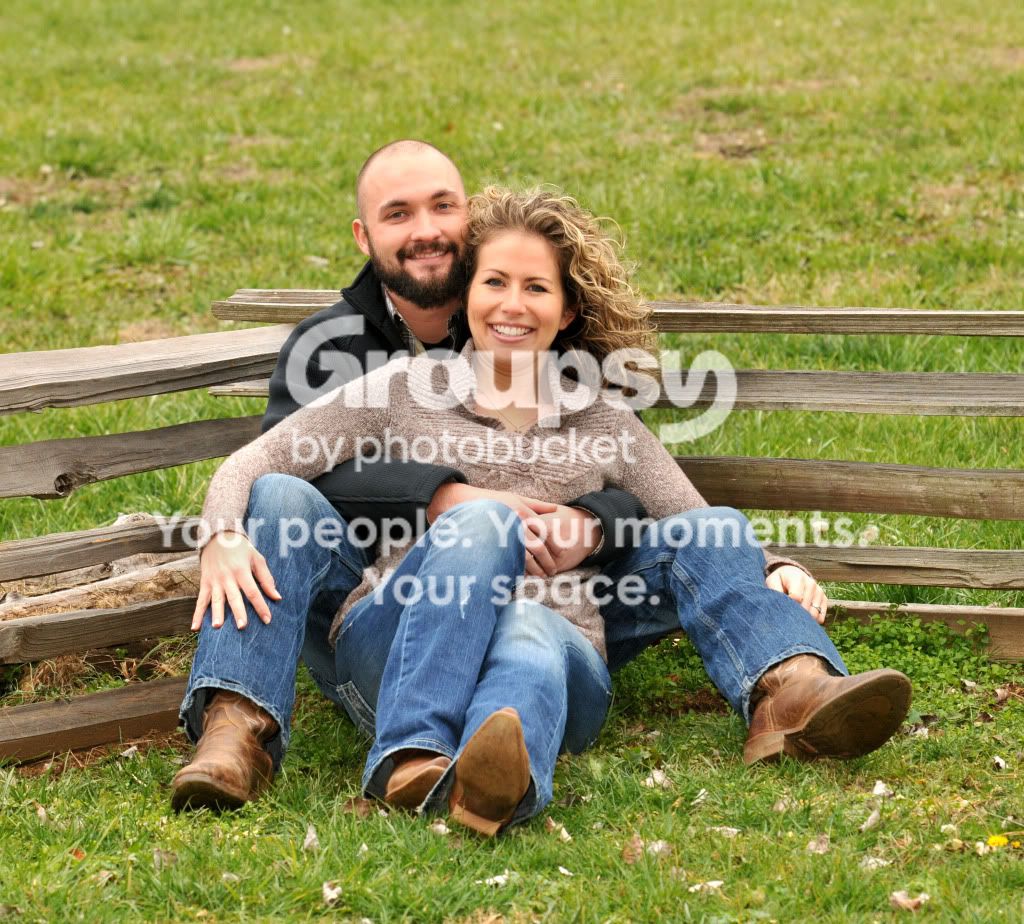
Here are a few couple shots I took a while back. I have to do engagment shots coming up soon! Any feedback on these and ideas on couple shots would be great!

1.

JoshandMichelle2010048w.jpg

2.
JoshandMichelle2010065w.jpg

3.
JoshandMichelle2010083w.jpg

4.
JoshandMichelle2010021w.jpg

5.
JoshandMichelle2010096w.jpg

6.
JoshandMichelle2010094w.jpg

7.
JoshandMichelle2010125w.jpg
 
not too shabby.

#1 you framed it cutting off fingers and intersecting joints. Needs a crop.
#2 is fun! Maybe crop in just a little too much dead space outside subject.
#3 best of the lot. Well done.
#4,5,6 and 7 are just ok.
 
#3 is my fave...#1 you cut off fingers (like pp said), but also the couple does not "pop" from the picture. Nice location!
 
Love the piggy back; what trever said and the 1st pic would be better if the offset was to the left rather than the right as it is now.. I am sure you were cropping to leave the stream in the background, but lose it the crop will be much more pleasing:)) just being nit picky:) otherwise very nice job and magical location!
 
#3 ftw if you do a tighter portrait crop.

Watch out for the 'neck scrunchy' on the girl on #2. This can happen if the subject looks down toward their body, such as when in a reclining position.

Actually, looking over the images again as a whole, I think I'd like them a lot better if they were tighter crops. I feel like I'm seeing too much background. Overall pretty nice though. The light is nice.
 
Watch out for the 'neck scrunchy' on the girl on #2. This can happen if the subject looks down toward their body, such as when in a reclining position.

You may be able to prevent this by having the subject push their head forward while maintaining a "natural" look.

I agree with other comments in PP's.
 
actually, I did notice that and ask her to push her chin out. It worked and I meant to post that photo, but I posted this one instead on accident. Maybe I'll go back and post the other one.
 
Last edited:
Thanks for the reply. I will go back and crop them some more. I am always a little nervous to crop too much tho b/c I did that once and when they were printed the crop was to tight and it cut off heads and stuff lol, but I agree they need croping more. The light that day was nice, it was an overcast day!
 
Thanks for the reply. What would you recommend to get the couple to "pop" from the picture?
 
I wouldn't necassarily recommend digitally cropping them, but just shooting tighter. Of course, what's done is done so you have to make the decision on whether you can crop more or not.

As for getting them to pop, the best way is to add your own light and underexpose the ambient a bit. As for processing, depending on your skill, you could *slightly* desaturate the background. It's very easy to go too far with any kind of processing though.
 
Try clicking 'Reply With Quote' instead of 'Reply' so it's easier to figure out who you're replying to.
 

Create an account or login to comment

You must be a member in order to leave a comment

Create account

Create an account on our community. It's easy!

Log in

Already have an account? Log in here.

New Topics

Back
Top Bottom