cigarguy
TPF Noob!
- Joined
- Feb 27, 2014
- Messages
- 16
- Reaction score
- 4
- Location
- United States
- Can others edit my Photos
- Photos OK to edit
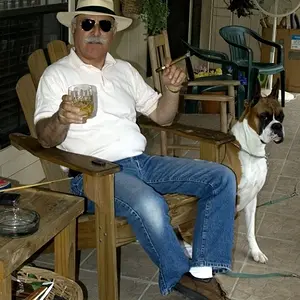
I've noticed very disappointing clarity in a lot of my photos lately and I'm at a complete loss why. I had to crank the contrast up in editing on this picture but it really highlights the problems I'm having. Help!
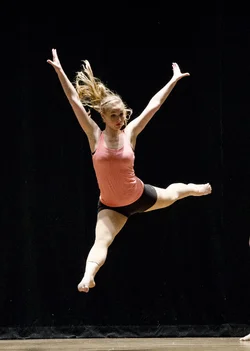
Here's the Exif Data:
Make
NIKON CORPORATION
Model
NIKON D7000
Exposure
N/A
Aperture
4.5
Exposure Time
1/640 (0.0015625 sec)
Lens ID
144
Focal Length
110.0 mm
Flash
Off, Did not fire
File Size
1393 kB
File Type
JPEG
MIME Type
image/jpeg
Image Width
2272
Image Height
3184
Encoding Process
Baseline DCT, Huffman coding
Bits Per Sample
8
Color Components
3
X Resolution
240
Y Resolution
240
Software
Adobe Photoshop CS6 (Windows)
YCbCr Sub Sampling
YCbCr4:4:4 (1 1)
Exposure Program
Shutter speed priority AE
Date and Time (Original)
2014:05:03 20:39:07
Max Aperture Value
4.6
Metering Mode
Multi-segment
Light Source
Unknown
Color Space
Uncalibrated
Sensing Method
One-chip color area
Custom Rendered
Normal
Exposure Mode
Auto
White Balance
As Shot
Digital Zoom Ratio
1
Focal Length In 35 mm Format
165 mm
Scene Capture Type
Standard
Gain Control
High gain up
Contrast
+25
Saturation
N/A
Sharpness
25
Subject Distance Range
Unknown
Time Created
20:39:07+00:00
F Number
4.5
Exposure Compensation
N/A
ISO
1600
Color Mode
3
Compression
JPEG (old-style)
Orientation
Horizontal (normal)
XMP Toolkit
Adobe XMP Core 5.3-c011 66.145661, 2012/02/06-14:56:27
Creator Tool
Ver.1.04
Here's the Exif Data:
Make
NIKON CORPORATION
Model
NIKON D7000
Exposure
N/A
Aperture
4.5
Exposure Time
1/640 (0.0015625 sec)
Lens ID
144
Focal Length
110.0 mm
Flash
Off, Did not fire
File Size
1393 kB
File Type
JPEG
MIME Type
image/jpeg
Image Width
2272
Image Height
3184
Encoding Process
Baseline DCT, Huffman coding
Bits Per Sample
8
Color Components
3
X Resolution
240
Y Resolution
240
Software
Adobe Photoshop CS6 (Windows)
YCbCr Sub Sampling
YCbCr4:4:4 (1 1)
Exposure Program
Shutter speed priority AE
Date and Time (Original)
2014:05:03 20:39:07
Max Aperture Value
4.6
Metering Mode
Multi-segment
Light Source
Unknown
Color Space
Uncalibrated
Sensing Method
One-chip color area
Custom Rendered
Normal
Exposure Mode
Auto
White Balance
As Shot
Digital Zoom Ratio
1
Focal Length In 35 mm Format
165 mm
Scene Capture Type
Standard
Gain Control
High gain up
Contrast
+25
Saturation
N/A
Sharpness
25
Subject Distance Range
Unknown
Time Created
20:39:07+00:00
F Number
4.5
Exposure Compensation
N/A
ISO
1600
Color Mode
3
Compression
JPEG (old-style)
Orientation
Horizontal (normal)
XMP Toolkit
Adobe XMP Core 5.3-c011 66.145661, 2012/02/06-14:56:27
Creator Tool
Ver.1.04



![[No title]](/data/xfmg/thumbnail/32/32698-38e2346942223e17b43fb958f66064c1.jpg?1734162253)



![[No title]](/data/xfmg/thumbnail/37/37280-a7e70a01ccd331918e71645cd4c1f16e.jpg?1734170137)