What's new

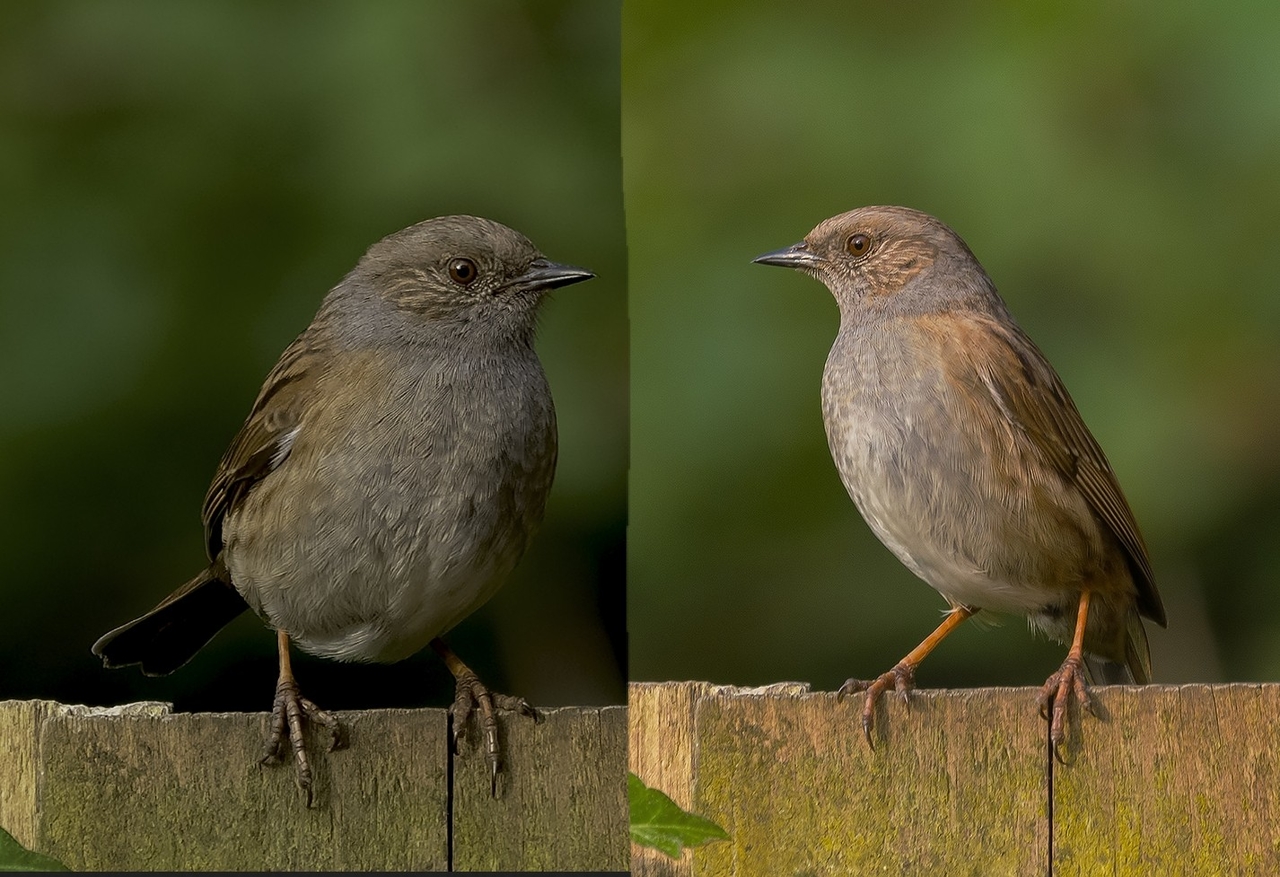
Dunnock sitting it out.

u8myufo

TPF Noob!
Joined
Feb 17, 2020
Messages
68
Reaction score
85
Can others edit my Photos
Photos OK to edit
Gotta feel sorry for these guys, just when they think it`s safe to drop in and pick a few morsels up off the floor, down comes the Robin and see`s it off. Only happens during this time of year though, in the winter the Robins seem to put up with them without any hassle.


DSC_3013.webp
 
Beautifully composed and exposed. I'd clone out the little bit of leaf in the bottom left corner.;)
 
Nice shot, I'd recommend exporting with your colour profile set to sRGB for uploading to the web, currently it's in ProPhoto RGB which can cause the colour to be a bit wonky in some browsers.
 
Nice shot, I'd recommend exporting with your colour profile set to sRGB for uploading to the web, currently it's in ProPhoto RGB which can cause the colour to be a bit wonky in some browsers.

Cheers,It was set to ProPhoto in LR and I normally export to PS to finish off and save as a png. As that image above was too big for this site as a png I converted the png to Jpeg so no idea what profile it was uplaoded as.
 
Nice shot, I'd recommend exporting with your colour profile set to sRGB for uploading to the web, currently it's in ProPhoto RGB which can cause the colour to be a bit wonky in some browsers.

Cheers,It was set to ProPhoto in LR and I normally export to PS to finish off and save as a png. As that image above was too big for this site as a png I converted the png to Jpeg so no idea what profile it was uplaoded as.

Cool, you should be able to change it on export in the file settings in Lightroom, though you may want to soft proof prior to export. I think PS gives you a popup on opening about using the embedded colour profile. I'm not too sure of the workflow if you wanted to use ProPhoto with PS I'm afraid. Maybe someone else would advise?
 
Nice shot, I'd recommend exporting with your colour profile set to sRGB for uploading to the web, currently it's in ProPhoto RGB which can cause the colour to be a bit wonky in some browsers.

Cheers,It was set to ProPhoto in LR and I normally export to PS to finish off and save as a png. As that image above was too big for this site as a png I converted the png to Jpeg so no idea what profile it was uplaoded as.

Cool, you should be able to change it on export in the file settings in Lightroom, though you may want to soft proof prior to export. I think PS gives you a popup on opening about using the embedded colour profile. I'm not too sure of the workflow if you wanted to use ProPhoto with PS I'm afraid. Maybe someone else would advise?

Cheers for that, I did change it in LR but not the external editor one below. Hopefully this should be fixed, if not I will take a look tomorrow.
DSC_3027.webp
 
Looks much better, softer and less blotchy looking. Brighter colors, too.
 
Last edited:
That's done it nicely! here's a comparison so you can see what a difference it's made....

39399-1588054840-8f496248fd5c1e5ad287934eebf356c4.jpg


Glad you worked it out, your editing is really nice with good exposure values and really nice colours.
 
That's done it nicely! here's a comparison so you can see what a difference it's made....

39399-1588054840-8f496248fd5c1e5ad287934eebf356c4.jpg


Glad you worked it out, your editing is really nice with good exposure values and really nice colours.

Thanks again, that`s interesting as whilst I can see the difference here they all look exactly the same as the right hand one to me. So I wonder, is it just some who see it like your example?
 
Thanks again, that`s interesting as whilst I can see the difference here they all look exactly the same as the right hand one to me. So I wonder, is it just some who see it like your example?

No bother, it'll depend on which web browser you use and whither it's colour managed. Chrome seems to be, firefox (at least on android) does not.
 

Create an account or login to comment

You must be a member in order to leave a comment

Create account

Create an account on our community. It's easy!

Log in

Already have an account? Log in here.

Back
Top Bottom