What's new

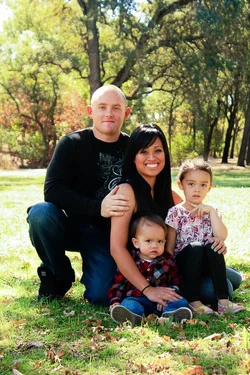
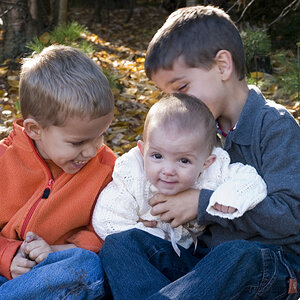
Family Photo Shoot

but yeah that seems very less orange and has less reds in it
 
I guess I will start using my Kodak program versus this ipiccy thing through google. (for the white balance)
 
but yeah that seems very less orange and has less reds in it

If Snowbears image doesn't look right to you, than your monitor is severely out of whack. You need to calibrate it.... that requires a calibration package.
 
What are you using for your editing program?

Your settings are SS 1/100; f/5.6; ISO 250 on a Canon T2i in Aperture priority.

The 1/100 is a problem here. The focus is very soft with some motion in it because you were evidently too slow for you to hand hold. Some people can hand hold as low as 1/50 or slower FOR STILL LIFE. For live subjects you need to be above 1/125 and for subjects that may move I wouldn't suggest being at 1/250 or faster.

I took the original and opened it in adobe camera raw. I fixed the orange color as best I can with a jpeg-it was quite a decrease in temp. Then I applied a curve to give it some contrast, reduced exposure on the trees behind and adjusted the blacks to fix the washed out look.

 

Attachments

  • $Family original as Smart Object-1.webp
    $Family original as Smart Object-1.webp
    248.3 KB · Views: 88
It just takes practice and determination. Check your settings before you shoot - especially white balance (I use auto WB). Take a few shots of things around the house so you can easily compare to the results of your editing.

Edit: I knew someone with better editing skills than I would come along!
 
Get rid of the kodak program. Anything with an easy button isn't going to be any good in the end. Stick to LightRoom. If you MUST actually EDIT use Gimp and learn what you are doing.
 

Create an account or login to comment

You must be a member in order to leave a comment

Create account

Create an account on our community. It's easy!

Log in

Already have an account? Log in here.

New Topics

Back
Top Bottom