What's new

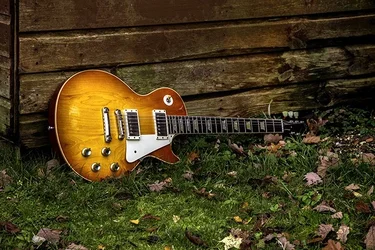
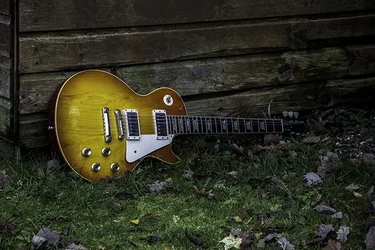
Gibson in the grass!

The lighting on the body is nice, but it seems to fall off toward the headstock. I like the contrast of the body against the weathered wood.
 
I agree with the above, and love Gibson, very nice guitar, I play a Takamine now. Alot more affordable. Would love to play on that for a while.
 
Love the guitar and weathered wood background. I think you should explore this more, but simplify somewhat, leaving the grass and leaves out of it and working the light more intentionally. That would be a beautiful candidate for a painting with light exercise ala Eric Curry too.
 
The lighting on the body is nice, but it seems to fall off toward the headstock. I like the contrast of the body against the weathered wood.

My reaction exactly. So, +1.

Beautiful guitar.
 
I like the second better. Good work and a nice instrument.
 
I like them both. Just tell me where you left that guitar in the grass, so I can go recover it. :lmao:
 
Nice guitar. You've got some color issues with these. That's a Gibson in the blue grass if you don't get the white balance adjusted. Your photo has a blue color cast. Here it is with the white balance adjusted.

$gibson_grass.webp

I also noted that you posted the photo with an embedded ICC profile that specifies ProPhoto. That's going to cause a lot of folks out there who see the photo to see it incorrectly. Not all web browsers are appropriately color managed so that people who look at your photo using IE or Chrome are going to see something that looks about like this.

$gibson_prophoto.webp

You want to make sure that any photos you post to the Internet have an embedded ICC profile that specifies sRGB as the color space.

Joe
 
Joe,


Where in CS6 can I change it? I found it in Photomax and changed it from Adobe RGB to sRGB. Is it within the RAW converter?

Kind regards

And thanks for the comments folks!
 
Joe,


Where in CS6 can I change it? I found it in Photomax and changed it from Adobe RGB to sRGB. Is it within the RAW converter?

Kind regards

And thanks for the comments folks!

In CS6 under the Edit menu select Color Settings. Unless you know precisely why you would want anything other than sRGB, set the working color space to sRGB.

When you open a raw file in ACR click on the blue line at the bottom of the screen and you can set ACR to export to a specific color space.

If you have a photo open in Photoshop you can convert between color spaces by selecting Convert to Profile from the Edit menu.

Joe
 
Really nice guitar and love the contrast this photo gives off. I have to show this to my friend, he is obsessed with all and any guitars!
 

Create an account or login to comment

You must be a member in order to leave a comment

Create account

Create an account on our community. It's easy!

Log in

Already have an account? Log in here.

Back
Top Bottom