What's new

Gimme Another Chance

JimMcClain

No longer a newbie, moving up!
Joined
May 25, 2014
Messages
616
Reaction score
420
Location
Feather River Country
Can others edit my Photos
Photos OK to edit
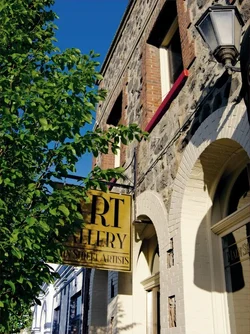
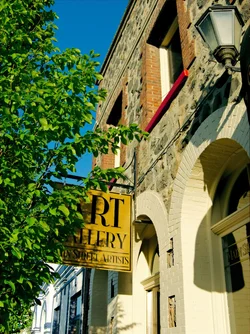
Seems my previous submission to the L&C forum was a flop, so I hope you'll give me another chance to learn from your feedback. This photo was taken at almost 8pm at f/4.0, 1/640 sec., ISO 100. The EXIF data says the focal length was 6.60mm, but I'm confused about that because the lens is a 25-600 superzoom (Lumix FZ200). Post processing was done with Corel AfterShot 2 and PSP X6.

I sure wouldn't mind getting good enough to have my pictures hang inside the walls of this building. This is the Clinch Building, in Quincy, CA, built in 1908.

Please share your comments and critiques.
$main-street-artists01.webp
 
The 25mm to 600mm range is the "135 format" equivalent. The actual, real focal length was 6.60mm according to EXIF Reader 2.7, which is somewhere down in the wide-angle range on the camera's zoom range.

As far as an earlier post not garnering much notice--that HAPPENS here, quite often. Seems like it's often a matter of timing/luck/what else is active/overall board activity level, and so on. Sometimes a weekend post gets ignored, only to spring to life later in the week when it is brought back to the Active Topics section. Once a post slips off of the Active Topics list, it can easily fall down the rabbit hole. For example, the Plumas Country Courthouse shot you posted yesterday at 4:40 PM...I never even saw the title of that post...I didn't even get the chance to deliberately skip over it, nor did I get the chance to ignore it...I literally never even saw it listed!!!
 
It's a nicely composed photo. You mentioned AfterShot Pro; Did you process from an original raw file?

The noise suppression seems a bit heavy handed.

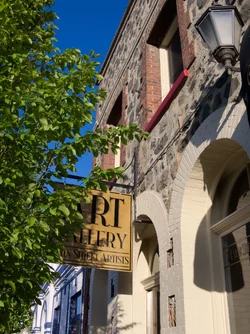
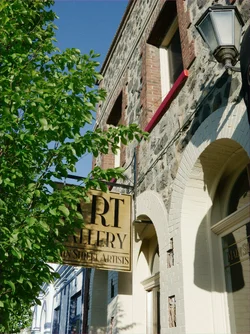
The color is too orange and the saturation level is passing the reality check point. Something more like this:

Joe

$gallery.webp
 
It's a nicely composed photo. You mentioned AfterShot Pro; Did you process from an original raw file?

The noise suppression seems a bit heavy handed.

The color is too orange and the saturation level is passing the reality check point. Something more like this:

Joe
Thanks Joe. Yes, all processing in ASP2 was from a RAW file (.RW2). When I viewed the image at 100%, I was concerned about the apparent speckling of the sky. I may have overdid it in an effort to fix that. I think what helped more was clarity, but then I didn't go back and reduce the noise removal. How would I go about correcting this in the RAW file?

I also see what you mean by unrealistic saturation level. As far as "too orange," is that a reference to color temperature?

Thanks for sharing your opinion. It helps.

Thank you too, Derrel, for the information. I manage a couple other forums and understand why some topics go without replies. But knowing that doesn't help much when it's MY topic. ;) I knew I could bump it, at some point, but after looking at the picture I posted again, I thought, why bother. :( You can't see the courthouse for all the trees.
Jim
 
It's a nicely composed photo. You mentioned AfterShot Pro; Did you process from an original raw file?

The noise suppression seems a bit heavy handed.

The color is too orange and the saturation level is passing the reality check point. Something more like this:

Joe
Thanks Joe. Yes, all processing in ASP2 was from a RAW file (.RW2). When I viewed the image at 100%, I was concerned about the apparent speckling of the sky. I may have overdid it in an effort to fix that. I think what helped more was clarity, but then I didn't go back and reduce the noise removal. How would I go about correcting this in the RAW file?

I'd need to see your raw file, but given that you took the photo at ISO 100 you shouldn't have a noise problem. If you want to upload the raw file I'd be happy to have a look.

I also see what you mean by unrealistic saturation level. As far as "too orange," is that a reference to color temperature?

Yes, color temp/white balance was off. How did you determine the WB in ASP?

Another note: the JPEG you uploaded to TPF had it's ICC profile stripped off. Not sure how or when that happened but it's a potential problem in terms of how your photo appears to others out there on the web.

Joe
 
I'd need to see your raw file, but given that you took the photo at ISO 100 you shouldn't have a noise problem. If you want to upload the raw file I'd be happy to have a look.
I wouldn't want to impose on TPF's storage, so I put it here temporarily: http://1footinthegrave.com/images/support/main-street-artists01.RW2

Ysarex said:
I also see what you mean by unrealistic saturation level. As far as "too orange," is that a reference to color temperature?

Yes, color temp/white balance was off. How did you determine the WB in ASP?

Another note: the JPEG you uploaded to TPF had it's ICC profile stripped off. Not sure how or when that happened but it's a potential problem in terms of how your photo appears to others out there on the web.
The image I posted above was the result of only my second processing with ASP2. I have never dealt with RAW images before, so this is a very new experience for me. I haven't normally gone very far beyond the defaults in PSP X6 before either, but I am determined to learn better photography habits and quality processing. Still, I have a limited budget, so what I have now is pretty much it.

I used the ASP2 white balance dropper to click a neutral tone area. I had to go back to the manual a couple times because I initially thought I should click what I thought was white, but not a highlighted or shaded area. Still not sure I knew what I was doing.

I got no idea how the ICC profile info got stripped out. I would not have done that on purpose - I didn't even know what it was until I just looked it up. I wonder if it's a bug in either ASP2 or PSP X6?

After resetting all the settings I made in ASP2, I am going to give this picture another chance - I guess that's what this thread is about. I'll see if I can do better. :)

Jim
 
I'd need to see your raw file, but given that you took the photo at ISO 100 you shouldn't have a noise problem. If you want to upload the raw file I'd be happy to have a look.
I wouldn't want to impose on TPF's storage, so I put it here temporarily: http://1footinthegrave.com/images/support/main-street-artists01.RW2

Ysarex said:
I also see what you mean by unrealistic saturation level. As far as "too orange," is that a reference to color temperature?

Yes, color temp/white balance was off. How did you determine the WB in ASP?

Another note: the JPEG you uploaded to TPF had it's ICC profile stripped off. Not sure how or when that happened but it's a potential problem in terms of how your photo appears to others out there on the web.
The image I posted above was the result of only my second processing with ASP2. I have never dealt with RAW images before, so this is a very new experience for me. I haven't normally gone very far beyond the defaults in PSP X6 before either, but I am determined to learn better photography habits and quality processing. Still, I have a limited budget, so what I have now is pretty much it.

I used the ASP2 white balance dropper to click a neutral tone area. I had to go back to the manual a couple times because I initially thought I should click what I thought was white, but not a highlighted or shaded area. Still not sure I knew what I was doing.

I got no idea how the ICC profile info got stripped out. I would not have done that on purpose - I didn't even know what it was until I just looked it up. I wonder if it's a bug in either ASP2 or PSP X6?

After resetting all the settings I made in ASP2, I am going to give this picture another chance - I guess that's what this thread is about. I'll see if I can do better. :)

Jim

Everybody starts new sometime. Folks here will help you along.

Here's a fairly clean ASP conversion of your original. I don't have ASP2 but your new version should read this .XMP file which will let you see what I did: main-street-artists01.RW2.xmp just copy it into the folder with your RW2 file then open the file in ASP.

One of the reasons you were seeing a lot of noise was the base exposure in ASP -- it was crushing your blue channel. I left the photo more noisy than not because I prefer sharp and a little noisy to mush. ASP used to ship with a bonus Noise Ninja plugin installed. Is that still a feature of ASP2? You'd find it grouped along with the sharpening adjustments. This can be further processed in PSP.

Got to run right now -- I'll stop back tomorrow afternoon and I can help some more with white balance and questions you may find from that xmp file.

Joe


$art_gallery.webp
 
Thanks Joe. I've been doing so much reading today, I got a headache. I got ASP2 because it was really popular with a lot of people, but I now learn that there's a lot of disappointment - and bugs - in version 2, as opposed to version 1. And no more Noise Ninja. NN decided not to renew their contract with Corel and have now come out with what sounds like a pretty nice program called Photo Ninja. If anyone is interested in a free trial, it's located here: Download Photo Ninja

I downloaded the trial of Photo Ninja and it really is a nice little program. I also looked at Lightroom 5 and it has a lot of bells and whistles, including the catalog and other image management tools. I found it easier to use, but the most disturbing thing happened that convinced me this is not the editor for me. It cropped my image. I can't figure out how or why and I can't seem to UNcrop it.

Both LR and PN do a better job of editing than ASP2. I got both to create a similar image result - except for the crop LR did. The trial of PN won't allow you to save or render.

I'm going to mess with LR5 a little more, but I have an ugly feeling that unwanted crop job is the deal breaker, unless it turns out it was something I did.

Jim
 
Last edited:
Thanks Joe. I've been doing so much reading today, I got a headache. I got ASP2 because it was really popular with a lot of people, but I now learn that there's a lot of disappointment - and bugs - in version 2, as opposed to version 1. And no more Noise Ninja. NN decided not to renew their contract with Corel and have now come out with what sounds like a pretty nice program called Photo Ninja. If anyone is interested in a free trial, it's located here: Download Photo Ninja

I keep ASP on my system so I can help my students who have it. It's a capable raw converter but it's not real easy as it's default conversion usually needs a lot of work. It does have a cataloging system and a real good price. If you're buying a retail product it's a lot of software for the money. I can't speak to the version 2 product and I will resist upgrading until I'm pressured by the job. Sorry to hear about the loss of Noise Ninja as that was one of it's best features.

PhotoNinja is excellent but lacks the cataloging function. As raw converters go PN is on top of the heap as far as image quality is concerned.

I downloaded the trial of Photo Ninja and it really is a nice little program. I also looked at Lightroom 5 and it has a lot of bells and whistles, including the catalog and other image management tools. I found it easier to use, but the most disturbing thing happened that convinced me this is not the editor for me. It cropped my image. I can't figure out how or why and I can't seem to UNcrop it.

The crop is built-in to LR's default import profile for your camera. You can't disable it since an import profile is required. Your option there would be to create a replacement profile which is possible in LR.

Both LR and PN do a better job of editing than ASP2. I got both to create a similar image result - except for the crop LR did. The trial of PN won't allow you to save or render.

I'm going to mess with LR5 a little more, but I have an ugly feeling that unwanted crop job is the deal breaker, unless it turns out it was something I did.

Jim

If you liked PN and were happy living without the cataloging function and you want better results without the effort that ASP requires there's a free option you might consider: Raw Therapee. Still not as easy as LR and without the LR or ASP option to apply local adjustments but it will deliver a very clean solid conversion that you can then continue to work in PSP. The price is very right. Here's that photo of yours converted in RT:

$gallery.webp

It took a fraction of the time ASP required. RT does a better job with noise/sharpness than ASP (minus Noise Ninja) and you can see that in this version.

I wanted to pick up on the topic of color/temp white balance. In using ASP you tried to white balance by finding a neutral tone in the photo. That can be pretty hit and miss. Setting white balance while converting a raw file is an excellent way to go, but to get consistent good results you want to shoot a reference target in the light you're working in. The best reference target is free; just cut the top out of a white Styrofoam food container and stick it in your camera bag. In the raw converter sample a shot of the target and then apply that to the photos taken in that light.

Joe
 
I wanted to pick up on the topic of color/temp white balance. In using ASP you tried to white balance by finding a neutral tone in the photo. That can be pretty hit and miss. Setting white balance while converting a raw file is an excellent way to go, but to get consistent good results you want to shoot a reference target in the light you're working in. The best reference target is free; just cut the top out of a white Styrofoam food container and stick it in your camera bag. In the raw converter sample a shot of the target and then apply that to the photos taken in that light.

Joe

Shouldn't the reference target be a gray card (18%)? When I was working with ASP2, it asked me to select a neutral color for white balance, not a white. That is a good idea to keep something with me. I'd like to use something small and flexible though, so I can carry it with my on my Segway. I use that as a mobility aide and my camera bag is small enough to fit in the Segway handlebar bag.

Thanks for helping me with this.

Jim
 
I wanted to pick up on the topic of color/temp white balance. In using ASP you tried to white balance by finding a neutral tone in the photo. That can be pretty hit and miss. Setting white balance while converting a raw file is an excellent way to go, but to get consistent good results you want to shoot a reference target in the light you're working in. The best reference target is free; just cut the top out of a white Styrofoam food container and stick it in your camera bag. In the raw converter sample a shot of the target and then apply that to the photos taken in that light.

Joe

Shouldn't the reference target be a gray card (18%)? When I was working with ASP2, it asked me to select a neutral color for white balance, not a white. That is a good idea to keep something with me. I'd like to use something small and flexible though, so I can carry it with my on my Segway. I use that as a mobility aide and my camera bag is small enough to fit in the Segway handlebar bag.

Thanks for helping me with this.

Jim

You can use a grey card as a target but it's not necessary. The only requirement for a WB reference is that it be spectrally neutral. The risk in using something white in a scene is that it could be clipped -- overexposed. White Styrofoam is as spectrally neutral as any commercial product you can buy. And if you simply hold it in the light and move in reasonably close with the camera the meter will see that bright white and pull the exposure down. It works perfectly. A classic salad bar food container will let you cut out a nice 5 inch square from the lid and just replace it when it gets dirty.

Joe
 

Create an account or login to comment

You must be a member in order to leave a comment

Create account

Create an account on our community. It's easy!

Log in

Already have an account? Log in here.

Back
Top Bottom