What's new

Having trouble editing this shot

Speckles

TPF Noob!
Joined
Apr 5, 2011
Messages
172
Reaction score
17
Location
Nashvegas, Tennessee
Can others edit my Photos
Photos OK to edit
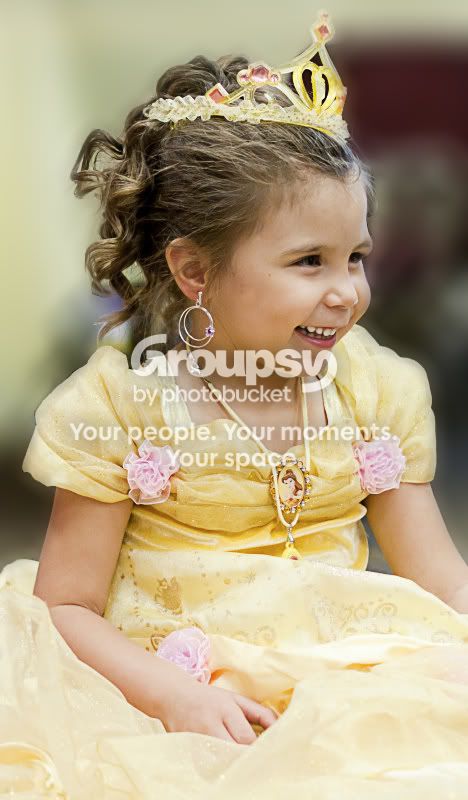
I was asked to help photo a friend's daughter at her birthday party. The thing is, the lighting was HORRIBLE and the background was very busy. I just wanted to get one or 2 decent shots of the child's face as Cinderella came in. lol Gaah! Anyhow, here is one, but as you can tell, it is struggling. :thumbdown: I am open to suggestions or critiques. Hell, just tell me to hit delete if you think that would be best. :lol:

AMS_1073.jpg


Thanks in advance!

 
If it were mine the eyes are not in focus so it would go in the recycle bin
 
Alrighty then. I guess I will toss it. Ugh, there are just so few to choose from. I totally blew it yesterday. :(
 
Shooting at F2 does not help matters, theres not enough DOF for portraits F5.6 would have been better
 
Yes F2 shouldn't be used for this type of candid shot...
 
Try using high pass sharpening techniques in photoshop, you may be able to improve it enough to save the memory...High pass works wonders if done right...

Flickr: Chris Wofford's Photostreamhttp://www.flickr.com/photos/w4graphics/

Thanks, I'll give it a whirl.

Shooting at F2 does not help matters, theres not enough DOF for portraits F5.6 would have been better

Yeah, I know, but the lighting was garbage and I only had my pop up flash with me. Bah.
 
For what it is as a happy snap, it's not that bad. I wouldn't have deleted this image. I just don't see anything really wrong with it, so it's a little soft and the background is a busy, but the background isn't so distracting that it takes over the photo.
 
I tried to edit it for you a bit, I think I accomplished the clarity, and I tried adding a blur background.. **ATTENTION** I know i'm not a pro at photo editing, I'm new to photography editing. I was just trying to help out and learn a bit for myself!

I blurred background. Touched up her cheek (looks like she had a scrap) Made the picture more in focus using high filter pass..

Princess.jpg


here is the before and after... it's too big to post on here so I'm just posting a link
http://i105.photobucket.com/albums/m210/7payne7/princess1.jpg
 
Try using high pass sharpening techniques in photoshop, you may be able to improve it enough to save the memory...High pass works wonders if done right...

Flickr: Chris Wofford's Photostreamhttp://www.flickr.com/photos/w4graphics/

Thanks, I'll give it a whirl.

Shooting at F2 does not help matters, theres not enough DOF for portraits F5.6 would have been better

Yeah, I know, but the lighting was garbage and I only had my pop up flash with me. Bah.

Instead of shooting in the f2.0 range try increasing your ISO to get a faster shutter speed. Rather have a little noise and be in focus.
 
In low light situations, I push my ISO up before my aperture. ISO 200 is too low for this situation, although you'll encounter more times where you won't want to go above 1250 ISO but still need f/2.8 to get a decent shutter speed.
 
This is the kind of result lots of people get when they don't have an understanding of the technical factors involved. (wide aperture focus softness, and ultra shallow DOF)

Many people recommend using a 50 mm f/1.8 to do portraits when more often than not it's the wrong lens to use. But, both Nikon and Canon make inexpensive ones so the cost, not being the right tool for the job, is what many gloom on to. (You were using a 50 mm f/1.4)

Did you know you had +1 EV of EC set? Why did you use center-weighted metering rather than Spot mode?
 
Well, mine is the 1.4G so the cost wasn't my reason for purchasing. lol I knew I had the EV at +1. I am totally a newbie, hence using this section of the forum, and am learning more and more as I go. I will try for the higher ISO and deal with the noise next time. Thanks for all the suggestions. They are duly noted and I will for sure take them in to account next time I am out shooting.
 
Why use spot metering on such a dead-simple shot? I almost never use spot metering--it leads to more screw-ups than fix-ups unless the user is an expert. As far as editing the shot: I would use the selection tool, and select the maroon-colored plastic chair back, and then erase it, and then fill that area with a 10x10 pixel eyedropper sample from the yellow background areas, and then paint in the areas where the maroon plastic had been.
 
Why use spot metering on such a dead-simple shot? I almost never use spot metering--it leads to more screw-ups than fix-ups unless the user is an expert. As far as editing the shot: I would use the selection tool, and select the maroon-colored plastic chair back, and then erase it, and then fill that area with a 10x10 pixel eyedropper sample from the yellow background areas, and then paint in the areas where the maroon plastic had been.

Thank you! I am not wonderful with CS5 yet, but will give your suggestions a go. The removal of that chair would help tons. Metering was something I was getting ready to do some more research on. I think this is one of the VERY few photos that I shot on spot metering that day. I usually use center weight, but was going to ask when it would be more appropriate to use the spot or matrix metering.
 

Create an account or login to comment

You must be a member in order to leave a comment

Create account

Create an account on our community. It's easy!

Log in

Already have an account? Log in here.

New Topics

Back
Top Bottom