What's new

HDR and noise in shadows...

fiveoboy01

TPF Noob!
Joined
Dec 28, 2008
Messages
684
Reaction score
1
Location
Waunakee, WI
Can others edit my Photos
Photos OK to edit
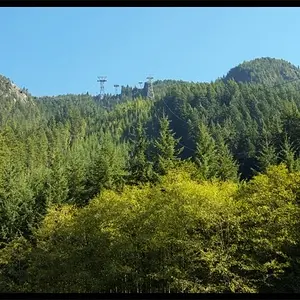
This is a 5(or 7, can't remember) exposure, .7EV spacing done in Photomatix.

640506327_6MuHE-L.jpg


I had a print delivered from Smugmug and the underside of the bridge is just a pile of noise. It's the worst closer to the rocks where there was less light. From a distance you can't see it but I eyeball my prints and this looks horrible to me.

Is there a technique specific to HDR photography that helps reduce noise in shadows? Would it be better to take fewer exposures, such as 3 with 1EV spacing? ISO was low, 200 or 400 so I am not sure if that caused this or not.
 
With HDR, 200 or 400 isn't enough. You need to get right down to the absolute low end of your camera, wherever there is the absolute least amount of noise. You then need to use good noise reduction techniques to attempt to eliminate as much of it as you can (which further increases the need for perfect technique and solid gear when creating HDRs, as you also need to capture the sharpest image you possibly can while you're doing this...what fun!).

The more exposures you use for the HDR, the more noise will crop-up and be magnified. So you also need to be sure that you're taking an appropriate number of exposures for the scene (that is, meter the darkest shadow, then the brightest highlight, and shoot 1 stop increments in between).
 
Errrm hangon a minute. Here we have a picture that looks noise free and you say that when you get the picture back it has noise?

Is the tone of the print the same as the picture? Is the sharpness the same? My guess is smugmug are screwing with the settings making your picture "nicer" and during the process it's bringing out some noise. I see no reason why printing that pristine looking picture should cause noise.
 
Errrm hangon a minute. Here we have a picture that looks noise free and you say that when you get the picture back it has noise?

Is the tone of the print the same as the picture? Is the sharpness the same? My guess is smugmug are screwing with the settings making your picture "nicer" and during the process it's bringing out some noise. I see no reason why printing that pristine looking picture should cause noise.

Yea That is what I said.

So many online print houses assume that its a point and shoot snap without PP. They "enhance" by default if you dont check the box that says do not do so. Pro print shops assume the file is ready to print as is.
 
I never shoot HDR on anything higher the ISO100.
On the darker noisy frames I will do a bit of noise reduction before processing .... also blowing out an area (usually the sky) will cause some artifacts in these areas.
 
Errrm hangon a minute. Here we have a picture that looks noise free and you say that when you get the picture back it has noise?

Is the tone of the print the same as the picture? Is the sharpness the same? My guess is smugmug are screwing with the settings making your picture "nicer" and during the process it's bringing out some noise. I see no reason why printing that pristine looking picture should cause noise.

The print looks the same, tone-wise.

If I view the original on Smugmug, I can see the same noise underneath the bridge that is on the print. Er, maybe it's artifacts and not noise, not sure on the diff there. I can post up the original if anyone wants.
 

Create an account or login to comment

You must be a member in order to leave a comment

Create account

Create an account on our community. It's easy!

Log in

Already have an account? Log in here.

New Topics

Back
Top Bottom