What's new

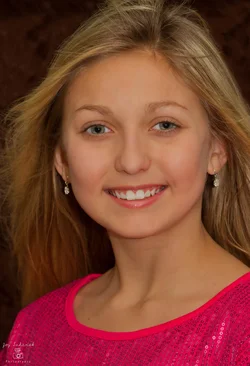
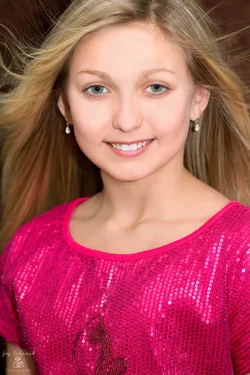
Head shot from today

joylyn

TPF Noob!
Joined
Jan 1, 2013
Messages
94
Reaction score
17
Location
United States
Can others edit my Photos
Photos OK to edit
I used reflector to the left side , window to the right and bounced my flash off my ceiling. Taken with 85mm f2.8 1/125 sec ISO 100
$IMG_0501-2a.webp
 
It's a nice portrait, I would tone down the saturation of her top, she is so light skin that my eyes are going to her blouse instead of going to her face. But it might be my screen...
I love her hair, smooth skin and beautiful eyes.
 
I'm not crazy for the top of the head being chopped like that. And the catchlights, or rather the lack of, are rather unflattering in my opinion. Using a reflector in front of her, or bouncing the flash off a surface behind you, would have thrown some light on her from the front and created some catchlights other that the pinpoint ones created by the flash.
 
I think the flash is overpowering the natural light, which makes it look flat and odd to me. Like the other commented on, the catchlights not appealing. easily fixed though..move them. lol.
 
Here's a few edits. Cropped and adjusted levels to try to bring out some mid tones, adjusted catchlights in eyes...kinda works. a few other nit pick things.

the latter two were just playing with trying to make her glow a bit, as well as various adjustments for fun.

They are 5mb files if you want to keep 'em, or download 'em and tweak 'em a bit to your taste. :-)


8462803797_0fbd4f1bf8_c.jpg


8463899106_d05c8720cc_c.jpg


8463901224_c2f5e8ee60_c.jpg
 
How come you shot so shallow? Top of her shoulder and earrings are going out of focus. I agree with the over powering statement. Maybe stop down to f4. You just want to fill in with the flash so I don't think you need to bounce it off the ceiling.Pally's first edit is good on my iPhone :)
 
Thanks everyone . I framed it in so that her eyes would pop . I shot so shallow because I was concerned with not having enough light and I wanted the focus on her eyes. As for the catchlights I planned on adding them in photoshop. Again I bounced the flash because i was worried about not having enough light to light up her face and eyes. I can fix the exposure easier since its over exposed. Thanks Pally I like the 2nd care to elaborate on how you do that?

I played around abit more with another picture from the session

$IMG_0508a.webp
 
Last edited:
For the second edit, I just took my first edit, made a new layer, set gaussian blur to about 50% or so, faded back to about 30-40% I think (to taste really) and set to screen at same time, erased over the eyes and mouth to keep them sharp, then adjusted levels a tad to bring in mid points while still keeping a somewhat glow effect.
 
Thanks everyone . I framed it in so that her eyes would pop . I shot so shallow because I was concerned with not having enough light and I wanted the focus on her eyes. As for the catchlights I planned on adding them in photoshop. Again I bounced the flash because i was worried about not having enough light to light up her face and eyes. I can fix the exposure easier since its over exposed. Thanks Pally I like the 2nd care to elaborate on how you do that?

I played around abit more with another picture from the session

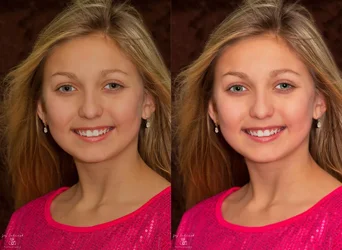
Joylyn, this shot looks a bit dark, and yellow. I did an edit to try to match the other edits above (I think I overdid the eyes... lol)


Original ........................................................................................... Edit...............................................................................................
$joy.webp
 
Charlie, I don't think you overdid the eyes. I was thinking that the shot was too dark as well. I'm thinking somewhere in the middle of the original and her photo would be about right.

Using a curves edit maybe. (Is that what you did Charlie?)
 
Charlie, I don't think you overdid the eyes. I was thinking that the shot was too dark as well. I'm thinking somewhere in the middle of the original and her photo would be about right.

Using a curves edit maybe. (Is that what you did Charlie?)

Nope.. just did a layer, hit that with a light Gaussian, deleted layer around eyes and mouth, lighted and color balanced a bit... that was all...
 

Create an account or login to comment

You must be a member in order to leave a comment

Create account

Create an account on our community. It's easy!

Log in

Already have an account? Log in here.

New Topics

Back
Top Bottom