What's new

Help me identify what this is...

Cpalmer03

TPF Noob!
Joined
Dec 22, 2012
Messages
15
Reaction score
1
Can others edit my Photos
Photos OK to edit
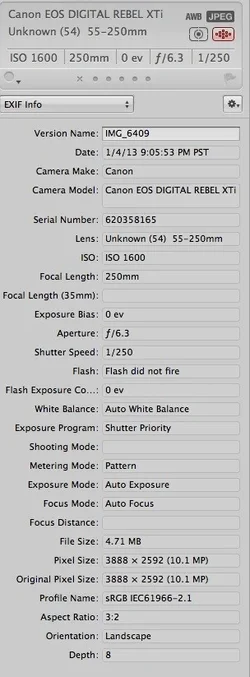
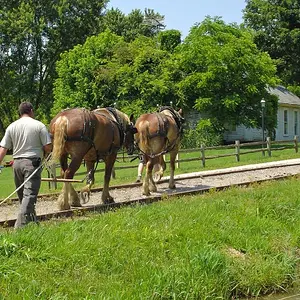
Here is a photo I shot...when I imported to aperture, i saw this red line...any ideas? (First time using Servo mode, so focusing is still a challange for me, I dont really know how to use it...all images seem to be hit or miss with the focus...)

Note: There was a bar in front of me that could have shined light up into the lens metallic dark forrest green in color.
 

Attachments

  • $IMG_6409.webp
    $IMG_6409.webp
    858.7 KB · Views: 241
  • $Screen Shot 2013-01-05 at 11.36.00 PM.webp
    $Screen Shot 2013-01-05 at 11.36.00 PM.webp
    46.2 KB · Views: 172
I see a white-ish line at the bottom of the frame, and that looks like it might be a cord or something that is part of the track?
 
Back in the film days, I'd say you have a scratched negative. But that's hardly the case.

First, it could be an issue with with the Aperture program. Try opening the JPG with the Windows Photo Viewer, or any other program that can open JPGs. If the stripe disappears, it's Aperture.

View the JPG on another computer. Perhaps it's the monitor. Back in the CRT monitor days, there was a horizontal internal wire on some CRTs that essentially prevented it from becoming oval shaped (screen physically getting wider). It would only be visible against very light colored displays. If the stripe doesn't show up on another computer, then it's the monitor and/or video card on your computer.

Lastly, if the stripe appears in the same location in all your photos, it may be camera related. Could be the memory card. Try a different memory card. If not, try shooting in RAW mode and using a program to convert the RAW to JPG on your computer. If the stripe goes away, then it could be the internal firmware in your XTi that needs updating.

If all else fails and you're getting that stripe all the time, sad to say, it may be send it to Canon time. It would also make good fodder for the Canon discount customer program where you send in an old Canon and get a discount on a new/refurb camera (I forgot what the formal name is)

 
A lot of people have been posting about lasers messing with sensors lately. I'm not saying that's what it is, but see if it's on anymore of your images.

BTW, I'm jealous that you got to go to Supercross. I'm stationed in Japan and miss the races.
 
..............

View the JPG on another computer. Perhaps it's the monitor. Back in the CRT monitor days, there was a horizontal internal wire on some CRTs that essentially prevented it from becoming oval shaped (screen physically getting wider). It would only be visible against very light colored displays. If the stripe doesn't show up on another computer, then it's the monitor and/or video card on your computer............


Nothing the monitor does will affect the file itself, nor even a screen shot.
 
If it was just this one image, I'd say it's simply a corrupt file. Could be caused anywhere in the pipe.... camera's processor, memory card, transfer to computer. I'd be alert about it, but not overly concerned unless it happens again.
 
I cannot remember the details but I had something weird show up in a picture a couple of months ago. It did not show up on the camera screen but when I opened it on my computer. I switched to a different program, opened the file again and it was gone. So it might just be a software glitch. I have a lot of programs on my computer that will open picture files and I have no idea which I used at the time.
 
Did this line show up on ANY other images, at any time within the recent past??? Let's hope not!!!

Anywayyyy, if an image has a line like this, but the line disappears when a different software application is used to open the file, then the problem is not necessarily inherent to the file itself. All those millions of pixels need to be read and displayed "just right"...there could be a problem with the hard drive and how it is parsing the data. I hope that there is not a sensor issue. THere COULD have been, I suppose, some bad blocks on the memory card, which caused an entire row or two of pixels to be written incorrectly...

Digital photos are "all data"...translating the data into digital form, writing the data to a memory card, transferring the data from memory card to a hard disk drive, and reading the data, and displaying the data--all those areas are areas where digital gremlins can rear their ugly heads!!
 
This looks like a damaged sensor. There are lots of YouTube videos which demonstrate how lasers can cause this problem (camera owner went to a laser show or night club using lasers. The laser sweeps by the camera while the camera was being used to make a video. The laser ends up permanently damaging a row of the camera sensor.)

Once the sensor is damaged, they get lines where the entire line/row of pixels are all stuck.
 
First, it could be an issue with with the Aperture program. Try opening the JPG with the Windows Photo Viewer

Umm Aperture is a Mac only program so why ask the person to open the file in a windows program.

If it was just this one image, I'd say it's simply a corrupt file. Could be caused anywhere in the pipe.... camera's processor, memory card, transfer to computer. I'd be alert about it, but not overly concerned unless it happens again.

A corrupt file is most likely the case.
 

Create an account or login to comment

You must be a member in order to leave a comment

Create account

Create an account on our community. It's easy!

Log in

Already have an account? Log in here.

New Topics

Back
Top Bottom