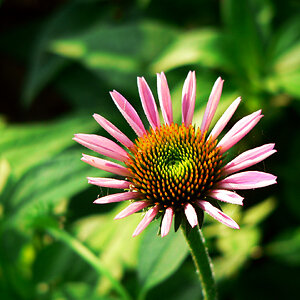
So this may be a total rookie question and I almost feel like I should know how to do this but how on Earth do you make the "shadowy" border? I keep trying but I can't make mine look that subtle. This is an image I stole from a TPF professional photographer and I was too shy to shoot out a message and ask him. I use Photoshop CS3 if anyone is willing to help me or direct me to a site that can give me some steps that would be greatly appreciated!
If you want to refer other members to an image you don't own the copyright to, a link is more appropriate than posting the image. TPF covers that in the rules and regs on the FAQ's page: The Photo Forum - Photography Discussion Forum - FAQ
I would recommend a book, rather than a web site: The Adobe Photoshop CS3 Book for Digital Photographers by Scott Kelby ..... [ame=http://www.amazon.com/Adobe-Photoshop-Book-Digital-Photographers/dp/0321501918/ref=sr_1_12?ie=UTF8&s=books&qid=1266503230&sr=8-12]Amazon.com: The Adobe Photoshop CS3 Book for Digital Photographers (9780321501912): Scott Kelby: Books[/ame]