What's new

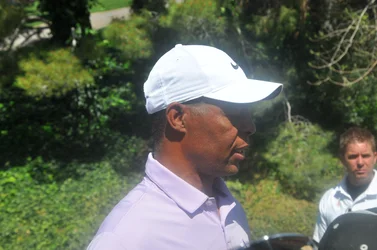
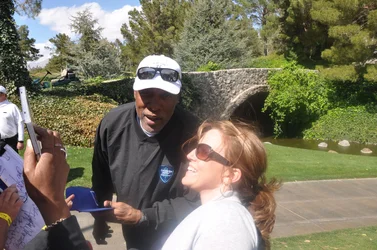
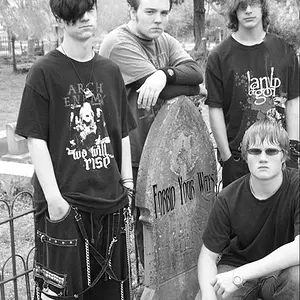
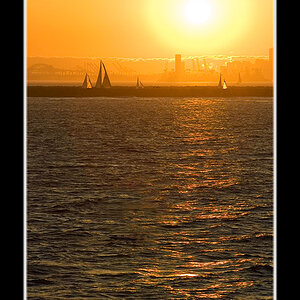
HELP! This guy is GLOWING!!

gsxturbo

TPF Noob!
Joined
Nov 24, 2008
Messages
49
Reaction score
1
Can others edit my Photos
Photos OK to edit
Hey Guys,

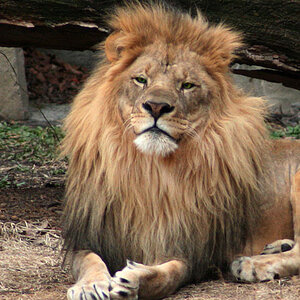
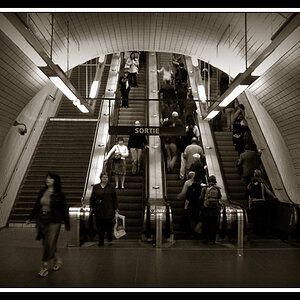
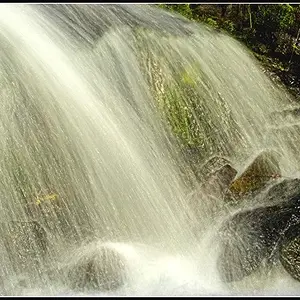
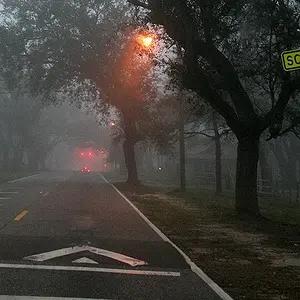
I'm relatively new to photography and recently I've had a lot of "Glowing" people. My good friend used my camera this weekend and shot in Auto mode and had the same problem. Would love some help on how to prevent it and is there anything I can do to fix a few shots in Photoshop? Here are a couple examples of what I mean. $DSC_0036.webp$DSC_0211.webp$DSC_0186.webp$DSC_0231.webp
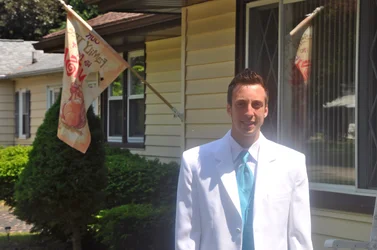

 
I think you need to clean the lens. Looks like maybe the front element was 'cleaned' with a greasy rag.
 
Are you using any type of filters, UV/protection/etc?
 
+2 filter


qalso note, last image title is wrong, not a guy :D
 
Dirty lens, condensation, mould in lens, poor quality filter(s) are all possibilities.
 
I looked at the lens it was a little dirty, I have never used a filter, probably should try that. Both days were extremely bright, it just seemed to do it on whites. Is there a correction I can do in photoshop to try to tame it?
 
My money is on a dirty t-shirt used to clean the lens.

Get a clean cotton t-shirt - or, even better, an actual lens cleaning cloth (but most of the time a good clean cotton t-shirt works just as well), fog the lens up with your breath, wipe clean in circular motions with the (clean) t-shirt. 5 bucks says that fixes it.
 
NO NO! Don't use a filter! That is a potential source of this kind of problem.What lens did you use?
 
Its just the 18-105 lens on the D90.
 
So the lens itself isn't the problem, and you don't have a cheap UV filter. I'm with josh. Properly clean the lens and you should be fine.
 
I'll give it a go! Any recommendations for how to fix this in photoshop?

Unpopular, spent some time in Bozeman, Billings, and Columbus for work recently, it's gorgeous out there! I'm jealous!
 
It's not an easy fix in PS, especially since it exists in all channels. I've fixed these sorts of things before by rebuilding channels from unaffected data. What you'll need to do here is adjust curves on an adjustment layer and mask away the affected area. The tricky part is matching the adjustment to the unaffected area so that it looks natural. Some people are really good at this, I'm not.

I like it here a lot, and it's been a good place for my wife to finish undergrad, but we're looking forward to moving on. Whilere you were here, did you get a chance to visit Zimmerman park in billings?
 
I think this is a bit beyond my skills as well. The best I can suggest is convert to B&W. :lol:
 
hahaha... I'll give B&W a try, I really didn't even think about it.

Unpopular, I work for an insurance company and we insure that arena that was hit by the tornado a couple years ago, so I was down there for that and then I met Peter Fonda while in Columbus when I looked at his vehicle that was hit by hail.
 
I remember the tornado, we were up visiting while living in Casper, WY. My wife and her mom were out, and I was with my toddler. I went out to get something from the car and noticed the clouds and thought "that doesn't look right at all" then the funnel formed and the sirens went off, looked like it was comming down on top of us. I hid in the closet with the boy until it was safe to come out.
 

Create an account or login to comment

You must be a member in order to leave a comment

Create account

Create an account on our community. It's easy!

Log in

Already have an account? Log in here.

New Topics

Back
Top Bottom