What's new

How do the professionals store and archive digital images (Raw, jpg, tiff etc)

I know see that there is no clear cut answer.

As far as I'm concerned there IS a clear cut answer. That answer being, always have at least one backup copy secured away from the other copy. How you want to do that may be up in the air, but that is beside the point.

In my opion, the best option is to keep 1 copy in your home (or stuido) and 1 copy archived offsite on a leased server from a reputable web hosting (or archiving) company. And just to make life a little easier, I also suggest keeping a thrid copy onsite. Due to remote data transfer speeds, it can be time consuming to get/take data from a remote location. If your primary source fails, and you need something in a hurry, its nice to have a second copy near by.

I keep the last about 5 years or so worth of photos on my local computer, with a duplicate copy of those photos on an external hard drive. Everything I have is also archived offsite on a web server.
 
I back up my raw files on two external usb powered drives. and then all of that same data backed up on a bigger drive and DVDs off-site
 
this is what my job was for many years .. and still kinda currently is.. file storage and handling / archiving of photos for a professional photographer.. Troy Plota Photography now i do it for myself.. the job title is digital tech... not much information online regarding it..

i wont share all the secrets ;) but the big ones are these

online file storage is not reliable and it will get extemely expensive.. even if your using amazon web services for cloud storage. online should be used for specific backups or online proofing for clients

buy a external hard drive..
buy a portable hard drive (i recomened lacie rugged drives)

get ahold of a copy of adobe lightroom

those are the tools you'll need

portable HD should be for backing up shoots on location as they come off the camera / card
external HD should be for backing up your shots for final storage / archiving and editing
lightroom is used for not only editing of photos but for archiving your images and converting the raws to various sizes of .jpeg / tiff etc etc
use specific naming conventions for your folder structure VERY IMPORTANT ie: 2010/10-29-10-Halloween-Party/ and then inside of that directory tree split out the RAW into their own folder the JPEG into their own folder the TIFF files into their on folder and also any editied files i like to keep seperate in a EDITS folder..


thats the basics that will help you greatly there are a bunch more tips and tricks to help with archiving and storing files for future use.. if you plan to be a pro photographer your gonna have a few thousand photos in no time.. after 3 years your gonna be thankful you adopted a good archiving system early on cuz you never know when your gona be looking for a specific shot from WAY BACK WHEN. pm me if you need any more help
 
Last edited:
get an external hard drive with RAID so it'll mirror copy the images. better yet, get one that has network backup so it'll auto backup at a certain time everyday.
 
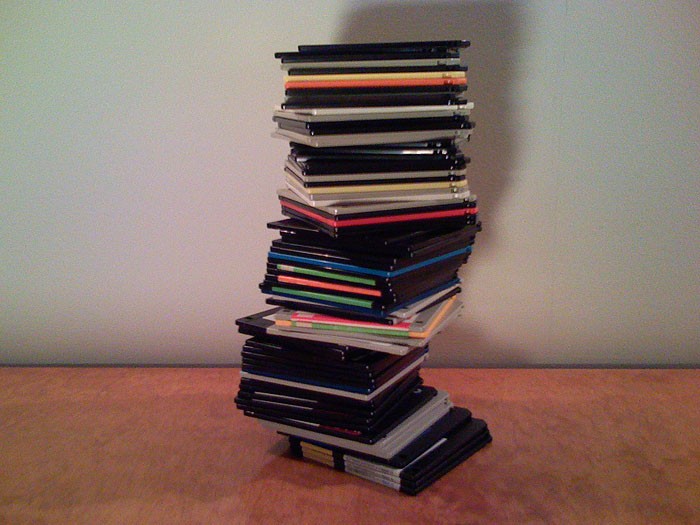
Floppy disks are the best backup. :mrgreen:

floppies.jpg

Wow, i didn't know you could even get floppys anymore! None of my computers even have a floppy slot anymore.
 
There are some companies that, automatically via internet, store your data off site in more than one place, some in fallout shelters.
 
Here's my back-up/archive routine:

Every night, my internal hard drive automatically gets backed up to an external hard drive.

Once a month, I copy the entire external drive to two other external drives.... one goes into my WP/FP safe, and the other goes into my neighbor's WP/FP safe. (She does the same thing, so I have one of her drives in my safe).

On an annual basis, I copy the external drive to yet another external drive, which is placed in my brother's WP/FP safe 6 states away.


It always amazes me how some people can spend tens of thousands of dollars on bodies, lenses, computers, monitors, printers, etc. etc. etc. and then ***** and moan about spending a couple hundred bucks to back-up their images. C'mon folks.......... a 1tb external drive can be had for $70 or so! That's CHEAP CHEAP CHEAP, and prices are dropping every day!
 
I thought I'd seen this thread before, got sucked in til the spam then noticed the date. :lol:
 
I absolutely do NOT believe in "free" storage. It's simply not reliable for backup purposes. The absolute most important thing to consider is how reliable your backup is. If it's not 110% reliable, then it's not a backup.

Flickr doesn't do RAW files.

There are MANY possible backup solutions out there though.

You can try Amazon S3 as they are relatively cheap, and highly reliable.

I would go for Rackspace Cloud Storage though:

Cloud Files - Unlimited Online Storage & Data Storage Services

Now, you'd need to check out whether it's the kind of thing that's right for you, BUT, you are not likely to find anything, anywhere that approaches the level of reliability and quality that you will get from Rackspace.

Rackspace has a much better value proposition than Amazon S3. They have a better network, better CDN, and better prices even. (I freaked out when I first saw their cloud storage as it really is all that.)

From their page:

UPLOAD FILES TO THE CLOUD
Store and manage unlimited files using our online control panel, desktop software, or programmatically via the API. And even manage it on-the-go via your iPhone®, iPad® and iPod® touch.

Their cloud storage uses the Akamai CDN (content delivery network), so it's pretty much the fastest network in the world.

It's not free, but it will give you peace of mind knowing that you've got your files safely stored on perhaps the world best network with the best service provider.

(I am NOT affiliated with Rackspace. I have used their services, and from a lot of experience, I know that they are the GO TO people for reliability.)

But, that's cloud storage. You need to ask yourself if you're comfortable with that.

NOTE: I am in IT and am not a professional photographer. My recommendation for Rackspace is purely based on "data safety" from an IT professional perspective and not what happens in the photography industry.

 
How reliable are the external hard drives? We had a Terrabyte external drive that I bought specifically to backup my photos and the damn thing died. I have the same question as all the rest but I am just a hobby photographer. I had a friend lose all of her pictures in a house fire and now I'm looking for better answers. Right now, I keep a copy on my computer and a copy on my laptop but that doesn't protect me against fire, flood, hard drive crash etc. I've read that Cd or DVD's aren't the answer because they don't last. Does anyone know anything about Blu ray disks? Right now I have about 75 GB of images but it grows exponentially each year.
 
I have 4 WD externals, a 500Gb, a 1Tb a 1.5TB and 2Tb. Never had a failure. Started with the small one and as it began to fill up added the 1.5 and kept dual backups in addition to the laptop hard drive and an online service. In each case as the smaller one filled up, it became an archival offsite backup and I went to the next size. At least one backup has to be offsite or a disaster makes it useless. I depend on the externals and they get synced weekly. I use the online service as it is real time. I've pulled files from there when I've screwed up something local.
 
How reliable are the external hard drives? We had a Terrabyte external drive that I bought specifically to backup my photos and the damn thing died. I have the same question as all the rest but I am just a hobby photographer. I had a friend lose all of her pictures in a house fire and now I'm looking for better answers. Right now, I keep a copy on my computer and a copy on my laptop but that doesn't protect me against fire, flood, hard drive crash etc. I've read that Cd or DVD's aren't the answer because they don't last. Does anyone know anything about Blu ray disks? Right now I have about 75 GB of images but it grows exponentially each year.

They're not that reliable but that's why they're backup (and only backup) drives. If you use them as extra storage you'll probably lose files sooner or later. The point of a backup drive is to keep copies of your primary archive on it. If one dies, you buy another.
Anyone using the Amazon Glacier to store photos? I'm seriously considering it as a third point of backup (computers with external drives are first and second). You can archive about 500GB for around $60/yr as long as you don't retrieve any of it. The price goes up significantly if you start retrieving files but that should only happen in case of a disaster.

Here is pricing info:
Amazon Glacier Pricing
...and an unofficial cost calculator:
Unofficial Amazon AWS Glacier Calculator
 
How reliable are the external hard drives? We had a Terrabyte external drive that I bought specifically to backup my photos and the damn thing died. I have the same question as all the rest but I am just a hobby photographer. I had a friend lose all of her pictures in a house fire and now I'm looking for better answers. Right now, I keep a copy on my computer and a copy on my laptop but that doesn't protect me against fire, flood, hard drive crash etc. I've read that Cd or DVD's aren't the answer because they don't last. Does anyone know anything about Blu ray disks? Right now I have about 75 GB of images but it grows exponentially each year.

Harddisks are great in terms of reliability. The problem is cheap external drives which have a tendency to die due to usually a very crap powersupply, or the USB controllers die.
A good backup solution should meet the following requirements:
1. Resistant against all onsite problems. The same disaster should not affect all data.
2. Be easy enough to manage that it gets done.

Number 1 is achieved by ensuring your backup is kept offsite. Your home should burn down without losing your backup. Take your harddisk to work and keep it in your desk draw. If you can't do that store it at a friends place (encryption from a free program like Truecrypt can help if you have trust issues).
Unfortunately point 1 is often at odds with point 2. A backup solution stored far away is a backup solution that won't get used often. If you lose your primary storage you shouldn't lose more than a few days of data. If you're a famous wedding photographer you shouldn't be able to use any.

The way I do the above is by two tiered backup. I have a second computer (but a NAS would also do) and every night my primary computer backs up to the secondary, two data locations on site. Weekly I bring my harddisks home from work (on a weekday to limit the time the backups are at home). The second backups are stored at work on encrypted drives.

I use physical drives that I connect via an attachable SATA dock. I literally slide a bare drive into the dock. The upside is the drive has a native interface (unlike the ****ty external seagate harddisk which not only didn't speak sata, only usb, but the case was held together with a bloody pentile screw. I used an angle grinder to free the harddisk from the case after the USB electronics died). The downside is that SATA connectors have a low insertion rating. Constant plugging and unplugging will ruin the connectors, though at weekly intervals I expect the system to work for at least 2 years without drive replacement.

Online is another solution though slow. I can't justify it. A photo shoot for me can be 10s of GB of data which would take all night to upload somewhere.

They're not that reliable but that's why they're backup (and only backup) drives.

Compared to what? :-)
 

Create an account or login to comment

You must be a member in order to leave a comment

Create account

Create an account on our community. It's easy!

Log in

Already have an account? Log in here.

Back
Top Bottom