What's new

How do you add color to a sky in Photoshop cs2?

NikonNewbie

TPF Noob!
Joined
Nov 8, 2010
Messages
635
Reaction score
0
Location
Half past a monkeys ass
Can others edit my Photos
Photos OK to edit
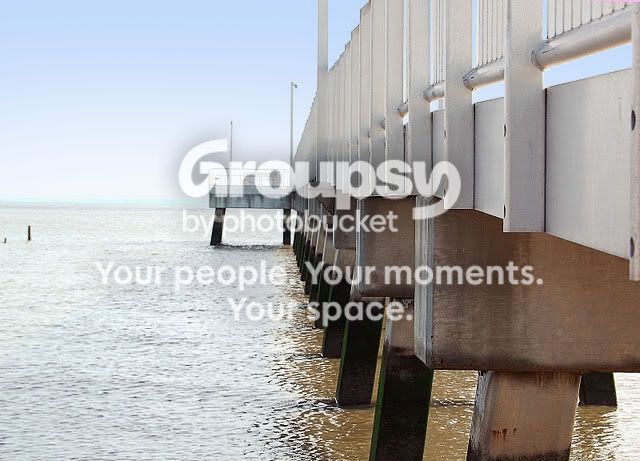
I have another pic of a pier, I cropped it straightened it and sharpened it, I also did "color correcting digital camera images" using curves...nothing made this sky blue blue.
I also tried "drag and drop Instant color correction" but moving the slider to Cyan and the other slider to Blue...did nothing at all to make the sky blue...not asking anyone to do it for me...but i've tried all the methods in this book i have here...can someone point me in the right direction?
1290%20cropcolor%20adjust.jpg


heres one where the color correction wasn't added
1290%20crop%20and%20sharpen%20straighten.jpg

The water was muddy....but the sky is just white :confused:
 
You're exposed for the pier. That's why the sky is blown out. You haven't yet tried all the methods in the book.
Graduated filter is your friend. I think CS2 has it. The problem is that the sky is so blown, saving it will require something close to parting the seas. Moses was the only one ever to do that, and of course he had a bit of help.

Edit: Oh and you might kick the idea around about graduated neutral density filter for your camera
 
You overexposed the sky, which makes it difficult to isolate.

I used the select-color range tool to select just the brightest areas of the image (the sky and the reflections of the sky in the water). I then created a new layer and filled the color-range selection with a light blue sky color. Finally I put a gradient mask on the layer to fade it in from top to bottom.

Unfortunately there are still some edge artifacts on the railing that would need to be painted out.

bluesky.jpg
 
i dont have the time but i would mask the sky into a new layer and go form there
 
The sky is beyond over exposed and has no details. There is no way correcting that unless the RAW file has some details.
 
You overexposed the sky, which makes it difficult to isolate.

I used the select-color range tool to select just the brightest areas of the image (the sky and the reflections of the sky in the water). I then created a new layer and filled the color-range selection with a light blue sky color. Finally I put a gradient mask on the layer to fade it in from top to bottom.

Unfortunately there are still some edge artifacts on the railing that would need to be painted out.

bluesky.jpg


this is not bad of a job.
 
Hi,

You have pointed to the most commonly faced prob as to how to get even exposure with the sky and the land. The ans is either to use GND filter or go for digital blending. If u are not having a GND then i recommed to take bracketed shots with -2,0,+2and then open the -2 and +2 exposed pics in photoshop and blend those. You will get even exposed image with beautiful blue sky.

Nothing much you can do with this pic if this is the only shot u have taken.

All the best,
Amlan Sanyal
 
If you shot this in RAW, there may be some data there for the sky. If not, you're probably screwed. If it's in RAW, duplicated the layer and take the new layer and reduce the exposure 2 stops or so. If you get some blue sky, put that layer under your original and mask through the original to show the blue sky. (create layer mask>reveal all, use a brush with opacity ~30% on black and paint the sky. Make sure you have selected the layer mask!) But again, there's no guarantee that there's blue sky data in the image, and it almost certainly isn't there if you didn't shoot in RAW.
 
You're exposed for the pier. That's why the sky is blown out. You haven't yet tried all the methods in the book.
Graduated filter is your friend. I think CS2 has it. The problem is that the sky is so blown, saving it will require something close to parting the seas. Moses was the only one ever to do that, and of course he had a bit of help.

Edit: Oh and you might kick the idea around about graduated neutral density filter for your camera

Ok! Ill see if I can try that...yeah, these pics were my first time! it was super sunny out so both pics I took the sky is white :(
I tried the methods in the chapter called "the color of money"...now I'll look up Gradient filter in the index and give it a try :)
 
If you shot this in RAW, there may be some data there for the sky. If not, you're probably screwed. If it's in RAW, duplicated the layer and take the new layer and reduce the exposure 2 stops or so. If you get some blue sky, put that layer under your original and mask through the original to show the blue sky. (create layer mask>reveal all, use a brush with opacity ~30% on black and paint the sky. Make sure you have selected the layer mask!) But again, there's no guarantee that there's blue sky data in the image, and it almost certainly isn't there if you didn't shoot in RAW.

nope not in raw :(
 
You overexposed the sky, which makes it difficult to isolate.

I used the select-color range tool to select just the brightest areas of the image (the sky and the reflections of the sky in the water). I then created a new layer and filled the color-range selection with a light blue sky color. Finally I put a gradient mask on the layer to fade it in from top to bottom.

Unfortunately there are still some edge artifacts on the railing that would need to be painted out.

bluesky.jpg


this is not bad of a job.

It looks 100% better then the original! thanx! I will repeat what you did so I can learn it, thanx for giving it a go!
 
meh...I f'd it up. Maybe I'll try it again today, the sky is SUPER blue from low hanging storm clouds...maybe I'll bring my $2 tripod and take several.
Thanks guys for trying to help!
 
Here's what I came up with after playing with it a bit. I use Capture NX2 for most of my PP, so I used color control points to get some blue in there....

bluesky2.jpg
 
Here's what I came up with after playing with it a bit. I use Capture NX2 for most of my PP, so I used color control points to get some blue in there....

bluesky2.jpg
that really helped it alot! now am I able to sharpen it some more to get the fuzziness out of it?
I'm gonna have my husband look for the program you used...have you ever used pcs2? is the one you used easier to work with?
 

Create an account or login to comment

You must be a member in order to leave a comment

Create account

Create an account on our community. It's easy!

Log in

Already have an account? Log in here.

Back
Top Bottom