Fleashine
TPF Noob!
- Joined
- Jul 26, 2012
- Messages
- 2
- Reaction score
- 0
- Location
- England
- Can others edit my Photos
- Photos NOT OK to edit
**(Edited)
Hello,
I have been tasked with taking pictures of the inner workings of steel works using a high end Bridge camera (Lumix FZ 150), I tried to talk them into a DSLR but they were having none of it This is not something I have any real experience of and wonder if anyone could help me with a small asepct.
The project involves lots of indoor shots of electrical arcs and spinnng and moving parts which so far, and without flash, the Camera has coped with admirably, until I came to take a picture of glowing, freshly welded metal. In every picture I have taken the glowing metal has turned out a sickly pink instead of the correct Deep red.
Is there anything I can do to correct this without** resorting to Photoshop?
Thanks in advance for your time.
Below is a prime example: -
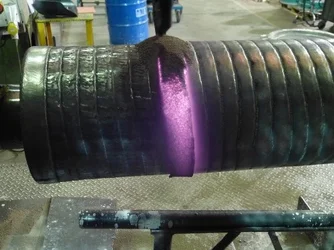
Hello,
I have been tasked with taking pictures of the inner workings of steel works using a high end Bridge camera (Lumix FZ 150), I tried to talk them into a DSLR but they were having none of it
This is not something I have any real experience of and wonder if anyone could help me with a small asepct.The project involves lots of indoor shots of electrical arcs and spinnng and moving parts which so far, and without flash, the Camera has coped with admirably, until I came to take a picture of glowing, freshly welded metal. In every picture I have taken the glowing metal has turned out a sickly pink instead of the correct Deep red.
Is there anything I can do to correct this without** resorting to Photoshop?
Thanks in advance for your time.
Below is a prime example: -
Last edited:




![[No title]](/data/xfmg/thumbnail/31/31050-824a861ee359cd274a794fc7b9ff8f7b.jpg?1734159158)





![[No title]](/data/xfmg/thumbnail/39/39479-b21bb968588fb225cd453013c6512c9a.jpg?1734173577)