What's new

Just a sparrow...

OldClicker

TPF Noob!
Joined
Nov 29, 2008
Messages
194
Reaction score
0
Location
Mundelein, IL USA
Can others edit my Photos
Photos OK to edit
Been shooting for about 3 months. Trying hard to learn. Please C&C. - TF

DSC00672_edited-6.jpg
 
Thats it I give up!
I am going back to computer games - at least there I can hide in single player!

Ok honestly I am stumped for a problem with this shot
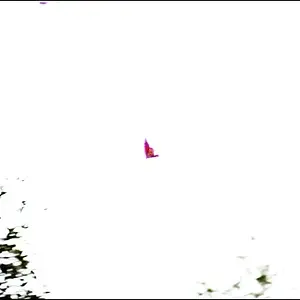
bird is clearly in focus, sharp, good lighting, bird is wholey in the frame, exposure is great - a few areas where the whites appear overexposed (just on the elbow of the wing and a spot on the beak) but in all honesty these aspects are hardly detracting from the overall shot.
You might have done better with a slightly smaller aperture just to get a tiny bit more depth to the shot, and if you use hte burn tool on the overexposed sports (set the brush to something like 10% or less exposure so as to build up the effect softly rather than all at once) you can lessen the effect.
All in all darn fine work for 3 months - out of interest what kit were you using?
*goes back to his computer games*

 
You did great with what the bird gave you. I'm not really crazy about the pose, as the limb kinda hides the body of the bird, but that is just my personal preference.

Did you sharpen it in post processing? If not, that may make your good shot even better.

Cropping some of the dead space might also improve it some too. Good job!!
 
Here it is sharpened a bit (assuming you didn't already sharpen.....if you did, then consider it oversharpened :) ) :

DSC00672_edited-6.jpg
 
Thats it I give up!
I am going back to computer games - at least there I can hide in single player!

Ok honestly I am stumped for a problem with this shot
bird is clearly in focus, sharp, good lighting, bird is wholey in the frame, exposure is great - a few areas where the whites appear overexposed (just on the elbow of the wing and a spot on the beak) but in all honesty these aspects are hardly detracting from the overall shot.
You might have done better with a slightly smaller aperture just to get a tiny bit more depth to the shot, and if you use hte burn tool on the overexposed sports (set the brush to something like 10% or less exposure so as to build up the effect softly rather than all at once) you can lessen the effect.
All in all darn fine work for 3 months - out of interest what kit were you using?
*goes back to his computer games*

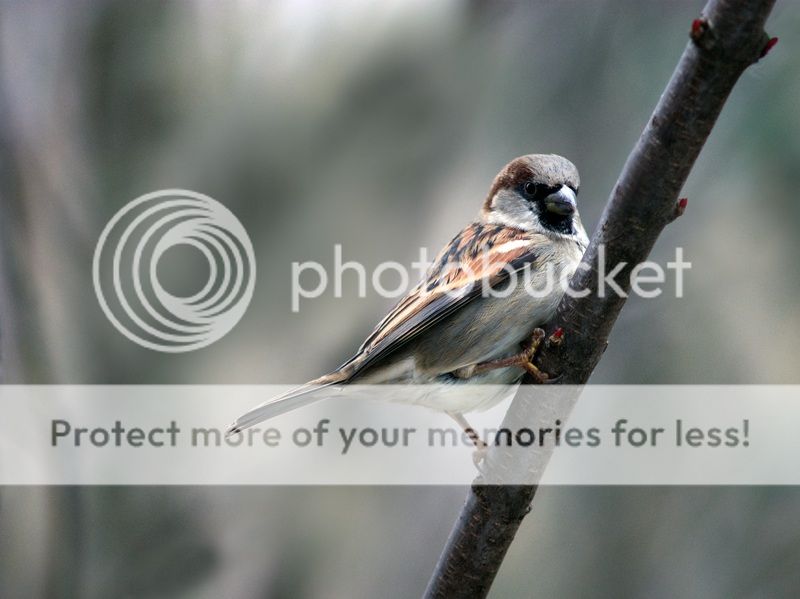
Thank you very much. It was shot with a Sony A350 and a Minolta 70-210 f/4 'beercan' lens. Also, I have spent some time post processing with my very limited knowledge of PS Elements 6. I'll take a look at the 'elbow' and beak. Again, thanks for the comments. - TF
 
Darn you got close to that bird didn't you!
 
You did great with what the bird gave you. I'm not really crazy about the pose, as the limb kinda hides the body of the bird, but that is just my personal preference.

Did you sharpen it in post processing? If not, that may make your good shot even better.

Cropping some of the dead space might also improve it some too. Good job!!

Thanks for taking the time to comment. It's really hard to get these birds to pose correctly and when you find one that knows how to pose, he wants union scale. :-)

I think your sharpening brought out a little noise on the background in the bottom right - no?

TF
 
the noise you can control - run a noise reduction filter over the whole image and then use a layer mask to blacken out the areas you don't want to reduce noise (and thus also reduce sharpness) in - ergo the bird and branch
. Of course elements does not have a layer mask - so you can download and install this one for free:
http://graphicssoft.about.com/od/pselements/qt/layermasktool.htm

there are also some articles here:
http://www.ronbigelow.com/articles/articles.htm
which are well worth reading and are understandable to a beginner
 
the noise you can control - run a noise reduction filter over the whole image and then use a layer mask to blacken out the areas you don't want to reduce noise (and thus also reduce sharpness) in - ergo the bird and branch
. Of course elements does not have a layer mask - so you can download and install this one for free:
http://graphicssoft.about.com/od/pselements/qt/layermasktool.htm

there are also some articles here:
http://www.ronbigelow.com/articles/articles.htm
which are well worth reading and are understandable to a beginner

Thank you. I'll look at that. Elements is really overwhelming. There is a lot there and if the interface is at all intuitive, it's not from any background that I have. - TF
 

Create an account or login to comment

You must be a member in order to leave a comment

Create account

Create an account on our community. It's easy!

Log in

Already have an account? Log in here.

Back
Top Bottom