What's new

Just Ruby

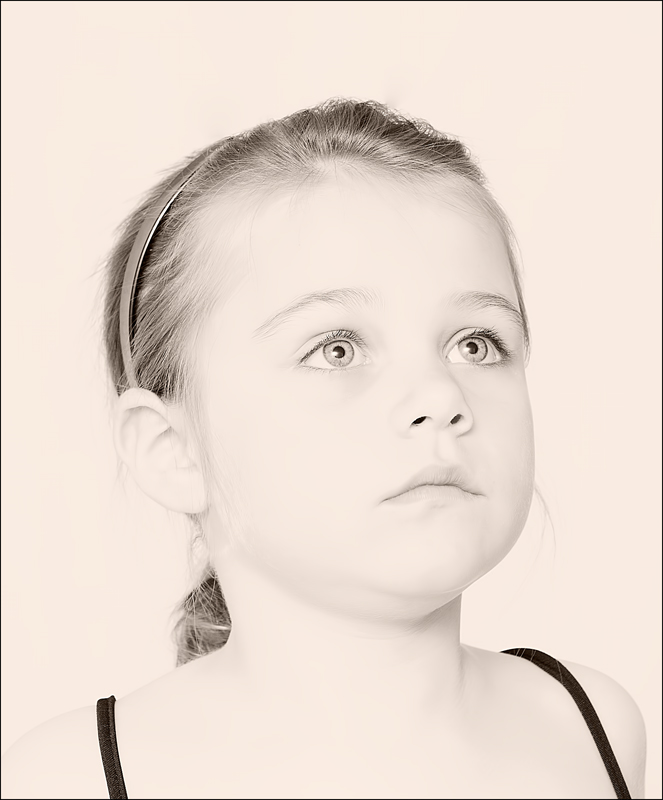
I understand you went for a high key effect, but the right cheek and ear are much too bright, no more texture, they almost fade into the background. I would try to change this. Otherwise a nice portrait of a cute girlie.
 
I understand you went for a high key effect, but the right cheek and ear are much too bright, no more texture, they almost fade into the background. I would try to change this. Otherwise a nice portrait of a cute girlie.

It is not so bright on my calibrated screen...clear definition between the face and background. It is a bright image, however, I agree. I will try a test print, as it's a printed competition...prints often print a little bit darker anyway, and so I may be ok. Otherwise I will add a little contrast as you say.

Thanks. :)
 
It is true that screens vary from one another, and from prints, too ... keep shooting ! :D
 
It is a great photo! I love the soft details in her eyes. is the picture to bright?...depends on how I look at it on my laptop. when looking at it normally it looks way to bright and loses all detail in the face but if I look at it from a lower angle it looks much better so I'm assuming its simply a matter of my screen settings.
 
BTL.. I calibrate my screen also.. but it is a little bit bright, IMO (literally... just the tiniest bit) . There is definition, but I think it needs a bit more (at least on my screen). Mostly because of the lack of contrast between Ruby and the background. There is just a tiny bit of clipping.. and the exposure is as far to the right as you could possibly get it and keep in the histogram.

Would love to see the original..
 
It is a great photo! I love the soft details in her eyes. is the picture to bright?...depends on how I look at it on my laptop. when looking at it normally it looks way to bright and loses all detail in the face but if I look at it from a lower angle it looks much better so I'm assuming its simply a matter of my screen settings.

Laptop screens are not IPS.. they give inconsistent viewing as it changes depending on the angle you view it at. That is why we don't recommend laptop screens for editing. Inexpensive desktop monitors (Non IPS) do this also.
 
It is a great photo! I love the soft details in her eyes. is the picture to bright?...depends on how I look at it on my laptop. when looking at it normally it looks way to bright and loses all detail in the face but if I look at it from a lower angle it looks much better so I'm assuming its simply a matter of my screen settings.

BTL.. I calibrate my screen also.. but it is a little bit bright, IMO (literally... just the tiniest bit) . There is definition, but I think it needs a bit more (at least on my screen). Mostly because of the lack of contrast between Ruby and the background. There is just a tiny bit of clipping.. and the exposure is as far to the right as you could possibly get it and keep in the histogram.

Would love to see the original..

It is a great photo! I love the soft details in her eyes. is the picture to bright?...depends on how I look at it on my laptop. when looking at it normally it looks way to bright and loses all detail in the face but if I look at it from a lower angle it looks much better so I'm assuming its simply a matter of my screen settings.

Laptop screens are not IPS.. they give inconsistent viewing as it changes depending on the angle you view it at. That is why we don't recommend laptop screens for editing. Inexpensive desktop monitors (Non IPS) do this also.

Thanks guys. I will see how it prints but will bear in mind some adjustment may be needed. I would like a better screen, but space restraints mean I can't. But I keep looking at them...:)
 

Create an account or login to comment

You must be a member in order to leave a comment

Create account

Create an account on our community. It's easy!

Log in

Already have an account? Log in here.

Back
Top Bottom