What's new

Make photos flat.

OldSchool98

TPF Noob!
Joined
Jul 2, 2014
Messages
24
Reaction score
0
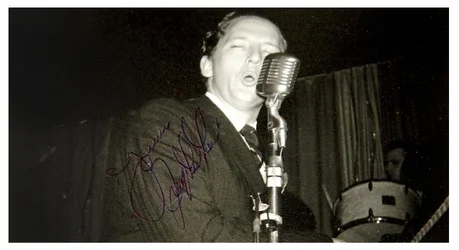
I hope i did post in the right section. Any program that can make these old Rock'n'Roll photos of Jerry Lee Lewis look flat without the wooden? These photos are rare otherwise i would had ask for scans.

 
Maybe just crop them a little?
 
Yea all you can do is crop out the wood. There is no way to make them flat now that you have taken the picture. If you still have access to them, you can ask of you can put a piece of glass over them and retake the pictures.
 
Yeah it probably would've been better to have the photos scanned so they would've been flat. Now there's only so much you can do since they were curved when the photos were taken.
 
A flatbed scanner is what's needed to digitize these. Not just the fact that the paper is curled, but the glare and uneven light would also be eliminated.

Difficult to do if you don't own the pictures.
 
Photoshop can alter prospective wonder if there is a way to reduce the curve or maybe adding to much pincushion correction I am sure there is a filter in ps that allows one to add a curve.. worth looking maybe
Edit just done a web search there seems to nothing directly linked to what you want to do but depending on ver of photoshop the free transform tool or Spherize is suggested to sort out distortion of wide angle lens, fish eye, maybe you could use this as a work around
Rem to save images first and work on the copies just in case it does not work

 
Last edited:
Photoshop. On a case by case basis since there is no evident "logic" determining the bend or position of the photo. as @Original katomi had mentioned -- PS does wonder. Perspective correction, free transform, puppet wrap (maybe) and content aware fill should help you to accomplish a lot.
 
with about 10 to 15 minutes in photoshop you can get a decent result. this was just a quickie but there is a lot more you can adjust.

Before:
b127dd1319518390.webp


After:
PS test.webp
 

Attachments

  • PS test.webp
    PS test.webp
    143.1 KB · Views: 211
That works for a copy if you don't need the entire photo, but I'm not sure if the OP has these photos or what exactly. I would think scanning them would've made the most sense. I've scanned my own B&W darkroom prints, works fine.
 
The wide angle filter in photoshop should allow correction of these, you just select a straight line through the shot for some horizontal and vertical lines and it should do it's magic. I've used it before to correct handheld panoramas with curvature issues
 
My biggest thanks for this. I can crop the white frame from another photo and put it around as i want that look, How to make this in Photoshop?
 
The wide angle filter in photoshop should allow correction of these, you just select a straight line through the shot for some horizontal and vertical lines and it should do it's magic. I've used it before to correct handheld panoramas with curvature issues
Never used it. Good to know. Thanks!
 
My biggest thanks for this. I can crop the white frame from another photo and put it around as i want that look, How to make this in Photoshop?

Put the frame in a layer in photoshop, put a mask on, use the square selection tool to paint black inside the square to reveal what's beneath. Cut the photos out to individual files then place them behind the frame layer is how I'd do it.

The wide angle filter in photoshop should allow correction of these, you just select a straight line through the shot for some horizontal and vertical lines and it should do it's magic. I've used it before to correct handheld panoramas with curvature issues
Never used it. Good to know. Thanks!

Try it out, it's really useful for shooting handheld.

here is a tutorial: Using Photoshop's Adaptive Wide Angle Filter - Outdoor Photographer
 
What photoshop version do you use? I only have Windows 7 so i hope it works. And a old processor that don't support newer windows than 7.
 
Not hard to fix. Lots of software has the means to correct pincushion / barrel distortion. I don't know about Photoshop though since I don't use it.
 

Create an account or login to comment

You must be a member in order to leave a comment

Create account

Create an account on our community. It's easy!

Log in

Already have an account? Log in here.

Back
Top Bottom