What's new

Picking the correct white balance

Joined
Apr 30, 2013
Messages
62
Reaction score
2
I noticed that I was shooting on auto white balance and it was perfect colour and contrast and when I tried to match it on manual WB I could never get the same results. Just wondering how I could get those results? Or should I just leave it on auto WB as it is not a necessary thing to learn

Jack M'crystal Photography
 
I use auto white balance 99% of the time and then correct the shot in post processing if necessary. The rest of the time, or if it's critical to get the white balance correct, I shoot a gray card and set a custom white balance based on that. You can also shoot a gray card, find the proper correction for it in post processing, and then use that same correction on the other shots.
 
It's still a necessary thing to learn and becomes particularly useful when you have a mixed lighting situation, or an oddball light source color temperature.
Manipulating WB can also be used to created a mood of lighting different from the light in a scene.
An example would be an outdoor daytime portrait location scene. Gell a flash unit to the color temperature of tungsten/incandescent light (CTO gel) and setting the camera WB manually to tungsten/incandescent.
The light from the flash unit will appear to be sunlight (white) in the photo, but the ambient sunlight in the scene will have a blue color cast that helps make on location portraits subjects really pop from the rest of a scene

Many of the entry-level DSLR cameras do not do auto WB as well as prosumer and pro grade cameras do.

Understanding White Balance
 
Thanks
Just a quick question, what is a grey card and how much of an advantage do you get from using it?

Jack M'crystal Photography
 
Thanks
Just a quick question, what is a grey card and how much of an advantage do you get from using it?

Jack M'crystal Photography

A gray card is a card that is gray. Neutral gray, so it has no 'tint' to it.

You include it in a shot under the lighting you're shooting with, then use it in post to set the correct white balance.
 
Learning WB is necessary at some point. Whether or not it's a point you'll reach is up to you. If by manual you mean actually entering the Kelvin value, I'd say that's a bit more advanced than you need. But certainly selecting a preset is a good place to start. For example, in daylight, there's no reason not to select the daylight preset. Better yet, you could shoot a white card and use it as a reference to select the exact WB in post. See more information in this article. Auto changes depending on where you point the camera. The other problem with auto is that when there's no white in the scene, the camera will have trouble.
 
I struggle with white balance and I recently purchased an expo disc and it's amazing how well it works. The only reason I bought the expo disc because I was able to get a substantial discount.. I couldn't see paying $100 for one, but it really does work well and it's super easy to use.
 
Learning WB is necessary at some point. Whether or not it's a point you'll reach is up to you. If by manual you mean actually entering the Kelvin value, I'd say that's a bit more advanced than you need. But certainly selecting a preset is a good place to start. For example, in daylight, there's no reason not to select the daylight preset. Better yet, you could shoot a white card and use it as a reference to select the exact WB in post. See more information in this article. Auto changes depending on where you point the camera. The other problem with auto is that when there's no white in the scene, the camera will have trouble.

How does the camera know when there's white in the scene or not?

Joe
 
I struggle with white balance and I recently purchased an expo disc and it's amazing how well it works. The only reason I bought the expo disc because I was able to get a substantial discount.. I couldn't see paying $100 for one, but it really does work well and it's super easy to use.

An expo disc is fine but if you're on a budget this works just as well if not better.

Joe

http://content.costco.com/Images/Content/Product/574066b.jpg
 
Last edited by a moderator:
Auto WB looks at the entire scene and assigns 'White' to something in the scene--this is why it usually works, but then sometimes doesn't (when there is no white in the scene). If you shoot in a lighting situation with weird lighting--lots of indoor and outdoor stadiums, for instance--you'll want to set a custom white balance. You can also ask other photographers what they're shooting at and they may be able to tell you the Kelvin temperature they're using. Here's more about using a gray card also.
 
I struggle with white balance and I recently purchased an expo disc and it's amazing how well it works. The only reason I bought the expo disc because I was able to get a substantial discount.. I couldn't see paying $100 for one, but it really does work well and it's super easy to use.

An expo disc is fine but if you're on a budget this works just as well if not better.

Joe

http://content.costco.com/Images/Content/Product/574066b.jpg

Who remembers the Pringle's chip can lit as the Poor Shooter's Expo Disc??? Remember those days?

If you,r camera offers a manual Degrees Kelvin setting option, it becomes pretty easy to just dial in a setting, like say 2,900 or 3,150, or 5,600, or 6800, or 7,800, or whatever, and thus have a good, consistent WB for sequences.

As to subject coloration, Nikon uses the 3-D Color Matrix light metering and white balance system, which can sense Red Green Blue color values and the reflectance values of subjects that are in the frame. The system measures RGB and reflectance values based on 420 locations, or 1,005 locations, or 2,016 locations, depending on the camera model and its hardware. It's the system that it took Canon 15-plus years to get around. As I read a few years ago when the Canon 7D came out, Canon did this by adding a FOURTH "color", which in Japan is though of as the Yellow-green, or in other words, how much YELLOW there is present in the shades of green! I forget what the word is for that in Japanese, but it's part of the secret that FujiFilm has incorporated into their color rendering; they realize that adding some yellow to the greens can make for less-accurate but more-pleasing color in many instances. That's a big reason the Fuji S1 and S2 and S3 Pro cameras had soooo much better, more-pleasing color than Canon or Nikon had, back in the early 2000's. Canon has some illustrations here, but this is not a very complex article. Canon Professional Network - Inside the EOS 7D

Canon uses a 63-zone approach and is what they call iFCL, or intelligent, focus, color, and luminance metering. These newer technologies are one of the reasons AUTO WB has become sooooo much better on newer cameras; the "fliers" that used to be common are nowadays pretty uncommon when running in AUTO WB mode with most newer cameras.

 
Last edited by a moderator:
Auto WB looks at the entire scene and assigns 'White' to something in the scene--this is why it usually works, but then sometimes doesn't (when there is no white in the scene). If you shoot in a lighting situation with weird lighting--lots of indoor and outdoor stadiums, for instance--you'll want to set a custom white balance. You can also ask other photographers what they're shooting at and they may be able to tell you the Kelvin temperature they're using. Here's more about using a gray card also.

How does the camera know when there's white in the scene or not? How does the camera know that some object in the scene was white and not yellow? How can the camera discern the difference between a white object that is yellow because the light is yellow and a yellow object?

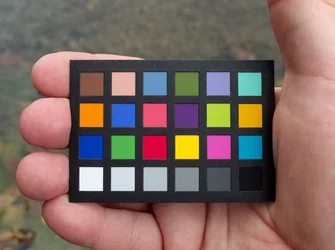
Auto WB usually works but sometimes doesn't because the camera knows when something is white except when it doesn't? Seriously? So in this photo:

$white_balance.webp

If I used my ring finger to cover the white square lower left the camera would get the WB wrong since there wouldn't be any white for it to find, but since I left the white square uncovered the camera saw it and got the WB right? But the WB is wrong and the camera was set to auto WB.

How does a camera know that the square in the lower left corner really is white and why didn't this camera figure that out?

Joe
 
I noticed that I was shooting on auto white balance and it was perfect colour and contrast and when I tried to match it on manual WB I could never get the same results. Just wondering how I could get those results? Or should I just leave it on auto WB as it is not a necessary thing to learn

Jack M'crystal Photography
You can try to use a user preset. Prepare a 18% gray card to set the preset. If you don't have one, just use some white color object and out-focus it to set user preset white balance. I always achieve extreme accurate result by doing so.
 

Create an account or login to comment

You must be a member in order to leave a comment

Create account

Create an account on our community. It's easy!

Log in

Already have an account? Log in here.

Back
Top Bottom