What's new

Pond Side Walk

fjrabon

Been spending a lot of time on here!
Joined
Nov 3, 2011
Messages
3,644
Reaction score
757
Location
Atlanta, GA, USA
Can others edit my Photos
Photos OK to edit
16742535698_c193f0c9ed_b.jpg
 
Last edited:
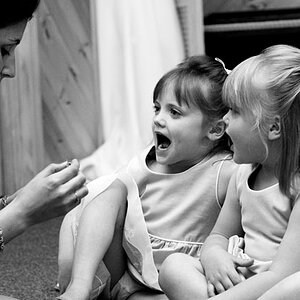
something is up. The little (girl?) seems very over exposed compared to the surrounding area.
 
agree with bri, she's way too bright. Dial back whatever you did on her in ps because sh'e the first thing I see on the photo


jmo
 
agree with bri, she's way too bright. Dial back whatever you did on her in ps because sh'e the first thing I see on the photo


jmo
Well, she is a very white little girl in very bright clothes in a foliage area that's very dark grey next to a very dark black woman wearing very dark black clothes. It was overcast but a small ray of light was hitting them. It's perhaps exacerbated because it's B&W and I moved the image such that the whitest points (her) and the darkest points are near pure white and black. But nothing outside of contrast increase was done brightness wise.

I'm also not sure why the subject being the brightest, first thing you see is bad?

Just trying to engage and understand the crit here, not trying to argue you're wrong, really just want to "get" the crit.
 
I guess I would not say it's right or wrong, but the little girl stands out. So some will point that out.
My eyes go directly to her also. Maybe give a try at toning her down and then see what folks think.
 
16751935540_88e3d6520d_b.jpg


I pulled the reds and upped the greens in the conversion (ie making the foliage brighter and caucasian skin tones darker). I also used the burn brush on the girl. I pulled the contrast down a bit and also didn't add as much local contrast. She's still pretty bright, but I think that's 99% how the scene was. The image above is basically every "natural looking" trick I could pull to make her less bright relative to the scene.

 
16751935540_88e3d6520d_b.jpg


I pulled the reds and upped the greens in the conversion (ie making the foliage brighter and caucasian skin tones darker). I also used the burn brush on the girl. I pulled the contrast down a bit and also didn't add as much local contrast. She's still pretty bright, but I think that's 99% how the scene was. The image above is basically every "natural looking" trick I could pull to make her less bright relative to the scene.
much, much better.
 
16751935540_88e3d6520d_b.jpg


I pulled the reds and upped the greens in the conversion (ie making the foliage brighter and caucasian skin tones darker). I also used the burn brush on the girl. I pulled the contrast down a bit and also didn't add as much local contrast. She's still pretty bright, but I think that's 99% how the scene was. The image above is basically every "natural looking" trick I could pull to make her less bright relative to the scene.
much, much better.

Funny because this is drastically less scene realistic. This version has a ton of processing compared to the original.
 
16751935540_88e3d6520d_b.jpg


I pulled the reds and upped the greens in the conversion (ie making the foliage brighter and caucasian skin tones darker). I also used the burn brush on the girl. I pulled the contrast down a bit and also didn't add as much local contrast. She's still pretty bright, but I think that's 99% how the scene was. The image above is basically every "natural looking" trick I could pull to make her less bright relative to the scene.
much, much better.

Funny because this is drastically less scene realistic. This version has a ton of processing compared to the original.
well you can still make it more scene realistic. Have the girl glow in the dark if you want. It is your photo. I just made a simple observation do with it as you will. I do think the girl in the second one looks much better. it does appear the rest of the scene might have suffered a little over the first version.
 
16751935540_88e3d6520d_b.jpg


I pulled the reds and upped the greens in the conversion (ie making the foliage brighter and caucasian skin tones darker). I also used the burn brush on the girl. I pulled the contrast down a bit and also didn't add as much local contrast. She's still pretty bright, but I think that's 99% how the scene was. The image above is basically every "natural looking" trick I could pull to make her less bright relative to the scene.
much, much better.

Funny because this is drastically less scene realistic. This version has a ton of processing compared to the original.
well you can still make it more scene realistic. Have the girl glow in the dark if you want. It is your photo. I just made a simple observation do with it as you will. I do think the girl in the second one looks much better. it does appear the rest of the scene might have suffered a little over the first version.
I have mixed feelings both ways. I wasn't criticising your critique, just remarking that it's funny that the more heavily processed image seems more natural.
 
16751935540_88e3d6520d_b.jpg


I pulled the reds and upped the greens in the conversion (ie making the foliage brighter and caucasian skin tones darker). I also used the burn brush on the girl. I pulled the contrast down a bit and also didn't add as much local contrast. She's still pretty bright, but I think that's 99% how the scene was. The image above is basically every "natural looking" trick I could pull to make her less bright relative to the scene.
much, much better.

Funny because this is drastically less scene realistic. This version has a ton of processing compared to the original.
well you can still make it more scene realistic. Have the girl glow in the dark if you want. It is your photo. I just made a simple observation do with it as you will. I do think the girl in the second one looks much better. it does appear the rest of the scene might have suffered a little over the first version.
I have mixed feelings both ways. I wasn't criticising your critique, just remarking that it's funny that the more heavily processed image seems more natural.
i like the image. kind of thing i would shoot.
 

Create an account or login to comment

You must be a member in order to leave a comment

Create account

Create an account on our community. It's easy!

Log in

Already have an account? Log in here.

Back
Top Bottom