What's new

Select the correct Exposure please

Ryan L

TPF Noob!
Joined
Apr 20, 2010
Messages
1,321
Reaction score
89
Location
Shelbyville, MI
Can others edit my Photos
Photos OK to edit
Ok I am having issues after a recent school event I did I added some lighting and am questioning my exposure now. The shot I am posting is just my daughter and friends acting goofy as always before the event for an example.


#1. According to the histogram and LR3 #1 is correct, not to my eyes, (or screen, I am calibrated with Spyder3 Pro).
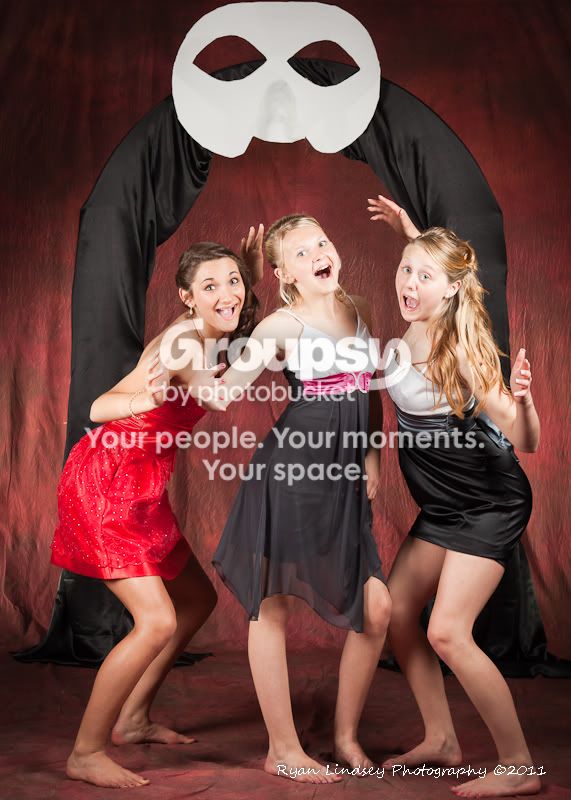
TPFAuto-7582.jpg


#2. According to my eyes this is more correct which is 3/4 stop underexposed.
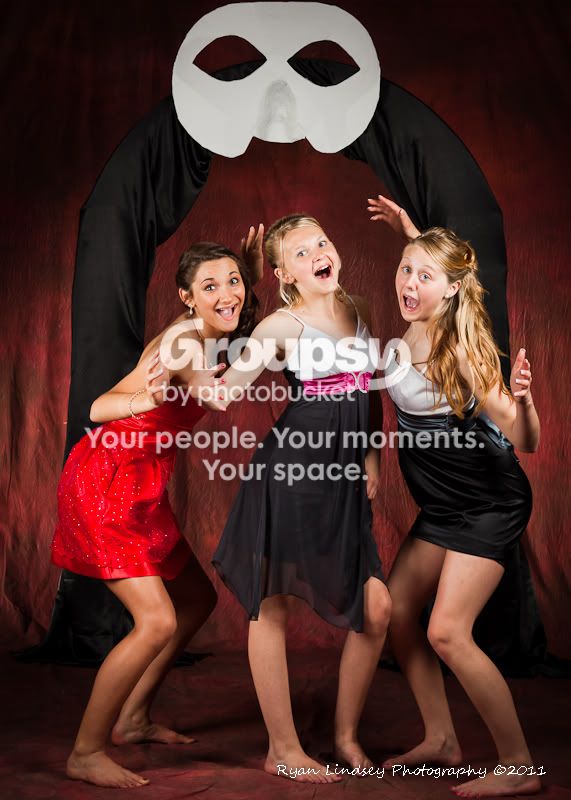
TPF-3_4-7582.jpg


And this is a happy medium at 1/4 undereposed, but still looks overeposued to me.
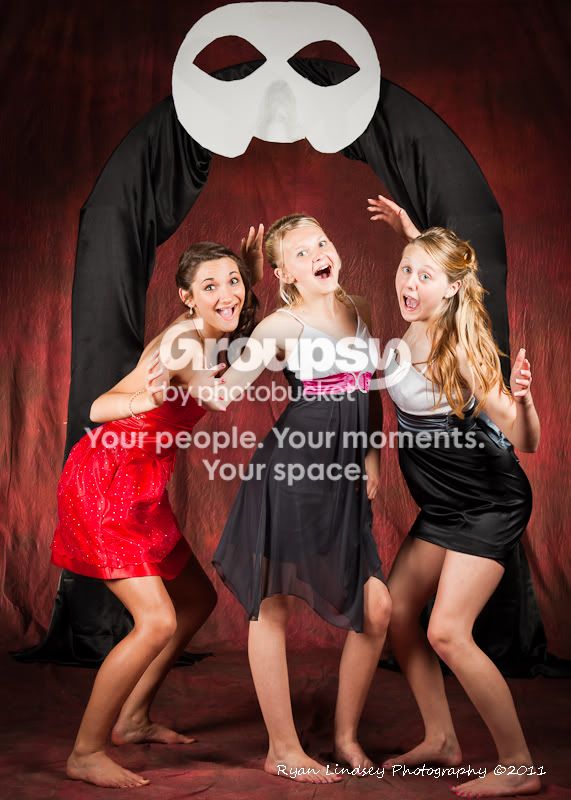
TPF-1_4-7582.jpg


Which looks correct to everyone else? Maybe it just seems off because of the darker background?
 
i think your right on the 2nd one as you said... im currently on a uncalibrated cheap monitor but from what i can see that one is best. If it is intended for print i would go for the last one. The dark back ground may cause some clipping but i dont find it to be important data
 
Just to be clear (for everyone)...a histogram won't really tell you if you have 'proper exposure'....it's just a graphical representation of what you have. It's up to you to decide if that is proper or not.

In this case, you are (it seems) looking to see whether or not the highlights on the middle dress are blown. The histogram may show you that, so if you are worried about that, you would adjust the exposure down until the histogram is no longer clipped (you could also use the highlight warning (flashing)).

This can give you an exposure with no blown out detail...but it may also cause the rest of the exposure to be under exposed...so which is correct?

The crux of the issue, is that some parts of the scene are much more reflective than other parts (the white on the dress is much more reflective than the dresses or the background)...and you are limited by the dynamic range of you camera. So it may be likely that no single exposure setting will give you want you want (in that lighting). So rather than fight with the exposure setting on the camera, the ideal solution may be to fiddle with your lighting (or the wardrobe) until you get the fully well exposed image that you want.

Also, when viewing the histogram, keep in mind that it's a histogram based on the in-camera processed JPEG (even when shooting in RAW). So when it's showing a slight clipping of highlights, the RAW file may actually have detail that has been lost in the JPEG preview.

I'm kind of jumping around now...but one way to 'fix' this...might be to shoot so that you don't blow the highlights, then do your post work to bring up the darks and mid tones, without making the highlights are brighter ('Fill' in Lightroom etc.).
 
Big Mike said:
Just to be clear (for everyone)...a histogram won't really tell you if you have 'proper exposure'....it's just a graphical representation of what you have. It's up to you to decide if that is proper or not.

In this case, you are (it seems) looking to see whether or not the highlights on the middle dress are blown. The histogram may show you that, so if you are worried about that, you would adjust the exposure down until the histogram is no longer clipped (you could also use the highlight warning (flashing)).

This can give you an exposure with no blown out detail...but it may also cause the rest of the exposure to be under exposed...so which is correct?

The crux of the issue, is that some parts of the scene are much more reflective than other parts (the white on the dress is much more reflective than the dresses or the background)...and you are limited by the dynamic range of you camera. So it may be likely that no single exposure setting will give you want you want (in that lighting). So rather than fight with the exposure setting on the camera, the ideal solution may be to fiddle with your lighting (or the wardrobe) until you get the fully well exposed image that you want.

Also, when viewing the histogram, keep in mind that it's a histogram based on the in-camera processed JPEG (even when shooting in RAW). So when it's showing a slight clipping of highlights, the RAW file may actually have detail that has been lost in the JPEG preview.

I'm kind of jumping around now...but one way to 'fix' this...might be to shoot so that you don't blow the highlights, then do your post work to bring up the darks and mid tones, without making the highlights are brighter ('Fill' in Lightroom etc.).

Thanks Mike, I guess I did know all this. I have just been flustered and it passed over my head. I was looking more at the skin than the white dress. In number one the highlights aren't blown, but I don't like the luminance in the skin tones so that's where my issue was.

I did use a light meter as well, but must have had it off a hair. I may have changed my aperture a 1/2 stop after I looked at the first couple thinking they were too dark...guess I should trust my meter.

I think I am going to process them all closer to #2. I think the skin tones are more pleasing and true to what I wanted. The background is trivial, as I didn't want the arch in it anyway lol. The school did, its a theme they came up with "an italian masquerade". I was hoping for just the backdrop.
 
I think it is between 2 & 3. But really you can go with 2 or 3 it will be good. It is all personal preference really.
 
Just keep in mind that things tend to print darker then on the screen... at least that is how it is on my printer
 
Skin is properly exposed if the highlights are between 235 and 240 in the red channel.

Your light is hotter on the middle girls face than on the other 2.

Most of your issue is because of your light placement.
 
Are these sharp on your monitor ? what were your settings because it looks like there is ambient light in the shot because of the movement
 
Yes they are sharp, I am not at home but I am pretty sure they were shot at ISO100, F9, 1/125, there were 5 strobes, key and fill with softboxes, hair w/grid, 2 background.

Now...ambient....this shot was earlier in the evening, but I was using the band room since it had high ceilings, I failed to realize when I picked it that it just happened to have an entire row of skylights, but by the time I was shooting the formals, it was gettinng dark though.
 
Yes they are sharp, I am not at home but I am pretty sure they were shot at ISO100, F9, 1/125, there were 5 strobes, key and fill with softboxes, hair w/grid, 2 background.

Now...ambient....this shot was earlier in the evening, but I was using the band room since it had high ceilings, I failed to realize when I picked it that it just happened to have an entire row of skylights, but by the time I was shooting the formals, it was gettinng dark though.

It's the crap picture quality of this forum then, i have noticed a lot the last month
 
Yes Keith I did, Its a Minolta V. But like I said earlier, I set it, and then changed it 1/2 stop thinking it looked too dark in camera.....I know, I am stupid, lol. I will trust it next time though.
 
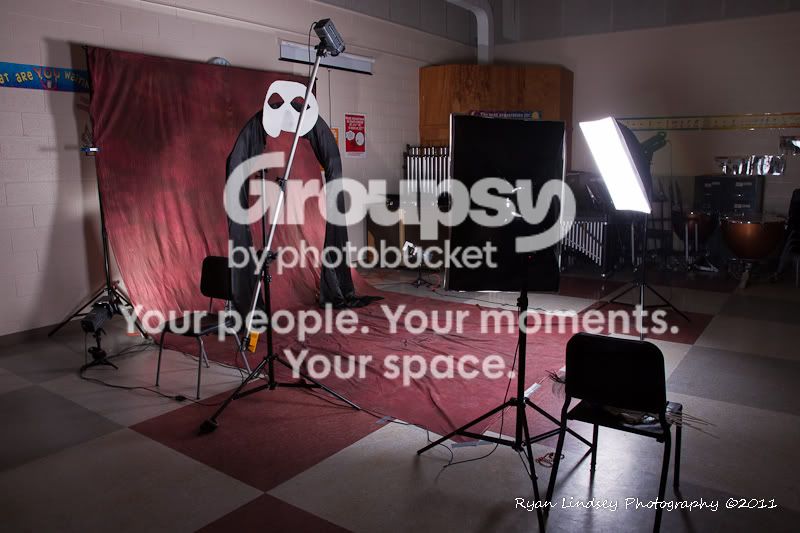
Here was the setup from the side...kinda. I started to pack up and then thought I should have taken a picture, so I put a few things back out. The light closest was the fill, it was to the side of the subjects, camera left just in front of the boom, the hair light was lower and pointed a little more forward, and obviously I shot from the front and not the corner.

TPF_Dance_Setup-1.jpg
 
#2 looks better, eventhough it is darker. The center girl is too bright in #1 and #3.
 

Create an account or login to comment

You must be a member in order to leave a comment

Create account

Create an account on our community. It's easy!

Log in

Already have an account? Log in here.

New Topics

Back
Top Bottom