What's new

slow shutter peek a boo

bribrius

Been spending a lot of time on here!
Joined
Jan 12, 2014
Messages
8,708
Reaction score
1,312
Can others edit my Photos
Photos NOT OK to edit
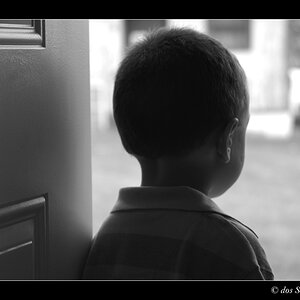
sooc

View attachment 70588

but I missed on the bottom it is still in focus


lightened and cropped

View attachment 70589

8x10 crop

View attachment 70590

1 is what I was going for
2 made it more visible
3 made it more printable and took out the infocus area at the bottom that I messed up sooc

I still like 1 better it is what I wanted, but I don't like the in focus area. I don't like cutting off the foot in 3.


I got a no win.
so I kept them all.

please think before you say something like "its dark and blurry"

and I know, it would be better with a straight black background.
 
  • Thread Starter 🔹
  • Banned
  • #2
lowlight iso 100 4.3 1/1.6 shutter f3.7
if anyone can tell me how to balance the top and bottom of the photo. the problem I was having seemed to be a technical one out of my knowledge. having the bottom of the photo just enough out of focus to balance the top to a degree. course, I bring the bottom out of focus the top becomes TOO blurry. I bring the bottom more in focus the top becomes not blurry enough. I really just couldn't figure out a easy way to balance. My next step I think im going to try to focus just on his face and hope the background blurs more and the bottom of his torso blurs more down toward his feet. but that is about a impossible feat within a three foot distance isn't it, balancing three sections of a frame with the the middle having movement and just being a little more blurry? I don't do much for pp either. Or what if I try to focus on another object totally out of the area and just crop that out after?
any suggestions welcomed on the this as I think I went over my head in my ability to adjust a camera when I start looking at three separate areas of the same photo.., the back ground, his upper torso moving and the bottom where his feet are.
all blurred but his upper torso just enough more to show movement.
 
  • Thread Starter 🔹
  • Banned
  • #3
okay. Maybe if I simplify this I can get a answer.
if you shoot a photo of a moving object hypothetically twenty fee away. you can adjust your aperture to have your foreground blurry, behind the object you are focused on more blurry. In this case you might have a hundred feet + total to play with or maybe fourty feet who knows. And the object itself just a little more blurry as it is moving. we do it all the time focusing on something and have our foreground, subject area and background to different degrees out of focus..
how do you do and balance the same thing in a four foot frame? Or maybe I could just put the entire thing out of focus and wing it without worrying about a dof approach...
 
It depends on your lens. Every lens has a falloff distance as you get closer to the subject. I have a pretty tight corner in my studio where I do portraits and I can just barely use my 85mm, but I can use the 60mm just fine in the same space.

As for the image, well it is interesting. I would like to see a combination of #1 and #3. Yes, it is unconventional for a baby shot, but there are many fine art photographers who have done weird/strange portraits of babies.
 
  • Thread Starter 🔹
  • Banned
  • #5
It depends on your lens. Every lens has a falloff distance as you get closer to the subject. I have a pretty tight corner in my studio where I do portraits and I can just barely use my 85mm, but I can use the 60mm just fine in the same space.

As for the image, well it is interesting. I would like to see a combination of #1 and #3. Yes, it is unconventional for a baby shot, but there are many fine art photographers who have done weird/strange portraits of babies.
so you are saying im weird? gee thanks. lol
 
  • Thread Starter 🔹
  • Banned
  • #6
Last edited:

Create an account or login to comment

You must be a member in order to leave a comment

Create account

Create an account on our community. It's easy!

Log in

Already have an account? Log in here.

Back
Top Bottom