What's new

Smugmug - Help With Navigation Bar

NedM

No longer a newbie, moving up!
Joined
Jan 6, 2014
Messages
390
Reaction score
64
Location
USA
Can others edit my Photos
Photos OK to edit
I feel like such a complete n00b.

I can't seem to figure out to disable clicking on the word "portfolio" in my navigation bar. (Highlighted in red)
I want my users to just be able to hover their pointer over the word "portfolio" to only see the dropdown menu without having to be able to click "portfolio".
kC5jh3v.jpg


And when users do click "portfolio" it takes to the galleries that are in that dropdown menu.
(I don't want this, I don't want my users to be able to click "portfolio"
CkN5Fuh.png


Here is what the folder looks like.
How can I delete the portfolio folder without deleting the galleries in it or the whole thing entirely? (I want to be able to keep the dropdown menu with the pages)
Geu5Do7.png
 
Customize > Entire Site
Hover over the nav menu content block until it turns red > click on the wrench for editing > click on the "Links" tab > Go to the "portfolio" name > click on the arrow (?) to the right of the word "portfolio" > in the URL box type "http://" (without the quotation marks and not bold)

Do that for all the menu items you don't want to be active.

Save / save / blah blah blah :D
 
Last edited:
Customize > Entire Site
Hover over the nav menu content block until it turns red > click on the wrench for editing > click on the "Links" tab > Go to the "portfolio" name > click on the arrow (?) to the right of the word "portfolio" > in the URL box type "http://" (without the quotation marks and not bold)

Do that for all the menu items you don't want to be active.

Save / save / blah blah blah :D


It didn't work.
My nav bar isn't an entire site content.

I went to customize site>wrench on navbar> links tab> portfolio>

and I have my portfolio set to have the dropdown menu pages.
I can't change the portfolio URL because it'll disable the dropdown menu.

yC4X6I3.jpg


I can't remove URL because it'll then remove the dropdown menu.
 
I have my portfolio set to have the dropdown menu pages.
I can't change the portfolio URL because it'll disable the dropdown menu.

yC4X6I3.jpg


I can't remove URL because it'll then remove the dropdown menu.
No - that's not correct.

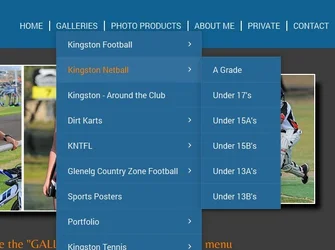
Here's part of my menu. Has quite a few sub-menus and within those there are sub-menus:
$Links #1.webp

Now I don't want my "Galleries" or my "Photo Products" to be active ... they have sub-menus cascading down from those two.
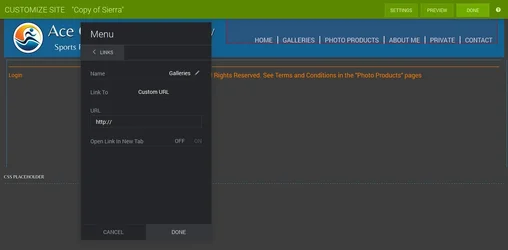
Hence I need to make the "URL" for those two to be "http://"
See image below:
$Links #2.webp

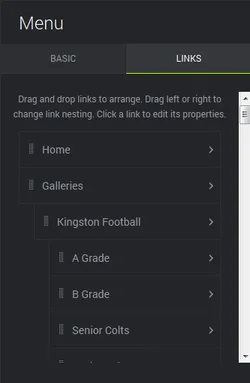
This does NOT break the cascading menu. This has been set up in your links tabs ... by dragging the various link names. THIS is what determines you menu structure ... then it is the URL for each link that determines the web page you go to when you click on it. Having http:// means you won't be taken anywhere when you click on "Portfolio":
$Link #3.webp

I think you should also consider having a link to HOME in your nav menu - you have it on your HOME page (where it is not needed) but it then is missing when you navigate away from your home page (where you DO need it)
... OR include breadcrumb so that people can get back to your home page

I would also question your landing page. What is the rationale for that? There is no slideshow. The only thing you can do with it is click on "Enter Site" that takes you to your home page that does have a slideshow exhibiting your work. From here a visitor CAN start marking decisions about what they want to see. From my point of view, the landing page just annoys people who have to add an extra click to go to you website. I just don't see the sense/reason for it.
 
Last edited:

Create an account or login to comment

You must be a member in order to leave a comment

Create account

Create an account on our community. It's easy!

Log in

Already have an account? Log in here.

New Topics

Back
Top Bottom