What's new

Some edited photos I took with my friend. Thoughts? Advice?

Photographyiscrack

TPF Noob!
Joined
Jan 25, 2017
Messages
12
Reaction score
4
Can others edit my Photos
Photos OK to edit
IMG_0281.webp
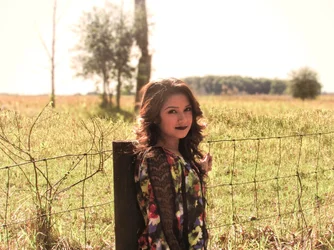
In this one I tried editing her face so it would be brighter but it ended up looking odd each time any advice on how I can do that?
IMG_0286.webp
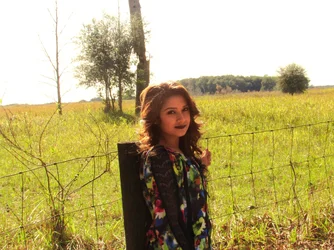
and in this one what bothered me was the tones on her face what else should I have done to make the photo better?
 
Shot 1 is straight backlighting with slight sidelighting: often encountered, often tricky to work with without a close-up light meter reading right off of the face of the person, or without the use of fill-in flash or reflector-fill lighting.

The second shot has the sunlight raking in from directly to the side...this is VERY tricky to get the exact, right exposure for unless you move in close, and take the precise meter reading off the close-up face. But the issue really is, the sunlight is at a fairly extreme angle; the little triangle of light under the eye on camera-right? This is classical Rembrandt Lighting!!! And that is dark, moody lighting. The little under-the-eyeball-triangle-of-light is the hallmark of Rembrandt Lighting. So, in one way, this is a success, and in anoher way, maybe not what you wanted to create?

To make these better, let's hope you have a RAW image file, and can re-process the shots. But if not...B&W conversion from color is one way to sort-of rescue a tricky, bad exposure. Shot #1, I would dodge her face a bit, OR just lighten the entire image, get her face and hair looking good, and live with the background being very,very bright. Shot #2 looks like it needs a complete re-process, from the original exposure.

I sense that yuo're not that experienced in post-processing, but take heart: you WILL become betetr, and you WILL, in a few weeks' time, be able to re-visit these pics and make themn much better-looking! I know you will!

 
Shot 1 is straight backlighting with slight sidelighting: often encountered, often tricky to work with without a close-up light meter reading right off of the face of the person, or without the use of fill-in flash or reflector-fill lighting.

The second shot has the sunlight raking in from directly to the side...this is VERY tricky to get the exact, right exposure for unless you move in close, and take the precise meter reading off the close-up face. But the issue really is, the sunlight is at a fairly extreme angle; the little triangle of light under the eye on camera-right? This is classical Rembrandt Lighting!!! And that is dark, moody lighting. The little under-the-eyeball-triangle-of-light is the hallmark of Rembrandt Lighting. So, in one way, this is a success, and in anoher way, maybe not what you wanted to create?

To make these better, let's hope you have a RAW image file, and can re-process the shots. But if not...B&W conversion from color is one way to sort-of rescue a tricky, bad exposure. Shot #1, I would dodge her face a bit, OR just lighten the entire image, get her face and hair looking good, and live with the background being very,very bright. Shot #2 looks like it needs a complete re-process, from the original exposure.

I sense that yuo're not that experienced in post-processing, but take heart: you WILL become betetr, and you WILL, in a few weeks' time, be able to re-visit these pics and make themn much better-looking! I know you will!
Thanks and yes I do have the originals on hand to re-work them and i'll take your advice and see what I can do thanks again :)
 
LR edit from the processed image.
 

Attachments

  • IMG_0281Low-Resolution.webp
    IMG_0281Low-Resolution.webp
    631 KB · Views: 176
Here's my B&W take on #2, it would probably be better in portrait orientation but I was in a rush ... got things to do. :)

She's lovely, I hope she'll be happy to continue to model for you as you progress at The Photoforum University. :D

PIC2.webp
 
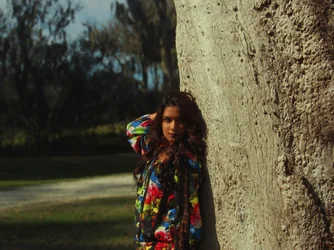
In this one ..... what else should I have done to make the photo better?
O.K.

#1. Move your model away from the fencepost & tree, put the sun at your back, meter and expose correctly.

#2. Move your model more in front of the tree so that the edge is not bisecting her head. Ask her to turn her face toward the light and meter/focus correctly on her face, not the tree.
 
LR edit from the processed image.
re-edit.webp I did re-edit with the original picture I brightened her face using her own skin tone and matching the brightness of the picture, but I feel she's a bit orange in the picture now hmmm
 
Keep in mind, white balance and exposure settings are important. You will get better and better as you edit more and more images.
 

Create an account or login to comment

You must be a member in order to leave a comment

Create account

Create an account on our community. It's easy!

Log in

Already have an account? Log in here.

New Topics

Back
Top Bottom