What's new

Things just aren't clear to me.

Tight Knot

No longer a newbie, moving up!
Joined
Nov 30, 2010
Messages
1,398
Reaction score
159
Location
Boca Raton, FL
Can others edit my Photos
Photos OK to edit
I'm not sure if this is the right place for this topic, if not, please let me know and/or move it.

Thanks.

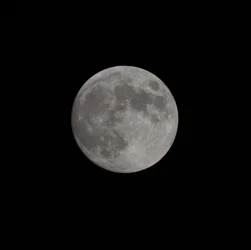
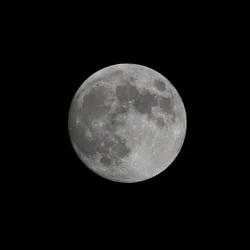
I took a shot of the moon earlier with my new (to me) 150-500 APO DG OS F5-6.3 Sigma lens. LOVE THIS LENS!!!!

This question is not however, a lens question, but an image question.

AS you'll see below, my image that was shot in JPG format is actually sharper than my image taken in RAW format, both of course taken simultaneously.

Can anyone give me a reason why (I have set the camera to give a little sharpening to my images, does that only work on my JPG's or also on RAW?)?

Thanks all.
 

Attachments

  • Moon from JPG file.webp
    Moon from JPG file.webp
    119.3 KB · Views: 200
  • Moon from RAW file.webp
    Moon from RAW file.webp
    123.6 KB · Views: 194
The in-camera sharpening is only applied to JPEGs. It has no effect on the raw capture. You can apply sharpening when you convert the raw file to an RGB image. You can also remove that CA during conversion :-)

Joe
 
The in-camera sharpening is only applied to JPEGs. It has no effect on the raw capture. You can apply sharpening when you convert the raw file to an RGB image. You can also remove that CA during conversion :)

Joe
Thanks Joe
 
^Yep. Exactly what Joe said. That really threw me when I first starting shooting in raw, because, back then, I didn't even KNOW I had the camera set to sharpen at all in-camera.
Thanks sm4him
 
I guess the question is then, how do I replicate that exactly in photoshop? The sharpening I've done seems to make it too noisy (may be my lack of skills :blush:)
 
Use a little noise reduction then sharpen. Sharpening is usually the last thing to be done (at least it is in my workflow). If you have any noise in the raw image and shapen first you just end up sharpening the noise so removing it first makes sense.
 
Use a little noise reduction then sharpen. Sharpening is usually the last thing to be done (at least it is in my workflow). If you have any noise in the raw image and sharpen first you just end up sharpening the noise so removing it first makes sense.
Thanks weepete,

In this case, there was no noise in the RAW file, that came up from sharpening too much. I'll have to play with the different sharpening tools in photoshop.
 
As the others have said RAW files don't have any sharpening nor noise removal applied to them.


However that isn't strictly true;

1) Noise reduction/sharpening is typically applied - however its a value applied to every photo the camera takes by default - basically you're manufacturers default if you like. It's applied to every shot no-matter-what - you can't even change these values with the custom settings. It's a minor technicality and not really something to worry about; but it does get mentioned from time to time.

2) Most RAW processing software options do apply a level of sharpening. This default value is small, but needed to give the shot some degree of sharpness to work from. This is typically called capture sharpening and whilst sharpening is a destructive process to the data in the photo; most people accept capture sharpening as an exception to the "always sharpen last" rule.
Have a look in your RAW processing software - chances are a tiny amount of sharpening is set by default - remember the value and try turning it off and see the difference for yourself.

3) Sharpening and Noise reduction are an art - you can take 20seconds or you can take 20 hours. There are lots of method and approaches and no single "right" answer - so read up on it and find a method that works for your needs.
 
As the others have said RAW files don't have any sharpening nor noise removal applied to them.


However that isn't strictly true;

1) Noise reduction/sharpening is typically applied - however its a value applied to every photo the camera takes by default - basically you're manufacturers default if you like. It's applied to every shot no-matter-what - you can't even change these values with the custom settings. It's a minor technicality and not really something to worry about; but it does get mentioned from time to time.

2) Most RAW processing software options do apply a level of sharpening. This default value is small, but needed to give the shot some degree of sharpness to work from. This is typically called capture sharpening and whilst sharpening is a destructive process to the data in the photo; most people accept capture sharpening as an exception to the "always sharpen last" rule.
Have a look in your RAW processing software - chances are a tiny amount of sharpening is set by default - remember the value and try turning it off and see the difference for yourself.

3) Sharpening and Noise reduction are an art - you can take 20seconds or you can take 20 hours. There are lots of method and approaches and no single "right" answer - so read up on it and find a method that works for your needs.
Thanks Overread,

Very concisely and clearly put.
 
Okay, now that we've got that out of the way :1247:, how about some C&C on the shot of the moon (either one, lol) with my new (to me) lens?
 
Glad it helped = also note I forgot something.

Lightroom and others often apply noise reduction for colour noise. Again this is oft a smaller value, but its often very necessary. Again try turning it off and see the results (they can be very surprising!) This is another setting that most of the time you'll leave on default and get good solid results most of the time -
 

Create an account or login to comment

You must be a member in order to leave a comment

Create account

Create an account on our community. It's easy!

Log in

Already have an account? Log in here.

Back
Top Bottom