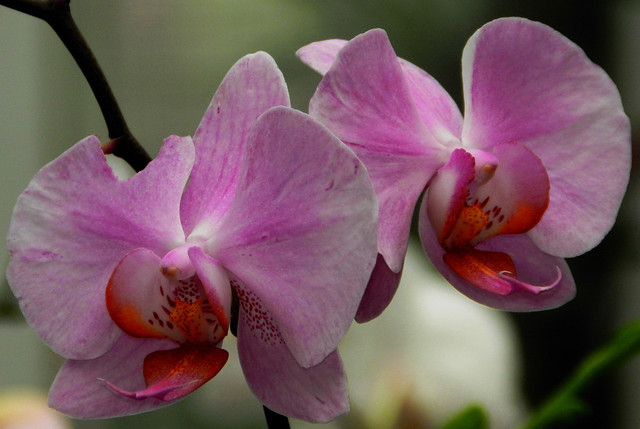
Hmmm, your Vireya shot (I think that's what the last one is) is properly exposed, but it still looks quite soft. It doesn't appear to be out of focus, it looks more like either slight motion blur or that the image is heavily cropped, reducing resolution. If you're using a tripod that can definitely help, but there is till the possibility of camera shake while you're pressing the shutter button or if some accidentally bumps the camera slightly. Additionally, it might be your post-processing methods or the hosting website you're using to post images that can be contributing to the softness (I've noticed that Photobucket in particular does a horrendous job at compressing photos). If it was me trying to photograph orchids in a greenhouse, I would use a higher ISO (~400) and a faster shutter speed (~1/200 sec) even if the camera was on a tripod. You can set your camera to shutter speed priority and let it figure out the proper aperture.
As for other members not sharing photos, I do post a lot of my photos as well, though mine aren't hosted on this site either. Mine are on Flickr, which is a great site that ensures the images still look right, even when they are resized and posted on a different website. If you wish to see the photos I took at the Pacific Orchid Exposition this year, you can click the link below (it's just seven images).
As of now, i liked the images. Joel sir, would you please brighten up the images a bit and post them again, so that every one can see what difference would it bring?
Regards
PS: the last image (just above this post)appears not well focused; i am not sure though
Thanks to all for your honest comments and evaluations. I thought about the actual conditions I shot in, and I can see some issues that I didn't think of. There are fans that move the air around in each of the various greenhouses, and with my slow shutter speeds, there could certainly be a little, hardly noticeable movement. I tend to like my indoor florals shot with consistent soft light as it adds to the texture of the flower.
Natalie brings up a excellent point about Photobucket, and all of my pictures are posted through them. I thought I noticed a slightly consistent decrease in the brightness, but never thought much about it. I will take all of your comments and try to rework the photographs, and repost through Flickr.
As many of you can see, I tried to build a my gallery here via the User Gallery, as I just assumed that most people posted their pictures there. That and the fact that so many of you have 0 photos in your gallery just seemed odd to me, especially since it's a photo site.
And Natalie, I will certainly take a look at your Orchid pictures today before I have to leave for work.
I opened a Flickr account, and uploaded one test picture, but for the life of me, I can't figure out how to download that picture to this thread. Can anyone help out?
I must be really thick, but I don't have share. I clicked on You, then right clicked the picture, as left clicking just highlights the image. There is no save that I can find. Tried all the various options, but none of the save ones work. Save image works but once I go to Go Advanced, I only get the link.
To post the image, navigate that particular image's page (left click it instead of right clicking it), then on the new page, above the image there will be drop-down menu title "Share". Click that, navigate to "Grab the HTML/BBCode", then make sure it is on BBCode by selecting that (I think the default is HTML at first). After that, a box will appear that has a bunch of text in it, that's what you copy and paste. Here's a quick screen shot:
Left click on the picture you would like to post.
That should take you to a page where that is the only picture you can see.
Now you should be able to see "Share" at the top.
Copy the BBCode and paste it here =)
No worries....you'll get it.
Natalie, thanks a million. I think I've finally got it. I increased the brightness just a touch, since I didn't have any idea of how Flickr's image quality would be over Photobucket. Take a look and let me know what you think.
Those look much, much better! 300% improvement at least - see what a difference the hosting site can make? The first one from Flickr you posted is much more crisp and vibrant than the version on the first page. I agree that the second image of the a tad underexposed. But it is perfectly focused and the water drops on the flowers add a bit of interest as well.
Those look much, much better! 300% improvement at least - see what a difference the hosting site can make? The first one from Flickr you posted is much more crisp and vibrant than the version on the first page. I agree that the second image of the a tad underexposed. But it is perfectly focused and the water drops on the flowers add a bit of interest as well.
Natalie, thanks so much for your critiques, and your help with Flickr. The 2nd picture was shot with on camera fill flash @ -1.0. Helped to some degree, but I it has that flash feel to the image. I've always been undecided if I like that or not. I've deleted way too many good pictures that were ruined by the over use of fill flash in the green houses.
BTW, the 2nd photo with the water drops was shot with fill flash set at -1.0. The darker background and to some extent the highlights along the center of the leaves is a dead give away.






![[No title]](/data/xfmg/thumbnail/35/35931-5e10675f3f7d827bc7ae4689f16bda8a.jpg?1734167723)
![[No title]](/data/xfmg/thumbnail/32/32711-b57dd72845f94aa34b3bd7207b07f98c.jpg?1734162320)