What's new

Western Digital Red NAS hard drives

Trever1t

Been spending a lot of time on here!
Joined
Dec 30, 2010
Messages
9,331
Reaction score
2,724
Location
San Jose, CA
Can others edit my Photos
Photos NOT OK to edit
I bought a Drobo 5N NAS in January and since then I've experienced 2 drive failures with the WD RED drives. WD RMA policy is cool, they ship me out a new drive and allow me to return the dead one without charge (A reconditioned unit, shipping not included) but what a PITA. 2 out of 5 drives in 2 months? The RED drives have a 3 year replacement warranty and I have enabled dual disc redundancy on the NAS so short of losing 3 drives at the same time I'm ok but dayum!!!
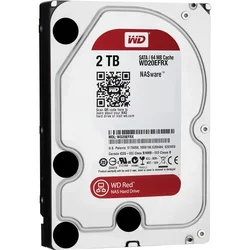
$884037.webp

Is there a better drive? Is this normal?
 
This is definitely not normal. The WD Red's are specifically built for RAID applications (like what you're doing). I've used several and they've performed as expected. There is an issue with some of the drives where the idle timer is set super-low, meaning that it'll sort of go into "standby" after only 10 seconds of inactivity rather than a matter of minutes or even hours. This may cause premature wear and tear.

Regardless, keep an eye on the RAID and you should be ok. Also remember that RAID isn't backup- always have a separate backup of your data.
 
Very odd. The most recent drives I added to my Drobo 5N were a pair of Seagate NAS HDD ST4000VN000 4TB drives, which should be pretty much equivalent to WD Reds as far as construction & intended usage. They've been running without incident, but that was only December of last year, so I don't know if you can draw too many conclusions about reliability.

FWIW, over the years, I've experienced bouts where I've sworn to never buy WD or Seagate again because I've experienced multiple failures from both brands. I have a feeling that both brands have had "lemon" drives that were just less reliable than normal, but of course, all HDD's fail eventually, and over the long run, I'm convinced that quality is probably about the same between these vendors.

Anecdotally, I've owned drives from Hitachi / IBM and Toshiba, as well, and I've yet to experience failures from either of them, but again, I can't consider that conclusive because I just haven't waited long enough. The Toshibas, for instance, are a set of three 3GB drives -- also in the Drobo -- installed last April. No failures in a year is good, IMO, but they'll die at some point, I know.
 
Wow...my Buffalo TeraStation NAS has been on-line almost continuously for about 7 years....not one, single drive failure in seven YEARS...

Sounds like some real garbage coming out of that factory...

I dunno...I had a run of bad,. bad luck with WD drive back in the early 2000's...I had one flame out after three days, back when drives were $399 a pop...damn, I was pissed...went back, got it replaced, and SOB...Western Digital replacement drive went down in about 30 days...I swore them off and have gone exclusively now to Maxtor, without a single flame-out since 2002...so...I dunno...
 
That's not good to here, especially since I just bought a pair of Reds. :confused:
 
no.
I have a couple externals which ive been running for years.
I have a internal that has been coming up with warning drive failure for ten years. I run fixdisk on it occasionally, wipe it, use it anyway. You can also run for bad sectors and avoid them (least I could under xp never tried on windows 8 like this one).
I would never totally trust a drive though. my external Seagate has been making strange noises. im scared about that...
I think it has been dropped too many times.

shoot. I think I have another western digital kicking around somewhere I don't even think I ever used it. wonder where I put it...
 
This is definitely not normal. The WD Red's are specifically built for RAID applications (like what you're doing). I've used several and they've performed as expected. There is an issue with some of the drives where the idle timer is set super-low, meaning that it'll sort of go into "standby" after only 10 seconds of inactivity rather than a matter of minutes or even hours. This may cause premature wear and tear.

Regardless, keep an eye on the RAID and you should be ok. Also remember that RAID isn't backup- always have a separate backup of your data.

OK Humor me, how am I going to backup if my RAID device isn't? Online backup is out of reach for me at the moment.
 
The DROBO can repair the drive (?) after a restart it reads as functioning but "Healed" meaning that bad sectors are being skipped over (I guess?) Either way I'm having it replaced. These are built in Malaysia. Not sure if that's where thay all come from or not.
 
OK Humor me, how am I going to backup if my RAID device isn't? Online backup is out of reach for me at the moment.

Just to be clear- your RAID's main function is redundancy- that meaning that if a disk fails, you'll still be able to work. The purpose of RAID isn't to simply keep a copy of the data, but to ensure that the system will continue to function if a part (the disk) fails. If the system itself fails (for instance if the logic board experiences an issue and starts writing gibberish to your RAID), you're done. That's why it's important to ensure you have a second copy of your data somewhere safe.

As far as backup solutions, most people use external hard drives. You can get 3TB drives for a pretty decent price these days. You mentioned that online archival isn't an option for you. If it was, I would suggest signing up for Carbonite or CrashPlan, as you won't have to worry about an external drive at that point.

Depending on how much data you have, you may also be able to purchase a BluRay burner and use Bluray discs, which store 25GB on a single-layer disc or 50GB on a dual.

The DROBO can repair the drive (?) after a restart it reads as functioning but "Healed" meaning that bad sectors are being skipped over (I guess?) Either way I'm having it replaced. These are built in Malaysia. Not sure if that's where thay all come from or not.

That's correct- for the Drobo NAS units, the "healed" means it basically just marks the bad disk error as unwritable and tries to utilize the area around the sector for the recovered data. I would certainly get the drives replaced. Just be careful with the array if you don't have a copy of the data.

Hope this is helpful.
 
Last edited:
Yes, and thanks! I have a bunch of externals, I'll BU to a couple of them, thanks!
 
just my two cents. But the reason I prolly spend so much on printing photos is I have no faith in data. This is probably because I spent too many years chasing lost files, having computers crash, having files mysteriously come up corrupted. Anything I want to keep, I print. you can back up, but ive had two failures before in the same week. so, sometimes the backup isn't really a backup.
The pita in retrieving info is something too. ive bought another laptop before JUST so I could take the drive out of one that died and retrieve the information putting the old drive in the new laptop..
bought a program whose sole purpose is to find and fix "misplaced files".
I really just don't have any faith in data. LIKE at all. And I got this way from spending many a hour and dollar trying to fix or retrieve it. I encourage everyone to have a backup , for the backup, of anything you really want to keep. If it comes down to something you totally absolutely need and plan on keeping it long term, put it in print. The money on the vehicle to keep the data isn't the main problem. The drive or computer aint worth crap its just the storage vehicle. it is the information on it that is valuable. Never used a online hosting service. But considering they put it in their own sort of drive, Im not sure I see the difference. Plus I wonder what happens if you forget to pay your yearly fee.
 
The DROBO can repair the drive (?) after a restart it reads as functioning but "Healed" meaning that bad sectors are being skipped over (I guess?) Either way I'm having it replaced. These are built in Malaysia. Not sure if that's where thay all come from or not.

Interesting. Come to think of it, I had a pair of 1TB WD Blacks that I had running mirrored in a desktop, and every once in a while, one would just hiccup and drop out of the array. I'd unplug it, plug it back in, and the the array asked if I wanted to rebuild onto the "new" volume. These drives are now doing light duty in external USB cases where I don't mind too terribly much if they die.
 
You know, maybe it's not a coincidence that they use the same naming scheme as Johnnie Walker.....
 
just my two cents. But the reason I prolly spend so much on printing photos is I have no faith in data. This is probably because I spent too many years chasing lost files, having computers crash, having files mysteriously come up corrupted. Anything I want to keep, I print. you can back up, but ive had two failures before in the same week. so, sometimes the backup isn't really a backup.
The pita in retrieving info is something too. ive bought another laptop before JUST so I could take the drive out of one that died and retrieve the information putting the old drive in the new laptop..
bought a program whose sole purpose is to find and fix "misplaced files".
I really just don't have any faith in data. LIKE at all. And I got this way from spending many a hour and dollar trying to fix or retrieve it. I encourage everyone to have a backup , for the backup, of anything you really want to keep. If it comes down to something you totally absolutely need and plan on keeping it long term, put it in print. The money on the vehicle to keep the data isn't the main problem. The drive or computer aint worth crap its just the storage vehicle. it is the information on it that is valuable. Never used a online hosting service. But considering they put it in their own sort of drive, Im not sure I see the difference. Plus I wonder what happens if you forget to pay your yearly fee.

I have ~ 2T in images, most of which are not of any type I'd want to print (event work, models, etc) and may have a need to recall it at a later date for a client or model.
 
something else to consider to. is partitioning a drive. run two or three operating systems. Not sure how this works with the new platforms (ive tried 8 and Linux unsuccessfully) but in the older ones running two or three operating systems tended to guarantee a better chance of access at least. im out of date now. just throwing this out there...
 

Create an account or login to comment

You must be a member in order to leave a comment

Create account

Create an account on our community. It's easy!

Log in

Already have an account? Log in here.

New Topics

Back
Top Bottom