Here, this may be a long post.
If you want to try Qtpfsgui, see if this download link works for you:
fixdown Download Server2
IF IT DOES NOT: Go to
this website and scroll down the page to have more download links.
I experienced a little bit of difficulty to fully download and install this, so here's a small guide from me:
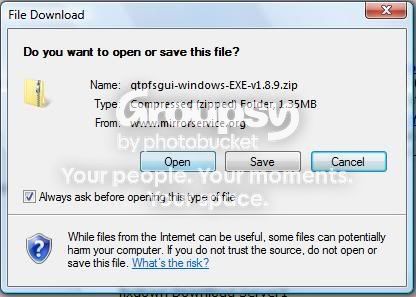
1. Click the download link and click "Open". If your computer asks if you want to allow it, click yes. (unless you don't want it to work)
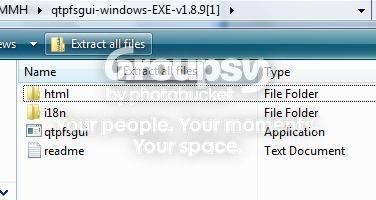
2. It should bring you up to a folder with a bunch of un-extracted files. Simply locate your "extract all files" button and click it.
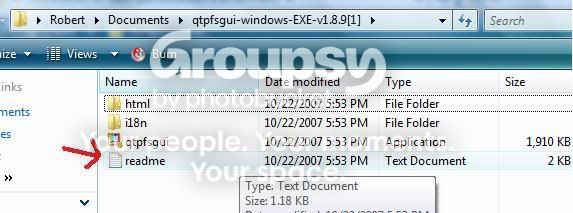
3. After you extract all the files, click the "readme" file for a necessary link that you should follow so you can download something that you need.
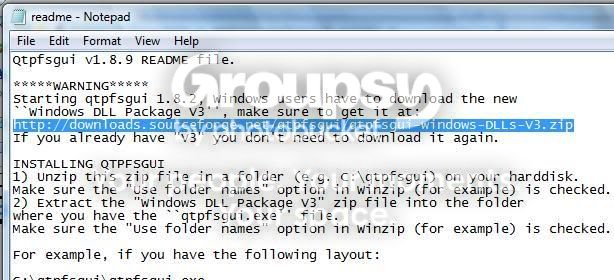
4. Now that you have opened the read me file, locate the link that will direct you to another download. Copy and paste the link into your internet browser to get the download. Once there, you should once again click to "open" the file. The files will once again be un-extracted. Extract them.
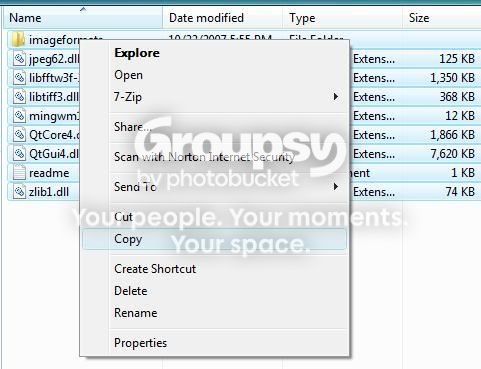
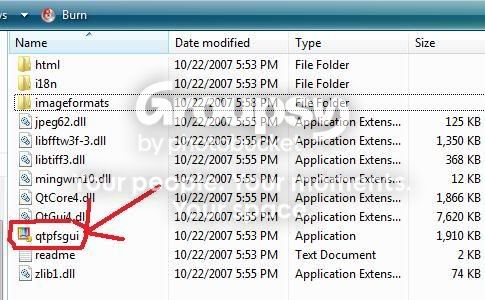
5. Now that will take you to another folder with a bunch of files. The readme file says that you should now be able to open the Qtpfsgui program, but it didn't work for me. You should highlight ALL the files in your newest folder (the one that shoulda just came up) and you should paste all of them into your older folder, where the Qtpfsgui program file is located.
6. Now you should be ready to start Qtpfsgui, just click on the program file and it should start up!
I know that was a very long post, I just decided I'd give you a guide if you wanted to try this out or not. Funny thing is that I don't even know if this program is any good because I still havn't tried it yet!
If I missed a step or anything just let me know and I'll see if I can help.










![[No title]](/data/xfmg/thumbnail/41/41490-6af71315284539e04ae1878cda0d613f.jpg?1734175883)
![[No title]](/data/xfmg/thumbnail/30/30884-b92cca2d3ad6f728825cf7e936e8cef6.jpg?1734158887)