DanPower
TPF Noob!
- Joined
- May 7, 2012
- Messages
- 81
- Reaction score
- 6
- Can others edit my Photos
- Photos OK to edit
Hi all... this is my first photo post at TPF  I've been playing with a Canon 550D and kit lenses for about 6 months now, learning as I go. Before that I had a P&S that never came out of auto mode.
This is the Newcastle (Australia) waterfront at dusk, taken last night... 11 portrait photos stitched together with Hugin.
Canon 550D, 55-250mm kit lens @ 55mm, f/6.3 for 6 seconds
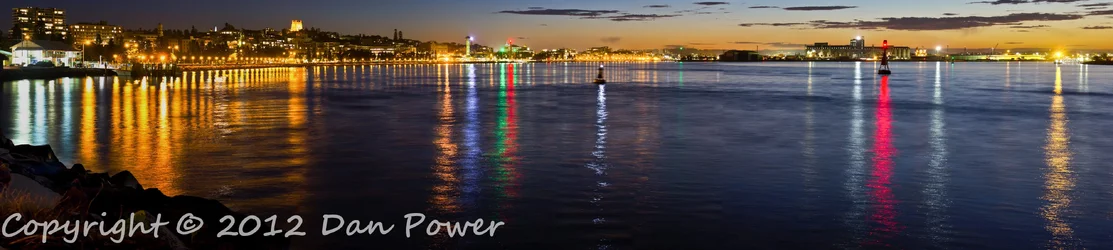
The mains things I'm not happy with are the haze that seems to make the orange streetlights glow which I can't seem to remove in post (it's not really obvious in this size but the final image is 25,000px wide and at anything approaching full size it makes the buildings near the streetlights look quite soft) and I've overexposed a lot of the lights while the shadows are a bit dark... I think if I had taken this photo maybe half an hour earlier when there was more sunlight left I would have been able to avoid both of those problems. Maybe the shoreline is a little high?
What do you guys think? I would like to go back and attempt to re-create this shot but nail it this time, so tips and suggestions are more than welcome. I'm hiring a 70-200 f/4L for a day next weekend so I could try to do it with that although I wouldn't get quite as much vertical range (this was at 55mm)...
Thanks!!
I've been playing with a Canon 550D and kit lenses for about 6 months now, learning as I go. Before that I had a P&S that never came out of auto mode.This is the Newcastle (Australia) waterfront at dusk, taken last night... 11 portrait photos stitched together with Hugin.
Canon 550D, 55-250mm kit lens @ 55mm, f/6.3 for 6 seconds
The mains things I'm not happy with are the haze that seems to make the orange streetlights glow which I can't seem to remove in post (it's not really obvious in this size but the final image is 25,000px wide and at anything approaching full size it makes the buildings near the streetlights look quite soft) and I've overexposed a lot of the lights while the shadows are a bit dark... I think if I had taken this photo maybe half an hour earlier when there was more sunlight left I would have been able to avoid both of those problems. Maybe the shoreline is a little high?
What do you guys think? I would like to go back and attempt to re-create this shot but nail it this time, so tips and suggestions are more than welcome. I'm hiring a 70-200 f/4L for a day next weekend so I could try to do it with that although I wouldn't get quite as much vertical range (this was at 55mm)...
Thanks!!




![[No title]](/data/xfmg/thumbnail/37/37604-7ad625e983f92f880eb65a264eeef5e4.jpg?1734170732)


![[No title]](/data/xfmg/thumbnail/37/37603-739c5d9b541a083a12f2f30e45ca2b7b.jpg?1734170731)