What's new

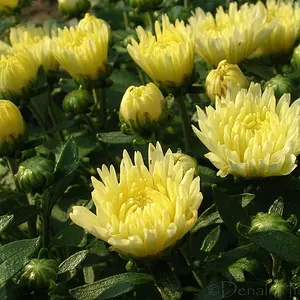
A Wild Weed Flower

TJ_Photographer

TPF Noob!
Joined
Apr 4, 2016
Messages
64
Reaction score
13
Location
Delaware Ohio
Can others edit my Photos
Photos OK to edit
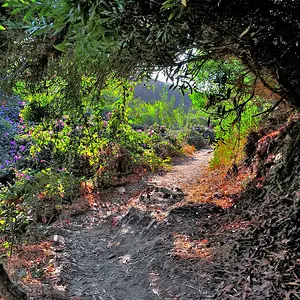
Please tell me what you think.

0f212e13c9942d550828462466c392f7.jpg


Sent From Galaxy S4 using Tapatalk
 
I think the background looks too uneasy. I guess you took it with your phone? Don't really have experience with phones, but i guess it's hard to really blur out the background. Maybe try to take a picture of one that is further away from the distracting background.
 
I think the background looks too uneasy. I guess you took it with your phone? Don't really have experience with phones, but i guess it's hard to really blur out the background. Maybe try to take a picture of one that is further away from the distracting background.
No, I did not take this with my phone. I used my Canon DSLR.

Sent From Galaxy S4 using Tapatalk
 
Hm, how do you process your photos? Do you shoot raw oder jpg? I looked at another photo of yours in another thread and it seems that you cut off a lot of black tones. Do you have your monitor calibrated?
 
Hm, how do you process your photos? Do you shoot raw oder jpg? I looked at another photo of yours in another thread and it seems that you cut off a lot of black tones. Do you have your monitor calibrated?
I do JPEG, and I am wondering if my laptop is calibrated right. I've tried calibrating it, but it doesn't seem to work. I notice that the colors in my laptop look different than on my phone when I veiw the same picture. I do all my editing in gimp, which I am still figuring out

Sent From Galaxy S4 using Tapatalk
 
TJ, processing a jpeg file will degrade the image quality a lot more and faster than shooting in RAW and processing the file. Images viewed on your phone will look different than on the laptop because of the size. The bigger you look at something the more the imperfections will be noticable.
 
TJ, processing a jpeg file will degrade the image quality a lot more and faster than shooting in RAW and processing the file. Images viewed on your phone will look different than on the laptop because of the size. The bigger you look at something the more the imperfections will be noticable.
Ots not the clarity of the image, it's more how the colors look, but it still might just be the screen size

Sent From Galaxy S4 using Tapatalk
 
If you process them on your laptop it could also be the angle you look at the screen. Depending on the quality of the laptop screen you can see huge differences in color depending on which angle you look at it.

How did you try to calibrate it?

I would also recommend to shoot in raw. A jpg is a file that is proccesed already. The more changes you do to it, the more the quality will degrade. You also let the camera decide how your photos look like.
Try to shoot in raw and you will see a big difference. But just a heads-up: The undeveloped raw files will most likely look very dull, but afterwards it will look much better.

 
If you process them on your laptop it could also be the angle you look at the screen. Depending on the quality of the laptop screen you can see huge differences in color depending on which angle you look at it.

How did you try to calibrate it?

I would also recommend to shoot in raw. A jpg is a file that is proccesed already. The more changes you do to it, the more the quality will degrade. You also let the camera decide how your photos look like.
Try to shoot in raw and you will see a big difference. But just a heads-up: The undeveloped raw files will most likely look very dull, but afterwards it will look much better.
Okay I will.

I used the color calibration. But I can't change all the settings to get it working. It's an old laptop. It's 6 years old, but running Windows 10

Sent From Galaxy S4 using Tapatalk
 
So i guess the color calibration is a software tool? In my experience that does never work. The only solution imo is to use a colormunki or a similar tool. I don't know how much sense this makes with your laptop, but this is the only way to adjust the colors in a correct way.

Hope this helps a bit :1219:
 
So i guess the color calibration is a software tool? In my experience that does never work. The only solution imo is to use a colormunki or a similar tool. I don't know how much sense this makes with your laptop, but this is the only way to adjust the colors in a correct way.

Hope this helps a bit :1219:
Okay, yeah, it does

Sent From Galaxy S4 using Tapatalk
 

Create an account or login to comment

You must be a member in order to leave a comment

Create account

Create an account on our community. It's easy!

Log in

Already have an account? Log in here.

Back
Top Bottom