What's new

Advice & opinion greatly appreciated!

rachelrach11

No longer a newbie, moving up!
Joined
Mar 22, 2012
Messages
195
Reaction score
29
Location
Birmingham Al
Can others edit my Photos
Photos OK to edit
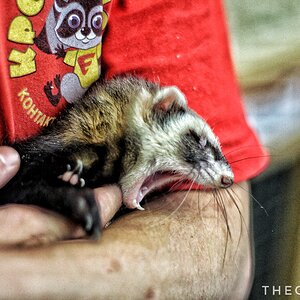
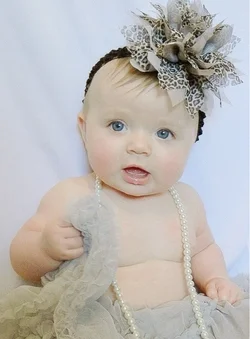
This is a photo of my sweet baby Piper. She doesn't seem to mind being used as my guinea pig during my learning process.

This was taken indoors next to a large window (no flash) with my Nikon P90. Its still more "noisier" than I would like. The flash seemed to intensify the colors and appeared to harsh.


$image-1652736723.webp

]


ISO 200 1/40 f2.8
 
Same setting as previous shot ( although i may have moved up the shutter speed to 1/30?)Still having the noise issue and not a fan of the shadows.


$image-3679433566.webp
 
Looks like you have auto white balance set? It doesn't do a very good job in auto mode. Notice how much warmer Piper's skin tones are in #2?

In #2 Pipers head has been distorted by the short focal length of the lens and looks to big for her body.

Oh, and the thread got moved because the Beginner's forum isn't a C&C forum.
 
KmH said:
Looks like you have auto white balance set? It doesn't do a very good job in auto mode. Notice how much warmer Piper's skin tones are in #2?

In #2 Pipers head has been distorted by the short focal length of the lens and looks to big for her body.

Oh, and the thread got moved because the Beginner's forum isn't a C&C forum.


Your exactly right. I tried to manually adjust the white balance and couldn't seem to get a consistent color. Could this be due to me being indoors with natural light and having the florescent lights on as well?

What can I do to get shaper photos? Thanks so much for the advise! You are always so much help!
 
rachelrach11 said:
Your exactly right. I tried to manually adjust the white balance and couldn't seem to get a consistent color. Could this be due to me being indoors with natural light and having the florescent lights on as well?

What can I do to get shaper photos? Thanks so much for the advise! You are always so much help!

Faster shutter speed, smaller aperture. You would have to use flash or raise your iso.
 
Same setting as previous shot ( although i may have moved up the shutter speed to 1/30?)Still having the noise issue and not a fan of the shadows.


View attachment 12764

Your pix are OK!

You can de-noise with PP.

The shadow is no big deal. Use a off cam fill flash at 1/32 or 1/64 to light fill if you hate shadows next time.
 
Her eyes are not sharp and the crop is too tight imo. Lower fstop might help and have the focus point in her eyes...
 
Rachel
your images look OK
if you use flash, make sure it bounces on the ceiling, but you may no get the soft light
i never shoot slower than 1/125
noise ? - perhaps and black and white picture?
white balance- you can change it on the computer to your like
keep taking pictures untill you are happy

Christian
 
KmH said:
Looks like you have auto white balance set? It doesn't do a very good job in auto mode. Notice how much warmer Piper's skin tones are in #2?

In #2 Pipers head has been distorted by the short focal length of the lens and looks to big for her body.

Oh, and the thread got moved because the Beginner's forum isn't a C&C forum.

Your exactly right. I tried to manually adjust the white balance and couldn't seem to get a consistent color. Could this be due to me being indoors with natural light and having the florescent lights on as well?

What can I do to get shaper photos? Thanks so much for the advise! You are always so much help!
One way to work with flouescent light is to use flash and gel the flash unit - Strobist: Lighting 102: 6.1 - Gelling for Fluorescent

For sharp, don't use a shutter speed slower than 1/focal length of your lens, or 1/100, whichever is faster. Don't use a fast lens at it's maximum aperture. Instead stop it down 2 stops or more.
 

Create an account or login to comment

You must be a member in order to leave a comment

Create account

Create an account on our community. It's easy!

Log in

Already have an account? Log in here.

New Topics

Back
Top Bottom