What's new

Advice please

RicJoe

TPF Noob!
Joined
Aug 16, 2010
Messages
54
Reaction score
0
Location
Ottawa Canada
Can others edit my Photos
Photos OK to edit
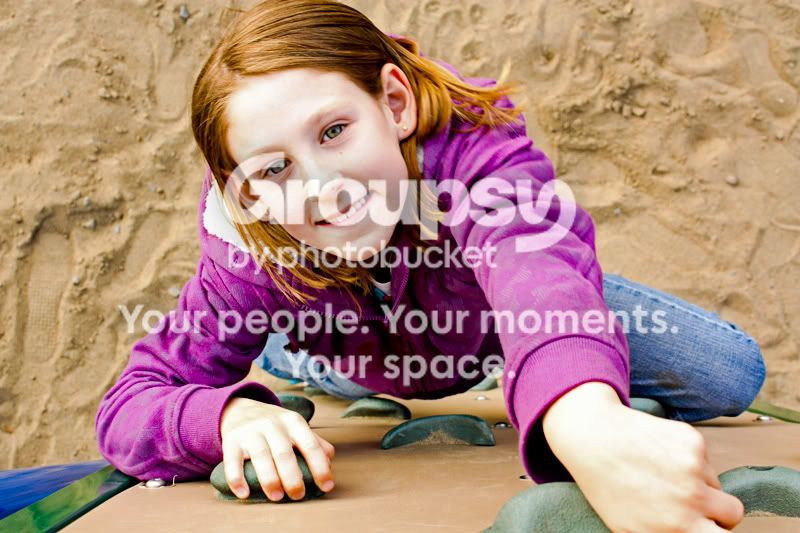
I did not realize that sand would make a picture so white, so I tried to clean it up in photo shop with Image>>Adjustments>>Shadows Highlights (Photoshop).

Would just like some C&C on how I did over all, picture and fixing it up.

Seen Overreads sig about info for C&C requests so decided would be good to add it.

Canon EOS DIGITAL REBEL XSi
App f8
Exposure 1/15
ISO 100

My intention was to have a picture in focus and filling as much of the frame as possible, the sun was at mid afternoon not right above us but down a bit.

IMG_0697copy.jpg
 
Last edited:
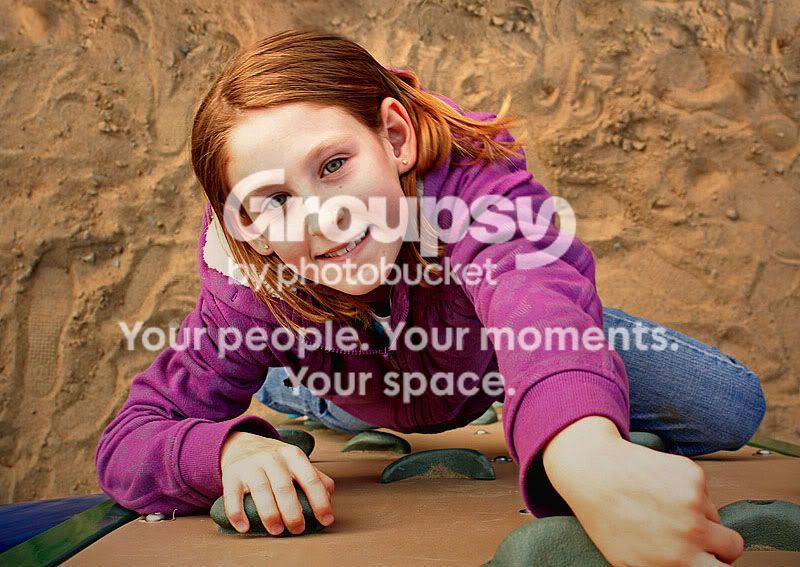
It's a cool photo but you overexposed it a tad. I would darken and add contrast

5173014561_e766746b53_b.jpg
 
Wow that really made a difference. Thanks will try to see if I can duplicate the results and also work hard on NOT over exposing my pictures, thats seems to be my achilles heel at the moment.
 
IMHO the the 2nd one is too saturated to me. Maybe my monitor?
 
It amazes me that just tweaking the image makes it all pop in both images, even the light patterns in her jacket come through on both your changes. Thank you both very much, it helps me to understand what I need to look for in my photo's.
 
It amazes me that just tweaking the image makes it all pop in both images, even the light patterns in her jacket come through on both your changes. Thank you both very much, it helps me to understand what I need to look for in my photo's.

I agree. I love what contrast can do to pictures!:hail:
 
Since you have photoshop - Did you shoot in RAW? If yes, then play around with the exposure control along with highlight recovery. Both photos seem overexposed on your daughter's skin. I believe you're reading "Understanding Exposure" and if you haven't gotten to the "Sky Brothers" section give that a read. Back to Photoshop - try burning the highlights on your daughter's skin if the other controls don't do it too well.

I just started playing around with Photoshop and it does have some powerful tools. here's a quick edit that I did but I suck at this point. Your daughter's face came out with a hue on my monitor.

IMG_0697copy1.jpg
 
All my photo's have been in high quality jpeg but, the one I was on was for the lower of two high quality compression options. I have now changed it to High quality full compression + Raw so it will save a copy of both. I have read that Raw can take some practice using so figure do both and I can learn using both for now.
 
You clipped of the top of her head and her hand.

Added contrast, toned down highlights, turned up blacks.

IMG_0697copy.jpg
 
JPEG from your camera comes out with "things" done to it, RAW doesn't. I shoot both RAW and JPEG large fine on my camera and have 2 copies of everything which I'll have to do something about that one day. The idea is to get everything correct as you are shooting but if you mess up somewhat, RAW will give you some options to fix the photo.

I will tell you it is a daunting task to learn photography, your camera and Photoshop all at the same time. My suggestion is to learn about photography and your camera as the 2 go hand in hand and then learn Photoshop.
 
I will tell you it is a daunting task to learn photography, your camera and Photoshop all at the same time. My suggestion is to learn about photography and your camera as the 2 go hand in hand and then learn Photoshop.


Sound advice, I will come back to Photoshop once I read "hey nice shot/composure ect" :D And when I can look at it and be satisfied!
 
^ very nice..can hardly tell it was overexposed in this one. what method did you use?
 

Create an account or login to comment

You must be a member in order to leave a comment

Create account

Create an account on our community. It's easy!

Log in

Already have an account? Log in here.

New Topics

Back
Top Bottom