What's new

Affinity

Flycaster1

TPF Noob!
Joined
Mar 15, 2023
Messages
38
Reaction score
25
Location
Illinois, U.S.A.
Can others edit my Photos
Photos NOT OK to edit
Hello. I'm considering dropping my Adobe editing programs (PS, LR, LR Classic). Getting too darn expensive. Apparently Affinity is a broad based free program, and I'm thinking of switching to it. But I need to know if I can print directly from Affinity. I'm asking because I can't print directly from LR, along with the steadily rising cost. Anyone have experience with Affinity? Thanks in advance for your input.

Chuck
 
I use Affinity 3. Yes, you can print with it, but I don't. I use Qimage Ultimate. I didn't like Photoshop or Lightroom for printing, either
 
First, Bigfoot beat me to it. I rarely print directly from Affinity but have done so with no problem.

Second, I'm a long-time Affinity user. I too hate the idea of a subscription model--I know that isn't a deal breaker for others and that's fine--whatever floats your boat. I will say this: Affinity is in-deed free. However, if you want access to the high-end AI features of it, that is done through Canva and for that you need a Professional Membership. That doesn't matter to me so I'm fine with the free model (which still includes a range of AI capabilities like batch processing or sharpening).
 
I don't see any "steadily rising costs." I've been paying $120 per year for Photoshop/Lightroom and all their variations for 14 years.

As stated, the basic model is free, but it doesn't have the same raw functionality as Camera Raw/Lightroom; it has only basic AI tools, and requires a Canva subscription to get the high-end stuff. It also combines the Vector drawing and page setup apps into one app, which may be of no use to you, or you may love it.

If you are used to Photoshop and Lightroom and the constant updates, superior tools, and 100% non-destrctvie raw editing, you may not like it.
 
Not sure what the printing issue is with LR? With my Canon printer i use the plugin Print and Professional canon software which integrates seamlessly with any adobe program. But fully understand not everyone prints on a Canon.
 
Not sure what the printing issue is with LR? With my Canon printer i use the plugin Print and Professional canon software which integrates seamlessly with any adobe program. But fully understand not everyone prints on a Canon.
Likewise, I use an Epson and use the Epson Print Layout software. I never print from Photoshop.
 
I don't see any "steadily rising costs." I've been paying $120 per year for Photoshop/Lightroom and all their variations for 14 years.

As stated, the basic model is free, but it doesn't have the same raw functionality as Camera Raw/Lightroom; it has only basic AI tools, and requires a Canva subscription to get the high-end stuff. It also combines the Vector drawing and page setup apps into one app, which may be of no use to you, or you may love it.

If you are used to Photoshop and Lightroom and the constant updates, superior tools, and 100% non-destrctvie raw editing, you may not like it.
Although Affinity's raw conversion module is by no means as capable as ACR Affinity's ability to work (partially) non-destructively in a raw workflow is equal to Photoshop's (if not arguably superior). Photoshop requires that you pass a Smart Object from ACR to PS and that smart object will contain the entire raw file embedded (ultimate king of bloat). Affinity can do the same embedding the raw file in a passed layer but it also has the ability to only pass a link to the raw file (obviously you then can't alter the location of the raw file). The link permits you to return to the work in the Develop module and make a change just like a Smart Object in PS but it's a small fraction of the size of a Smart Object. Raw files from my Fuji camera are about 50mb. I have an image from my Fuji saved with all processing work in a PSD file in which a Smart Object was passed from ACR and the PSD file is 152mb saved to disk. I also have another image from my Fuji saved with all processing work in an AF file in which a link was passed from Affinity's Develop module to AP and the AF file is 14mb saved to disk. Times many hundreds or thousands of photos that's some consequential storage space.
 
Last edited:
Hello. I'm considering dropping my Adobe editing programs (PS, LR, LR Classic). Getting too darn expensive. Apparently Affinity is a broad based free program, and I'm thinking of switching to it. But I need to know if I can print directly from Affinity. I'm asking because I can't print directly from LR, along with the steadily rising cost. Anyone have experience with Affinity? Thanks in advance for your input.

Chuck
You got your print question answered.

Affinity may serve your purposes. It is an excellent and very capable raster editor. If you don't need AI support to fake a sky or invent stuff to fill in holes in your photos it may be all that you need and it is free. (A paid subscription version is available with some of that AI stuff, but then might as well pay Adobe for better). It's biggest weakness is the raw Develop module. Affinity it seems has always maintained focus on the main editor and the raw conversion module has gotten short shift. Their attitude is get the basic raw conversion done and get to work in the editor proper. If you can accept that approach it's very good software at a very right price.

An option if Affinity's raw conversion module doesn't do for you is to use an alternative (free versions like RawTherapee exist and can be excellent).

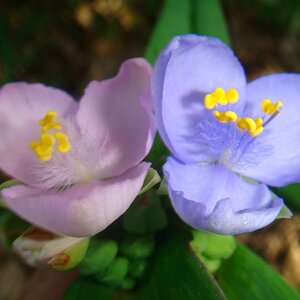
Here's a recent photo I took entirely processed in Affinity including the raw conversion module. The processing includes retouch work, color editing, and masking applied with gradients; AP did a good job.

daylily-ap.webp
 
You got your print question answered.

Affinity may serve your purposes. It is an excellent and very capable raster editor. If you don't need AI support to fake a sky or invent stuff to fill in holes in your photos it may be all that you need and it is free. (A paid subscription version is available with some of that AI stuff, but then might as well pay Adobe for better). It's biggest weakness is the raw Develop module. Affinity it seems has always maintained focus on the main editor and the raw conversion module has gotten short shift. Their attitude is get the basic raw conversion done and get to work in the editor proper. If you can accept that approach it's very good software at a very right price.

An option if Affinity's raw conversion module doesn't do for you is to use an alternative (free versions like RawTherapee exist and can be excellent).

Here's a recent photo I took entirely processed in Affinity including the raw conversion module. The processing includes retouch work, color editing, and masking applied with gradients; AP did a good job.

View attachment 297447
It is horses for courses, as not every software is going to suit everybody. As for Affinity's develop studio for raw editing, there was a major upgrade to masking in Affinity 3.2, which I am still trying to get my head around
 
It is horses for courses, as not every software is going to suit everybody. As for Affinity's develop studio for raw editing, there was a major upgrade to masking in Affinity 3.2, which I am still trying to get my head around
I'm aware of the masking addition to the Develop module and they did a good job with that. However that doesn't begin to address some of the more serious problems with the Develop module. For example one nice addition to those new masks is the ability to create a hue mask (something I've been used to doing for years in C1). Once you've created a hue mask what do you typically need then to modify the masked area -- an HSL tool of course. And what's missing in the Develop module? Something that basic just not there.
 
I'm aware of the masking addition to the Develop module and they did a good job with that. However that doesn't begin to address some of the more serious problems with the Develop module. For example one nice addition to those new masks is the ability to create a hue mask (something I've been used to doing for years in C1). Once you've created a hue mask what do you typically need then to modify the masked area -- an HSL tool of course. And what's missing in the Develop module? Something that basic just not there.
As I said horses for courses. When at 71 I was forced to retire, I was left with a meagre pension, so had to cancel all subscription software. So for me Affinity was a no-brainer, after trying to make Gimp work. My point was Canva is improving the software, and yes there is still a way to go to match Photoshop. But it is the best software for my situation and needs, and I have always found a way, it just takes longer
 
As I said horses for courses. When at 71 I was forced to retire, I was left with a meagre pension, so had to cancel all subscription software. So for me Affinity was a no-brainer, after trying to make Gimp work. My point was Canva is improving the software, and yes there is still a way to go to match Photoshop.
As far as the raw conversion module -- there's not a way to go to match Photoshop, there's a long way to go to match just about everything else.
Assume I'm using one of the major raw processors:
Capture One
Lightroom/ACR
DXO PL-9
On1
SilkyPix
Etc.,
and I'm going to start working on a raw file. First thing to do is select the input profile which all those apps I listed will let me do. They'll even let me import and use my own. It's pretty much a standard feature of a raw processor. Entirely missing in Affinity.

For me personally Affinity's raw conversion module is unusable for many of my photos. I make full use of the sensors in my cameras and push exposure to the sensor's physical limit. Often enough I'll slightly clip the green channel. Now that's not a problem if I'm using any major raw processor because every raw processor I know (except 1) does a good job of highlight reconstruction. Typically the green channel will clip first without clipping in the red and blue channels and so a raw converter will reconstruct the clipped data in the green channel from the intact data in the red and blue channels. C1 is the best at this with LR a tight second. It's an expected standard function in a raw converter (even the FOSS titles RawTherapee and DarkTable do it) and I should be able to say they all do it, but then there's Affinity again missing a basic function.

The main Affinity app is fully featured and works well, but the raw conversion module is hanging on the edge of not ready for prime time.

But it is the best software for my situation and needs, and I have always found a way, it just takes longer
 
Not sure about the printing. I use RawTherapee and Gimp to edit my photos and both are free.
Both have massive number of features which I only use a few. I use Gimp for "heal" and "clone" features and RawTherapee for everything else. There is also free Darktable which I know little about.
 
As far as the raw conversion module -- there's not a way to go to match Photoshop, there's a long way to go to match just about everything else.
Assume I'm using one of the major raw processors:
Capture One
Lightroom/ACR
DXO PL-9
On1
SilkyPix
Etc.,
and I'm going to start working on a raw file. First thing to do is select the input profile which all those apps I listed will let me do. They'll even let me import and use my own. It's pretty much a standard feature of a raw processor. Entirely missing in Affinity.

For me personally Affinity's raw conversion module is unusable for many of my photos. I make full use of the sensors in my cameras and push exposure to the sensor's physical limit. Often enough I'll slightly clip the green channel. Now that's not a problem if I'm using any major raw processor because every raw processor I know (except 1) does a good job of highlight reconstruction. Typically the green channel will clip first without clipping in the red and blue channels and so a raw converter will reconstruct the clipped data in the green channel from the intact data in the red and blue channels. C1 is the best at this with LR a tight second. It's an expected standard function in a raw converter (even the FOSS titles RawTherapee and DarkTable do it) and I should be able to say they all do it, but then there's Affinity again missing a basic function.

The main Affinity app is fully featured and works well, but the raw conversion module is hanging on the edge of not ready for prime time.

In continuing my quest to be the best darn photographer ever, by golly, I have acquired DXO PureRAW 6.0. While using AI to research this and how it will affect my workflow, it said this:


If you are using DxO (either PhotoLab or PureRAW) to pre-process your raw files into linear DNGs before editing them, you have to throw a massive wrench into the standard ETTR advice.

DxO's demosaicing algorithms and DeepPRIME denoising engines are phenomenal, but they handle the bleeding edge of raw data completely differently than Adobe Lightroom or Capture One.

Preprocessing with DxO completely changes how hard you can push your Z8 and Z50 II sensors.

1. The Ceiling Drops: DxO Discards the Absolute Edge​

When you pull an aggressive ETTR file into Adobe Camera Raw or Lightroom, Adobe’s engine uses hidden metadata thresholds to actively compute and guess the values of raw channels that are practically touching saturation.

DxO handles raw data with mathematical rigidity. To guarantee pure color accuracy, DxO's pipeline establishes a strict "white level" safety ceiling. If a raw channel (usually that dominant Green channel we discussed) gets too close to the sensor's physical clipping limit, DxO will frequently discard or hard-clip that data early in its internal math.

  • The Trap: If you push a file to your absolute +2.7 EV limit, and then pass it through DxO to generate a linear DNG, DxO will bake its strict clipping boundary into that DNG.
  • The Consequence: When you open that DxO-generated DNG in Lightroom and try to pull the Highlight slider down, you will often find the highlights have abruptly clipped into a nasty magenta or purple color cast. The safety margin Adobe usually uses to reconstruct the channel is gone because DxO flattened it.

 
In continuing my quest to be the best darn photographer ever, by golly, I have acquired DXO PureRAW 6.0. While using AI to research this and how it will affect my workflow, it said this:
I believe AI is correct in that instance, I've encountered that before. It occurs in the unique case where you use PureRaw or PL to create a linear DNG to pass to another app for continued processing.

If instead you use PL to complete the processing of the image then PL does a really good job of highlight reconstruction. Here's an example:

First the candidate image displayed in RawDigger to verify it meets the criteria for highlight reconstruction. I've highlighted the stats and we can see both the Red and Blue channels have zero clipping. The slight Green channel clipping is highlighted in the image in the sky above the garage. Because the Red and Blue channels are intact the clipped areas of the Green channels can be reconstructed from the Red and Blue data.

only-green-clip.webp


Next let's have a look at no attempt to perform highlight reconstruction. Here's the image in Affinity. That's a show stopper for me. I can't proceed to use Affinity's raw develop module with this image.

affinity-ouch.webp


And here's that photo processed in DXO PL-9 with the highlight reconstruction very nicely accomplished. As noted I've previously encountered the specific case you identified with the linear DNGs and as I recall there were some pretty upset folks who I imagine have let DXO know how unhappy they were -- maybe they'll address it in a future update.

EPL51230_DxO.webp
 

Create an account or login to comment

You must be a member in order to leave a comment

Create account

Create an account on our community. It's easy!

Log in

Already have an account? Log in here.

Back
Top Bottom