
BHuij
TPF Noob!
- Joined
- Feb 24, 2013
- Messages
- 10
- Reaction score
- 0
- Location
- Utah
- Can others edit my Photos
- Photos NOT OK to edit
Hey all
I've been using my Canon 5D Mk II for over a year now, with very few problems.
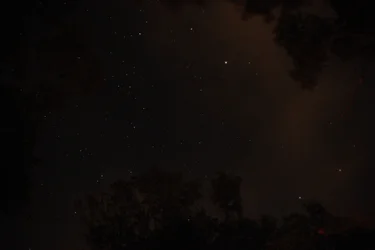
Last night I was camping and I decided to shoot a time lapse of the stars. Each exposure was at ISO 1600, F/2.8, and 20 seconds. I fired off about 550 frames (let it run overnight). Just got back from my trip, and looking at the frames in Lightroom, I have a LOT of red and blue stuck pixels that are in the exact same place between frames (the stars, of course, drift a little in between frames). Curiously, I don't see any green ones.
I'll upload a full-res JPG so you can take a look. I used the Medium JPG setting and no RAW as I didn't need more resolution than the ~8MP offered by that setting (just producing a time-lapse in 1080p).
As soon as I saw these stuck pixels, I sort of panicked and pulled the camera out to test it with my usual settings of full-res RAW and a normal shutter speed. The photo I took of outside at f/2.8, 1/100th of a second, and ISO 100 looked fine (thank heavens) with no visible sensor issues or stuck pixels.
Anyone have any idea what could be going on here?
Here's one of the frames in question:
I've been using my Canon 5D Mk II for over a year now, with very few problems.
Last night I was camping and I decided to shoot a time lapse of the stars. Each exposure was at ISO 1600, F/2.8, and 20 seconds. I fired off about 550 frames (let it run overnight). Just got back from my trip, and looking at the frames in Lightroom, I have a LOT of red and blue stuck pixels that are in the exact same place between frames (the stars, of course, drift a little in between frames). Curiously, I don't see any green ones.
I'll upload a full-res JPG so you can take a look. I used the Medium JPG setting and no RAW as I didn't need more resolution than the ~8MP offered by that setting (just producing a time-lapse in 1080p).
As soon as I saw these stuck pixels, I sort of panicked and pulled the camera out to test it with my usual settings of full-res RAW and a normal shutter speed. The photo I took of outside at f/2.8, 1/100th of a second, and ISO 100 looked fine (thank heavens) with no visible sensor issues or stuck pixels.
Anyone have any idea what could be going on here?
Here's one of the frames in question:



![[No title]](/data/xfmg/thumbnail/37/37605-90c8efaef5b7d1f52d4bf8e7dfd33673.jpg?1734170732)


![[No title]](/data/xfmg/thumbnail/41/41800-9fad93555f178073cae2f303c5ef4e23.jpg?1734176111)
![[No title]](/data/xfmg/thumbnail/37/37606-3c9ffb5906173fa2aa489341967e1468.jpg?1734170733)


![[No title]](/data/xfmg/thumbnail/37/37602-1ef8dbb1c2d0e4ff347ee65d328c3603.jpg?1734170730)