What's new

Another Headshot for C&C

Ballistics

Been spending a lot of time on here!
Joined
Jun 5, 2011
Messages
3,781
Reaction score
633
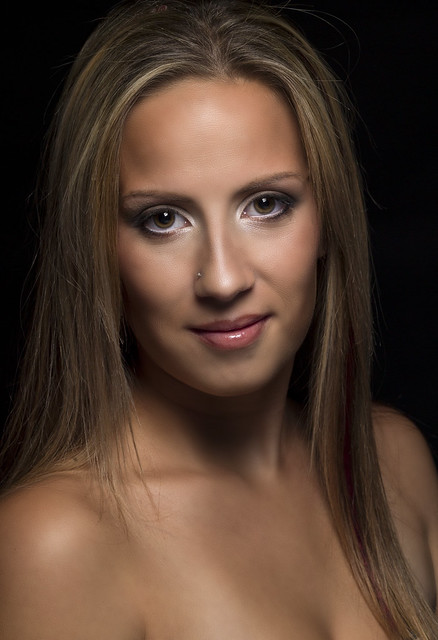
EDIT: Updated pic below

I'm still struggling in the studio, I'm trying to go for beauty lighting here, and it's just not working for me. The light just isn't soft enough, and I am very limited on light modifiers.
Any suggestions?

Single strobe overhead in a small softbox. Maybe 12x12, but it's fairly close to her head. Reflector below to help fill shadows.
 
Last edited:
was all the shadow on purpose then? no fill light? it looks like there was flash hitting the top of her head, but much less as you pan down. did you bounce a flash or just tilt it up?
 
The light seems to fall off softly in the shadows? Seems the shadows themselves can be improved. If you're that short on modifiers using a white poster or anything as a reflector may do you justice.

Also, I'm no Hasselbald expert but noticed in exif:
Exposure0.001 sec (1/1000)
Aperture
f/2.0
ISO Speed50

Would it be better to decrease shutter and decrease aperture to f4-f9 or such? Again I'm not an expert just throwing the CC out
 
Hang on, I uploaded the wrong image.
Also, the Metadata is incorrect. The HB doesn't record the metadata for some reason.
 
Ok fixed, I put the light used in the OP. Also I believe this was:

1/250
ISO 50
f/11
120mm
 
Ok fixed, I put the light used in the OP. Also I believe this was:

1/250
ISO 50
f/11
120mm

bigthumb.gif
 
Light-wise I think this is fine. If you want softer then just get a larger light modifier. If you can't buy a larger light modifier for some reason, then even a shower curtain or plastic bag can work wonders. Or bounce the light from something.

A better pose & some retouching could help a lot here though.
 
Light-wise I think this is fine. If you want softer then just get a larger light modifier. If you can't buy a larger light modifier for some reason, then even a shower curtain or plastic bag can work wonders. Or bounce the light from something.

A better pose & some retouching could help a lot here though.

What would you suggest for the pose and retouching?
 
Nice catch. Where do I draw the line with how much above the subject I place the camera?
 
Last edited:
I think the things that would help would be a softer light source and more fill...which I think you know already. To make your flashed light softer, all you need to do is bounce it off of a larger surface. You can use a wall, it's just a matter of placing your subject in the right spot and aiming the flash in the right place.

I would suggest having the camera be a smidgen higher...well, depending on what you're going for. As it is, you are below her and she looks big and powerful. But if you were higher, and she had to look up at you, even a little bit, she might look a little more feminine.

The cropping is a bit confusing. If it's a head shot, then why show so much of the shoulders and chest? If it's meant to be a topless/nude portrait, then you would probably include more body (maybe this is just a family friendly crop for on-line...I don't know). The more skin we see (especially at the same brightness as the face), the more the viewer is distracted away from the face....which is what they should be looking at for a portrait. You know it's a really strong portrait if, when it includes breasts, the average guy can still look her in the eyes :lol:

In the first one, her shoulder being pushed forward and up, doesn't make for a good look IMO. Shoulder back and chin/face out, will make her look better and more confident.
 
The first one is awful mostly because you're in tight and she's doing something very weird. The light could certainly be smoother, like Big Mike says.

I like the second one quite a bit. Both the model and the frame have some room to breathe. I think you're definitely in the general region where you're not "wrong" you're just maybe not getting the effects you want. With a little bitty softbox, shove it in as close as possible. Heck, who cares if it's in-frame, even. In the first place, you're learning, and in the second place if Irving Penn can shove the entire backdrop and surrounding studio in frame, you can shove a light in there.

Or, get creative bounce off an existing flat surface, and rotate the model and camera to place the "light" in the right place. This might mean the model lying down on the floor and you shooting from above.
 
I think the things that would help would be a softer light source and more fill...which I think you know already. To make your flashed light softer, all you need to do is bounce it off of a larger surface. You can use a wall, it's just a matter of placing your subject in the right spot and aiming the flash in the right place.

I'm going to actually attempt this, but I don't know if I have enough room to back up to prevent light from hitting the backdrop.

I would suggest having the camera be a smidgen higher...well, depending on what you're going for. As it is, you are below her and she looks big and powerful. But if you were higher, and she had to look up at you, even a little bit, she might look a little more feminine.

She's about 4'10" and I had the camera set about 5'7". I was on a latter looking into the viewfinder.

The cropping is a bit confusing. If it's a head shot, then why show so much of the shoulders and chest? If it's meant to be a topless/nude portrait, then you would probably include more body (maybe this is just a family friendly crop for on-line...I don't know). The more skin we see (especially at the same brightness as the face), the more the viewer is distracted away from the face....which is what they should be looking at for a portrait. You know it's a really strong portrait if, when it includes breasts, the average guy can still look her in the eyes :lol:

I'm learning more and more that I am clueless when it comes to cropping.

In the first one, her shoulder being pushed forward and up, doesn't make for a good look IMO. Shoulder back and chin/face out, will make her look better and more confident.

Yeah, I'm going to chuck the first one.
 
Last edited:
The first one is awful mostly because you're in tight and she's doing something very weird. The light could certainly be smoother, like Big Mike says.

I like the second one quite a bit. Both the model and the frame have some room to breathe. I think you're definitely in the general region where you're not "wrong" you're just maybe not getting the effects you want. With a little bitty softbox, shove it in as close as possible. Heck, who cares if it's in-frame, even. In the first place, you're learning, and in the second place if Irving Penn can shove the entire backdrop and surrounding studio in frame, you can shove a light in there.

Or, get creative bounce off an existing flat surface, and rotate the model and camera to place the "light" in the right place. This might mean the model lying down on the floor and you shooting from above.

I have a few 45" umbrellas that I am going to bring with me Sunday morning. I am closer to what I am trying to achieve I think, but every step I take seems like a step in the wrong direction.

I have a portrait I am trying to replicate, but due to rules I can't post the image. It's not a link, it's out of a magazine.

Digital Photographer issue 120 page 6
 

Create an account or login to comment

You must be a member in order to leave a comment

Create account

Create an account on our community. It's easy!

Log in

Already have an account? Log in here.

New Topics

Back
Top Bottom