What's new

Anyone Familiar With X-Rite Monitor Calibration

do you use the new one or the old one?
 
Both. I also have an i1 Pro and a DTP94. The i1 Display Pro produces the most accurate profiles.
 
nice, thanks for your help!
 
I use the old one and it works fine but I wouldn't recommend a product which has been formally discontinued.

yeah its crazy i dont understand this world. they should have a standard color for all monitors. if im going to take a picture of something and then photoshop it how can the rest of the world enjoy what i have created?

What kind of a sound system do you have? If you've spent less than about $10k on it, how are you supposed to enjoy the subtle timbre of a specific brand of instrument an artist has chosen to make his works?

See the problem is one of quality. High end monitors are quite consistent with same models really. You buy two top of the line NEC MultiSync displays and put them side by side they will look very similar out of the curve. But you'll pay dearly for it. Why don't they make identical displays and stuff? Technology is the answer. Identical colour on displays need identical manufacturing processes for the LCDs, identical manufacturing processes for the backlight and a blue moon would help too.
 
yeah i understand your point, so this x-rite software helped you out?
 
No because my monitor came with its own software and has an internal hardware calibration table :-) The software did help me because my monitor is different in that it has a non standard colour profile. As such it needs a profile made or applications won't be able to display colours correctly. This is part of the controls you were talking about. It makes sure that I see the colours the way you intend it because when I open your image my software reads out the working profile (usually sRGB) and then displays the colours on my screen by converting it to my monitor profile. So yes it helps me a lot. It doesn't help me if my mum's screen isn't calibrated but hey if my image looks dull on her screen so will everyone else's she can use as a reference.

What you need to realise is that most software is pretty much identical in capabilities. They all give you a choice of various settings you want to achieve (such as colour temperature). They calibrate the white point to that colour temperature. They all flash up a series of test images to create a monitor profile. They all then do a greyscale check. They all then write out the appropriate colour correction curve to the video card. It really doesn't matter which device you buy as long as it has the feature you're after.

If you want to calibrate an LCD, make sure you buy one that says "calibrates LCDs" on the box.
If you want to calibrate a printer, you need a more expensive device that has a spectrophotometer in it and says "calibrates LCDs and printers" on the box.

Pretty much every current device on the market is capable of calibrating every LCD monitor and all of them come with software to do it.
 
which monitor would give me the same colors as other monitors because im so fed up with this dell monitor. i just tried calibrating with the x-rite and it just does not work. all it did was darken my display to the point where my pictures look black.i basically would want a monitor that has everything already set and ready to go. like if i use an apple monitor the colors are more or less going to look the same on every monitor.

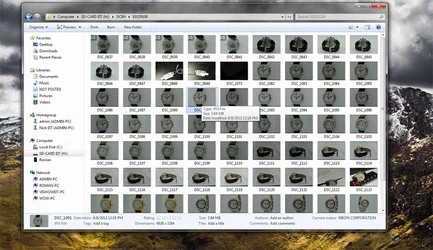
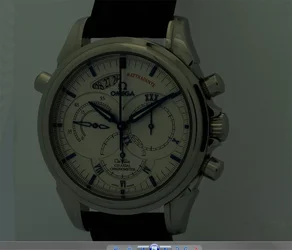
$DDDUntitled-1.webp thats how it looks on desktop, then when i double click a picture this is what happens -> $ddddddUntitled-2.webp
 
I'm not 100% on this but maybe the reason all your photos look so dark is because they are underexposed. Monitors usually come really bright and really contrasty.

Plus its going to take a little bit to get use to the way your monitor looks after calibration.
 
yeah i also checked out pictures on google images thats i compared with my ipad. its 50% more dark with this setup
 
Roomka said:
yeah i also checked out pictures on google images thats i compared with my ipad. its 50% more dark with this setup

Your iPad isn't calibrated so it's bound to look brighter on that.

The pictures on your cameras LCD will look brighter then they are too!

With your new calibrated screen - edit a picture. Raise exposure/brighten it up until it looks good on your screen. Then post it on here - Then hopefully someone who is calibrated can help you out.
 
which monitor would give me the same colors as other monitors because im so fed up with this dell monitor. i just tried calibrating with the x-rite and it just does not work. all it did was darken my display to the point where my pictures look black.i basically would want a monitor that has everything already set and ready to go. like if i use an apple monitor the colors are more or less going to look the same on every monitor.

View attachment 17213 thats how it looks on desktop, then when i double click a picture this is what happens -> View attachment 17212

Looks like a badly underexposed shot.... thumbnails lack data, they are not always accurate (depending on your settings). If you are posting Photos here (the watch).. and they look that dark.. then THEY are too dark, it is not a monitor problem! you had the brightness cranked way up on your other monitors... that is the problem.
 
Last edited:
Roomka said:
so basically if i buy this x-rite software its going to make my dell monitor have the same colors as all the other monitors correct?

Not necessarily. It's going to calibrate the dell monitor so that when you edit your photos - you are seeing the correct colors/brightness/etc. - and your printed photos will match what you see on the computer screen. More than likely, after calibration, your monitor will look completely different from any other monitor that isn't calibrated....
.
 

Create an account or login to comment

You must be a member in order to leave a comment

Create account

Create an account on our community. It's easy!

Log in

Already have an account? Log in here.

New Topics

Back
Top Bottom