What's new

Brand Noobie on Safari in Kenya

Dubaiian

TPF Noob!
Joined
Mar 11, 2012
Messages
184
Reaction score
18
Location
Dubai, United Arab Emirates
Can others edit my Photos
Photos OK to edit
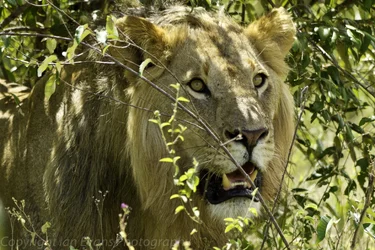
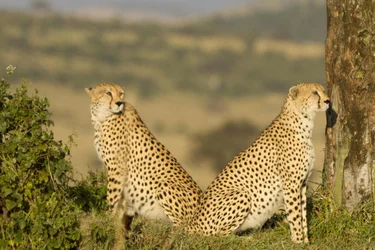
Hello everyone, I am brand new to the forum and am also pretty new to DSLR photography in general. I would be grateful for any hints/tips/constructive criticism on the attached photos from my recent trip to the Masai Mara, Kenya.

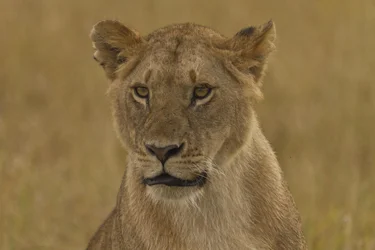
I was using my 7d with a Sigma 150-500 for all three photos. I did not have too strict an objective in mind, but just wanted to take wow!! photos which I dont seem to have captured by my reckoning. The composition is pretty much as I envisaged it, but they dont jump off the page at me. Any ideas what I could do better??

These are rendered JPEGs f $2 cheetahs.webp$Lion 1.webp$Kenya 201220120404-_MG_29361220120404.webprom lightroom, but if its better for me to send RAW files I can also do that.
Many thanks

Ian:scratch:
 
Ooops just remembered, Big Mike advised me to put exposure infor etc.

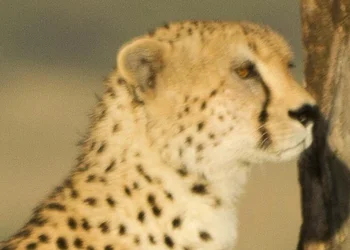
Picture 1 - Two Cheetahs ISO 100, 439mm, F6.3, 1/250th
Picture 2 - Female Lion ISO 100, 500mm, f6.3, 1/125th
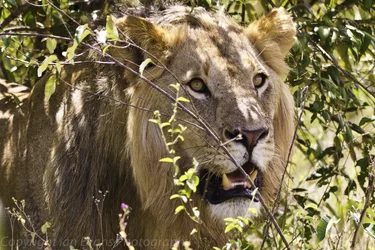
Picture 3 - Male Lion ISO 100, 313mm, f6.3, 1/125th

Please be gentle with me.

Ian
 
You should maybe consider stopping the lens back. I found a site that says that lens is sharpest when out at 500 between f13-16. #1 looks oof to me. I like #2. As for #3 the color seems off and it may be overexposed. Just my 2 cents. Many will have better insight than I.
 
At this stage, I am happy for any advice or citicism as I need to learn more. when you say move the focal length out does this improve focus but reduce the amount of Bokkeh??

I think something went funny with #3 in lightroom and I will try to repost it as its my favourite of the three.

Many thanks for you comments and time.
 
Your shutter speeds were too low for the focal length used, ISO should have been uped to get a higher shutter speed, shot 2 would have been better shot in portrait
 
Dubaiian said:
At this stage, I am happy for any advice or citicism as I need to learn more. when you say move the focal length out does this improve focus but reduce the amount of Bokkeh??

I think something went funny with #3 in lightroom and I will try to repost it as its my favourite of the three.

Many thanks for you comments and time.

I'm not talking about your focal length. I'm talking about your f-stop also known as aperture. Lenstip.coms review says the optimal f-stop is between 13-16 when shooting at 500mm for that lens.
http://www.lenstip.com/184.1-Lens_review-Sigma_150-500_mm_f_5.0-6.3_APO_DG_OS_HSM-Introduction.html
In either case I'm not saying to stop down that low, I'm just saying your picture won't be as crisp wide open at 6.3. Generally all lenses perform better stopped down 2 stops. I hope this helps.
 
the one of the female lion is flat and needs a contrast boost.
 
Also, as gary has stated, you should have been using a faster shutter speed. Shot #1 of the cheetahs or leopards looks nice small, but viewed 100% it is both out of focus and suffering from slight motion blur from either the subject moving or camera shake. It's a pity because the lighting on it was nice.

$leopard.webp
 
Welcome to the site :)

I honestly think beginners in wildlife need to be told that ISO 400 or even ISO 800 on newer cameras should be their starting ISO. Noise we can deal with in editing and much of it won't even appear in prints or web-sized images - however motion blur from subjects or handshake whilst holding long lenses is impossible to remove*

Shutter speed wise the rough rule of thumb is that your shutter speed should be at least 1/focal length of the lens for a sharp handheld shot. Many also advise a little faster for crop sensor cameras (like the 60D). Further you'll need speeds in the 1/400sec or faster range for sharp wildlife shots anyway (slower can be possible for a sedate subject, but any motion will likely blur).

Aperture wise nearly all lenses are a little sharper if you stop down around one or two stops from wide open. With superzooms like the lens you are using this difference between wide open and around f7.1-f8 is often quite noticeable (whilst on higher end prime lenses like a 400mm f2.8 the difference would be much less and the wide open much sharper).
Of course dropping the aperture down a stop is going to affect your shutter speed. Ultimate sharpness does help, but if you need more light throw the lens open to wide open.
This will affect the depth of field and the background blurring that you are getting - however so too does the long distance between yourself and the subject. Further as you can see in your cheetah shot, the further away the background, again, results in more blurring to it. Its a tricky relationship, though I'd personally say consider the blurring of the background a tertiary concern - after first shutter speed and then subject sharpness.

so - check your shutter speed; check your aperture; take a shot and then see if the blur is desirable or if you want to push wider (experience will help here in time).


For the Lioness shot (second for any who don't know their cats ;)) I would suggest giving the shot some levels and contrast changes. If you're confident with the brush tool you can get better results if you select the cat alone and set one contrast level for the cat and then a separate one for the background (it lets you give far more "pop" to the subject that way).


*some might be recoverable in editing, but you are looking at a lot of hours to get a decent result. Generally its in that category where its more hours than its worth it for many people.
 
Hello Everyone, thank you so much for the advice, I have just learnt as much in 5 minutes as I learnt at all of those courses :-). I was so concerned with keeping the ISO as low as possible I wrecked the pictures with crap shutter speeds. Your advice is valuable and I will be back in Kenya shortly to try out what you have suggested. I will also try to get some shots at the local bird sanctuary with the advice given here and see if I can improve.

Thanks again
 
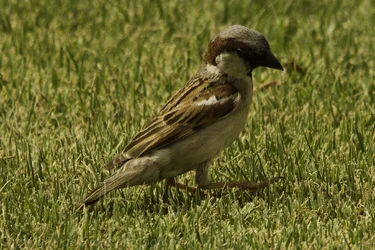
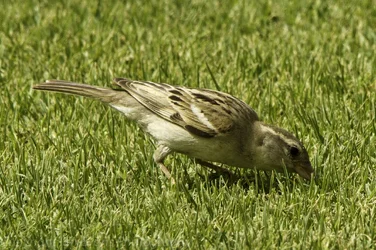
Hi all, I have taken your advice and dramatically increased my shutter speed and stopped down the aperture. Are these better??I was hand holding the camera and the birds were about 15 feet away.

$Bird (1 of 1).webp$Bird 2.webp
 
Try this in editing for the first shot (I'm not sure what you have but this should be easily possible with most editing programs). I know the process for software like elements, but whilst I think this is possible in lightroom I'm not sure of the process by which I'd get the result (since lightroom does not have layers, but does have the brush tool)

1) Copy the base layer - ie the original photo in the layers pallet.

2) On the new copied layer select the "levels" tool. This should open up a new window and in that window, somewhere, there should be some "dipper" icons (like little water pipettes). One of these should be white (normally you've white grey and black). Select the white one and then go to the back of the wings where you have those white feathers and click on a pure white part. This should remove the slight colour haze that I can see over the photo.

2) Ok the levels changes for now, however notice that the photo is slightly strong in exposure on the white parts now. This is where the layer mask comes in; select the white layermask and then select the brush tool. With the brush set its opacity to around 30% and its colour to black. Then gently brush over the white parts of the bird. This will show the layer under the new one through the first; thus letting you get a little of that detail and take the edge of those bright whites.
Using a smaller opacity lets you brush in layers over the section to build up the amount you want. If you use separate mouse clicks for each brush sweep you can use the undo command to go back a step if you feel you've gone too far.

3) With the changes to the whites made now open up the shadows and highlights option and boost the lighting in the shadows. Don't go too extreme as you still want to retain the shadow effect rather than destroy it, but use it to take the dark edge off the birds face and eye which are currently shadowed.


Editing tips aside these photos are an improvement certainly. Settings used would help; however the primary problem with these isn't so much settings as the direction of the lighting. The light itself is quite nice and soft, but the direction is causing the birds own body do shadow its head and eye (key parts that the viewer looks to). You can see this most of all in the second shot
 

Create an account or login to comment

You must be a member in order to leave a comment

Create account

Create an account on our community. It's easy!

Log in

Already have an account? Log in here.

Back
Top Bottom