What's new

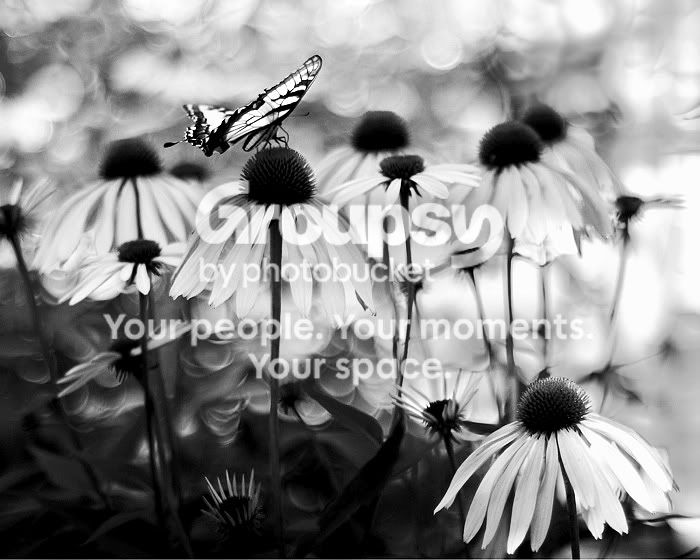
Butterfly and Flowers

SwissJ

TPF Noob!
Joined
Mar 29, 2010
Messages
243
Reaction score
1
Location
Brooklyn, NY
Can others edit my Photos
Photos OK to edit
As always, comment on whatever you want. Thanks.

#1
4753712437_e4191a9581_b.jpg
 
Last edited:
What lens did you use to take this? The bokeh is fantastic. I do, however, think that the photo is underexposed as a whole..

Mark
 
Yeah, usually shots like that don't have that much bokeh, I wonder how you did it.
 
Markw is right about the exposure problems. It could be wonderfully contrasted if it were brighter. Could some tweaks in post help? Other than that the lighting looks as if you almost had backlight which shines through the wings of the butterfly, and that is really nice.
 
Did you use a mirror lens for this? Or did you add that bokeh in post?
 
The bokeh is real. The lens is an old Nikon 50mm f/1.4 AI mounted on my Canon T2i.

I agree about the underexposure. I added a slight vignette layer over the b&w conversion to try to dim the bright background on the right. It darkened the overall image quite a bit.

Here is the original (cropped to 5:4) in color. Feel free to suggest any edits if anyone has the time :mrgreen:

#2
4754965106_a286f6cc02_b.jpg
 
NIK software has the ability to add a vignette to any one side of the image, this way you do not have to apply it to the whole image.

I like this photo in b&w as well, and would love to see it with the vignette lifted.
 
I am learning the layers in PSE and felt this might be a good test. I apologize if it doesnt meet standards but it cried selective coloring to me. There are bits of color still showing from the original but I got most I think to give and idea.
butterfly-with-black-and-wh.jpg
 
^^ vtf, your selective color edit looks pretty cool... just not my style.
I like your b&w conversion though... nice contrast and retention of the darker foliage.
 
I really like this picture! It looks so dreamy and fairy like. The selective colouring of vtf is great!
 
I tried an edit. Selective levels, desaturated, more levels, a tad sharpening. I tried to get a full range of values.

tank.jpg


Mark
 
that bokeh is really distracting....sure its round,, but whats supposed to make the background out of focus is detailed.
 
I tried an edit. Selective levels, desaturated, more levels, a tad sharpening. I tried to get a full range of values.
tank.jpg
Cool, thanks for the edit. I like seeing the foliage on the lower left, but the flower petals lose quite a bit of detail being so bright.

Edit: Looking at this one again, I do like how the vertical stem lines are more pronounced.
 
Last edited:
My 2 cents:

I like the original. :) I just wanted to see what it would look like with a bit of a different crop... In Gimp, I boosted the contrast a hair and re-cropped it using a 5:2 aspect ratio. This was the result...

Butterfly.jpg
 

Create an account or login to comment

You must be a member in order to leave a comment

Create account

Create an account on our community. It's easy!

Log in

Already have an account? Log in here.

New Topics

Back
Top Bottom