What's new

C&C: Film SLR n00b Shots

WinkWink

TPF Noob!
Joined
Jul 31, 2011
Messages
13
Reaction score
1
Can others edit my Photos
Photos NOT OK to edit
Hey, I'm new here (as the title indicates) ;) and I was hoping to get a little CC on some verrrrrrrrry amateur photos!

Please keep in mind that these were taken with a film Nikon N55 with no touch ups--obviously (I just added a teeny little watermark using powerpoint, of all things! lol)

Anyhow, Curious to hear.
Please provide HOW they could have been improved, not just why they might suck ;)

Thanks-a-Million!
;;)

(There last one near the bottom was only taken on my iphone and filtered up with Instagram! lol... perhaps you might CC any type of comp?)

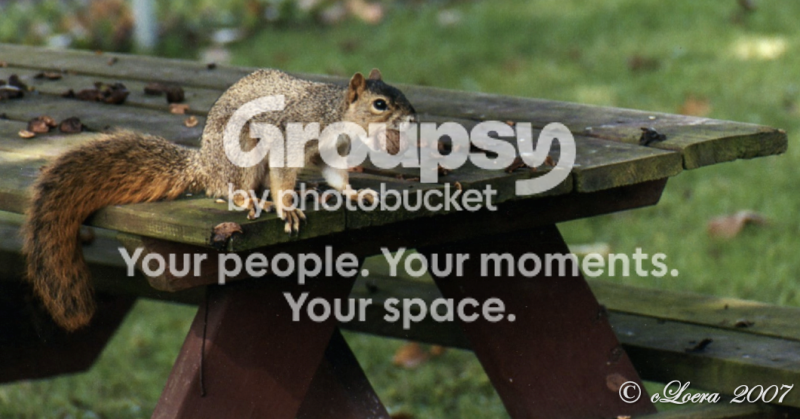
Screenshot2011-07-19at32539AM.png


ClairtonNuts.png


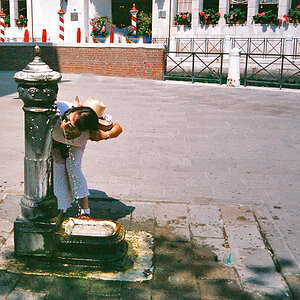
RenzieFountain.png


Screenshot2011-07-31at65347PM.png


SolesWM-1.png


(the iphone shot)
Screenshot2011-07-20at22612AM.png
 
wow... 44 views and not one person to offer up any kind of help.


Gee, Thanks! Seriously.
 
wow... 44 views and not one person to offer up any kind of help.


Gee, Thanks! Seriously.

A respectful reminder would have been sufficient. Good luck getting any sort of serious and insightful responses now! :)

While you wait, you may want to read the post linked below. The more helpful people are tired of snotty attitudes.

http://www.thephotoforum.com/forum/photography-beginners-forum-photo-gallery/252186-well-then-shall-we-just-let-blind-lead-blind.html

EDIT: Also, try to limit the number or photos you post for critique to 2-3 and number them accordingly.
 
Last edited:
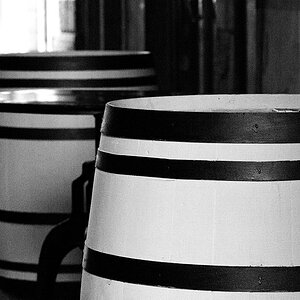
#5 is the only one that really does anything for me. I think it could use a few degrees of counter-clockwise rotation though...

I like the tones/textures of it.
 
I am pretty amateur too.... but in my opinion they are a bit underexposed... I would dodge the dogs eyes a little so they dont just look like black caves... Squirrel looks a bit fuzzy and is kinda a boring shot... even if he is cute ( ; Other that that I think you did a good job. What mode were you in? I love film!
 
wow... 44 views and not one person to offer up any kind of help.


Gee, Thanks! Seriously.

You waited a whole 28 minutes for feedback? Let me put my life on hold to critique your half dozen OOF pictures!!!!

Patience is a virtue. And being sarcastic and rude will NOT get you help here. That's free advice there.
 
These actually look alright! With negative film, it REALLY helps to overexpose it. Since you can't set an ISO on the N55, what you need to do is change the exposure compensation. So make sure the camera is in M, A, S, or P mode, and hold down the +/- button by the shutter release, and twist the dial. Set it to +1.0 or +1.5(if it's really bright daylight). Than you're golden.

You'll find a huge boost in tonality, and you shadows will look richer/less grainy. Also, 35mm is a pretty small format for film, so when you compose, you really need to try and get it right the first time, cropping has serious consequences.

Fuji films typically focus on greens and blues, Kodak films are usually warmer, focusing on reds and yellows.

When in doubt, OVEREXPOSE.


So with that in mind, you should get great results.

3 rockstars who shoot 100% film are:

Jose Villa:http://josevillablog.com/
Jonathan Canalas:Jonathan Canlas Photography
and Sarah Chen: http://sarahkchen.net/

A
ll they do is shoot 400H or Portra 400 overexposed on old, obsolete cameras with fast lenses. It's not rocket science, but it sure is beautiful.
 
Thanks to those who have offered information, especially Switch!

Perhaps the others should get the sticks out of their bottoms and realize when some sarcastic humor as been interjected?
Those that failed to do so... what really did your post do? Did it make you feel better? lol

@JMBriggs, I was making my first attempt at M [shrugs] Not too successfully for most tastes, however. :( lol

And... for Gaerek, perhaps you should take note that I didn't goof on my unpopular thread in 28 minutes. Where the eff did you get that?! You def need to lighten up and not take anything so darn seriously. You realize that this is the interwebz right? ;)
 
Last edited:
I am pretty amateur too.... but in my opinion they are a bit underexposed... I would dodge the dogs eyes a little so they dont just look like black caves... Squirrel looks a bit fuzzy and is kinda a boring shot... even if he is cute ( ; Other that that I think you did a good job. What mode were you in? I love film!

I also totally agree with the dog's eyes comment; and the squirrel, though boring... he was just there ;) lol
(thanks, again)
 
I'm also trying to master M. For your first attempt you did amazing. I think film is a lot harder... At least it was for me. Keep up the good work...
 
I'm also trying to master M. For your first attempt you did amazing. I think film is a lot harder... At least it was for me. Keep up the good work...
Well, thanks again, JMB! :)

This is terrible to admit, but what makes it especially challenging is wearing contact lenses! I think once I get my new RX in, it'll def help in making clearer pictures! ;) lol
 
Another film-only, b/w only guy from my country (but shooting everywhere): Danilo De Marco » HOME PAGE (no weddings and so: reportage and portraits only).

In the first picture there is some glare on center top - sun was behind the trees? Or are you using some (cheap) UV filter? Both animals are slightly OoF: you have to focus on eyes, it's a portrait.
However, #1 could be nice. I would come back trying some slightly different composition, because the idea is good. I would cut slightly on left, in order to bring the foreground flag more on the third. I do not like the blurred, dark tree mass, but I imagine is difficult to avoid it.
Finally, since now they are in digital form, you may even pp slightly to recover underexposure - no shame, it is something you had to do in dark room ;) .
 
50% of your pictures have an animal with its mouth open and/or something in it haha thats funny!
 
Another film-only, b/w only guy from my country (but shooting everywhere): Danilo De Marco » HOME PAGE (no weddings and so: reportage and portraits only).

In the first picture there is some glare on center top - sun was behind the trees? Or are you using some (cheap) UV filter? Both animals are slightly OoF: you have to focus on eyes, it's a portrait.
However, #1 could be nice. I would come back trying some slightly different composition, because the idea is good. I would cut slightly on left, in order to bring the foreground flag more on the third. I do not like the blurred, dark tree mass, but I imagine is difficult to avoid it.
Finally, since now they are in digital form, you may even pp slightly to recover underexposure - no shame, it is something you had to do in dark room ;) .

This was all great info! You guys are totally right about the eyes--they're caves! (crap! lol)
I'm going to have to invest in some kind of editing suite for the computer. I'm still shooting film, but at least I can upload the CD's and attempt some retouching for my realtime goofs ;)
Thanks-a-million! ;)

(and it is/was a cheap filter, sadly!)
 

Create an account or login to comment

You must be a member in order to leave a comment

Create account

Create an account on our community. It's easy!

Log in

Already have an account? Log in here.

New Topics

Back
Top Bottom