What's new

C&C this portrait for me please!

cestlefun17

TPF Noob!
Joined
Jul 23, 2009
Messages
66
Reaction score
11
Location
Rhode Island
Can others edit my Photos
Photos OK to edit
Camera: Canon Rebel T2 35mm
Lens: 28-90mm f/5.6
ISO: 400
Film: Krueger 400 color negative


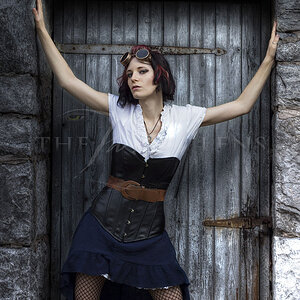
A portrait of my sister. Is the sun too harsh? Composition OK? Thanks. One of my first photos.

 
The WB seems off. That red tint isnt right.
 
Any image editing software should have an Auto and manual white balance (should be under colorer)
 
Still a bit to red but better

80890020.jpg


Sorry for double post:meh:
 
looks over exposed to me.and there is a lot of blow out.
 
hah that's a lot better...

i think the light is a little rough?...
 
the OP, looks like something you'd see in a 70's early 80's magazine, thats what I got from a quick look, Ophers edit brings the coloring closer to where it should be, but it is a lil'overexposed too, I would have probably framed the whole modle aswell as not to much of her is actualy cut out.
 
New edit (desaturated the green to try to give it more depth)

808900202.jpg
 
Thanks! Those edits look great, especially the second one.
 
If you think those edits look great you should see what some of the other people on hear can do.:er:

OP feel free to try some editing your self. You can do the basics with something like the GIMP. Mostly just have fun with it.
 
Last edited:
How do you adjust the white balance?

Use different film, or use a color correction filter.

That film is probably Daylight balanced though, so - since this was shot in daylight, it's right.

Is this a scan of the print, or the negative?

If it's the print, the redness was from the lab and could easily be corrected before printing. If it's the negative, it would still be pretty easy (not sure what software you're using).
 

Create an account or login to comment

You must be a member in order to leave a comment

Create account

Create an account on our community. It's easy!

Log in

Already have an account? Log in here.

Back
Top Bottom