What's new

Camera + golf = ______

mpasq66

TPF Noob!
Joined
May 12, 2009
Messages
144
Reaction score
22
Location
Pittsburgh
Can others edit my Photos
Photos OK to edit
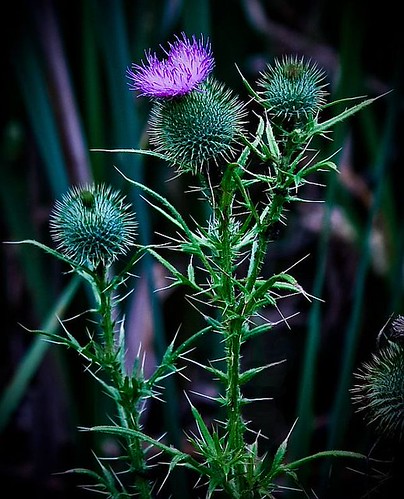
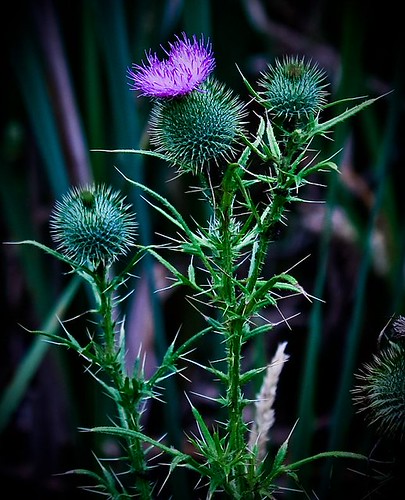
Just a quick shot between rains...

C&C always welcome.

ISO 400 f/5.6 1/160
3819975140_5bba0119ae.jpg
 
Oh man I really like this photo. It's perfect ! :thumbup: If I was really nit picky I would remove the grain stalk.
 
oooo nice one.
the purple pops really nicely among the dark greens.
well done.
i agree with the grain stalk too...that;s the only thing i see that i'd change.
 
i agree with the grain stalk too...that;s the only thing i see that i'd change.

Then my next stupid question would be : How?

What's the best method for removing it?
 
I like it quite a lot. I think your best CC would come from the following; (including but not exclusive to) Cloudwalker, Musicale, JerryPH, Samanax, Garbz, Bitter Jeweler.

All the above are my favourite photographers here that know and enjoy the art.
 
Gave it a shot myself:
3822087833_1f6d3a1e34.jpg


But this was with some good old fashioned pixel painting... what's the best way to do this? (Thanks everyone!!)
 
Last edited:
Not going to lie; I'm not sure of the differences between the 3.

We're working on removing that light "stem" thing at the bottom of OP.
 
You guys just can't get rid of the stuff in the background and make it the dark/black color... I just learned photoshop about a week or so ago and even I know that. I also changed tone of your image and adjusted the contrast as well. I sharpened the image a bit too. Let me know what you think. Again I haven't been doing this long, but I feel that I've come a long way for how long I've been doing this.

flower2.jpg
 
What was your method, if you don't mind me asking?
 
for what? getting rid of the white thing? Oh by the way I got rid of the spikey ball on the right side it was bothering me too... For the white thing I used the clone tool and just figured out what I thought it should look like behind that white thing. And for all the other adjustments I just did them in aperture by adjusting white balance, vibrancy, black point, definition, and contrast.
 
This time I cleaned some more stuff up and I used the burn tool to sharpen all the edges of all the thorns... I think it looks MUCH better now.

flower3.jpg


Let me know what you guys think.
 

Create an account or login to comment

You must be a member in order to leave a comment

Create account

Create an account on our community. It's easy!

Log in

Already have an account? Log in here.

Back
Top Bottom