What's new

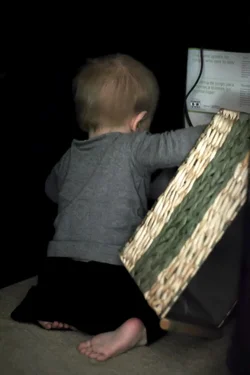
can this be salvaged?

I'm scared of the editing process.. and I really need to dig out my ehd so my laptop doesn't get crazy with all the files. I take pics daily of my son. I have over 3000 since he was born in early May. lol
 
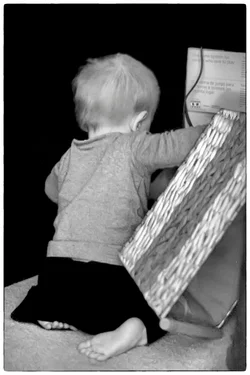
A little different spin on it.


$8285041909_4dee8ff801_k-1.webp


$8285041909_4dee8ff801_k-1bw.webp
 
Most cameras that I'm aware of can save the picture as raw and a preprocessed JPEG. I have mine set to save small JPEG's so I can post them straight to Facebook or whatever ("small" JPEG is still large enough for this), but I still have the raw files to play with if needed.
 
Most cameras that I'm aware of can save the picture as raw and a preprocessed JPEG. I have mine set to save small JPEG's so I can post them straight to Facebook or whatever ("small" JPEG is still large enough for this), but I still have the raw files to play with if needed.

Yes, mine has this.. I'm just not looking forward to sooo many files. ;\ But its prob the best way to do it since most my shots are just snapshots that I may not even edit ever.. and then there will be a handful like this image where a RAW copy would be nice.
 
That's where lightroom comes in handy. Best thing really for workflow process. No need to edit one at a time in photoshop, that takes forever.

The cull is important as well. I have finally forced myself to be strict. Blurry, insta delete, dont' even think about it. Underexposed...buh bye. Over exposed...maybe, depends. so forth.

after that I import into lightroom, if it's from the same shoot, wb adjust and exposure adjust first image, apply to all, export. Done.

Then if I have any special ones I want to give attention to, I open with CS6 and put finishing touches on for print.

If you are finding all of your images from the same shoot with many variances, you need to look at your shooting process, not editing. Make your life easier, not harder.
 
also don't forget about actions and batch processing. If I know I have some noise and a simple Imagenomic basic "portrait" or "landscape" adjust will clear it up, set up an action. Takes about 2 minutes. Run a batch on entire set, takes about 1 minute to set up to run, then let the computer do the rest.

I just used noise as an example, but you can do anything with actions and batch processes.
 
That's where lightroom comes in handy. Best thing really for workflow process. No need to edit one at a time in photoshop, that takes forever.

The cull is important as well. I have finally forced myself to be strict. Blurry, insta delete, dont' even think about it. Underexposed...buh bye. Over exposed...maybe, depends. so forth.

after that I import into lightroom, if it's from the same shoot, wb adjust and exposure adjust first image, apply to all, export. Done.

Then if I have any special ones I want to give attention to, I open with CS6 and put finishing touches on for print.

If you are finding all of your images from the same shoot with many variances, you need to look at your shooting process, not editing. Make your life easier, not harder.

Part of it is me not sure what shots are worth keeping til I see them big on the screen and can see how well they did turn out.. the lil screen on my cam is well, little and quality is meh. I insta delete some, but not enough. lol This child is like the most photographed in history I think. I have done the copy of edits to all before, just learned that trick recently. I think my life will be easier once I learn my camera better too, which is slowly happening.
 
also don't forget about actions and batch processing. If I know I have some noise and a simple Imagenomic basic "portrait" or "landscape" adjust will clear it up, set up an action. Takes about 2 minutes. Run a batch on entire set, takes about 1 minute to set up to run, then let the computer do the rest.

I just used noise as an example, but you can do anything with actions and batch processes.

right over my head.
 
That's where lightroom comes in handy. Best thing really for workflow process. No need to edit one at a time in photoshop, that takes forever.

The cull is important as well. I have finally forced myself to be strict. Blurry, insta delete, dont' even think about it. Underexposed...buh bye. Over exposed...maybe, depends. so forth.

after that I import into lightroom, if it's from the same shoot, wb adjust and exposure adjust first image, apply to all, export. Done.

Then if I have any special ones I want to give attention to, I open with CS6 and put finishing touches on for print.

If you are finding all of your images from the same shoot with many variances, you need to look at your shooting process, not editing. Make your life easier, not harder.

Part of it is me not sure what shots are worth keeping til I see them big on the screen and can see how well they did turn out.. the lil screen on my cam is well, little and quality is meh. I insta delete some, but not enough. lol This child is like the most photographed in history I think. I have done the copy of edits to all before, just learned that trick recently. I think my life will be easier once I learn my camera better too, which is slowly happening.

Sounds like you need to work on your culling. You can do this in lightroom. When you import them all in from the shoot, even raw, they will show up on your screen large for you to scrutinize. Get in the habit of not editing here at this part. Just cull. Like it, click next, don't like it, right click on image in the bottom part and click delete. Move on.

Once you force yourself to be stricter on the cull, it makes things easier and forces you to focus more on your shooting.

Then you can get into adjusting the ones you kept. If you are finding yourself with too many pics after the first cull, do it again.

It seems like it's overwhelming at first, but once you make a routine for yourself, and force yourself to stick to it, you'll find life easier later. Like most things, it's a pain in the beginning, but pays off in the end.
 
also don't forget about actions and batch processing. If I know I have some noise and a simple Imagenomic basic "portrait" or "landscape" adjust will clear it up, set up an action. Takes about 2 minutes. Run a batch on entire set, takes about 1 minute to set up to run, then let the computer do the rest.

I just used noise as an example, but you can do anything with actions and batch processes.

right over my head.

It was over everyone's head in the start. Just gotta force yourself to learn it. Start with a practice set of say...5 images. Play with it, learn it, watch tutorials on youtube. I too fought it and fought it, even knowing it would make my life easier. Once I finally sat down and learned it and did it, I kicked myself as it was much easier than expected.

I average nowadays, about 30 minutes to an hour on a set, maybe 300 or so images (not counting any special images I want to spend extra time on). I try to too shoot more than that just 'cause I don't wanna edit forever. I don't do weddings...so that makes life easier, lol.

I am sure there are more who spend less time on a set than I do, but I'm just not there yet. It's a learning process we all go through or have been through.

 
also don't forget about actions and batch processing. If I know I have some noise and a simple Imagenomic basic "portrait" or "landscape" adjust will clear it up, set up an action. Takes about 2 minutes. Run a batch on entire set, takes about 1 minute to set up to run, then let the computer do the rest.

I just used noise as an example, but you can do anything with actions and batch processes.

right over my head.

It was over everyone's head in the start. Just gotta force yourself to learn it. Start with a practice set of say...5 images. Play with it, learn it, watch tutorials on youtube. I too fought it and fought it, even knowing it would make my life easier. Once I finally sat down and learned it and did it, I kicked myself as it was much easier than expected.

I average nowadays, about 30 minutes to an hour on a set, maybe 300 or so images (not counting any special images I want to spend extra time on). I try to too shoot more than that just 'cause I don't wanna edit forever. I don't do weddings...so that makes life easier, lol.

I am sure there are more who spend less time on a set than I do, but I'm just not there yet. It's a learning process we all go through or have been through.

My head already hurts.. lol *sigh* so much to learn!
 
I'm scared of the editing process..

The editing process is the same. Go take 10 pictures and take it for a test run. You import, cull, then go into develop module, adjust then export. About culling, you can do that in the library module. Click on the single picture icon to preview and if it's no good, just uncheck the box. Then click 'import' and only the images with the checked boxes are imported. I also do my star ratings in the library module so when i'm in the develop module, I work on the 5 stars and down.
 

Create an account or login to comment

You must be a member in order to leave a comment

Create account

Create an account on our community. It's easy!

Log in

Already have an account? Log in here.

New Topics

Back
Top Bottom