What's new

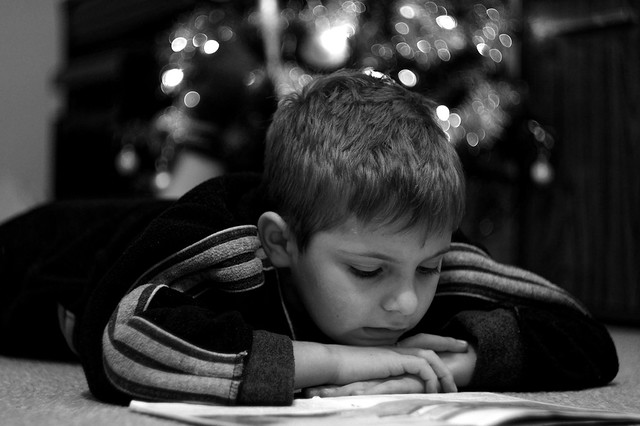
Candid of my son, B&W and Xmas Tree bokeh C&C

jamesdavidboro

TPF Noob!
Joined
Nov 2, 2010
Messages
216
Reaction score
0
Location
Middlesbrough UK
Can others edit my Photos
Photos OK to edit

Concentration by jamesdavidboro2, on Flickr

He's laid reading his school book. I spotted a photo opportunity with the Christmas Tree lights in the background. I've never really tried Portrait before but its something i'm determined to conquer. Does it class as a Portrait with it being candid?
 
It's a little dark.. but nice.

Brighten it up a little and you're set. Levels adjustments here:


iEnBM.jpg
 
Cooke's right but I would have been more subtle and maybe used the dodge tool on & around his face... I like the background darker.
 
Last edited:
Nice work, I agree with Paul concerning brigtening around the child, and not darkening the bacground as much (if at all).
 
Why lighten? I like the dark one more, my attention went right to the boy. if i look the lighter one i get more distracted.
 
It's a little dark.. but nice.

Brighten it up a little and you're set. Levels adjustments here:


iEnBM.jpg

you over brightened

realizethat you don't have white in the scene except for the chrismas lights (if white ones), the brightest thing are the lights and there was no light on the face. you can tell the light is overhead based on the shadows. because he's looking down his face is supposed to be dark.

i would perhaps make it 10% lighter but not this much
 
If you are going for a "Christmas" image, I would reshoot with maybe a different angle and a little less background blur. If it wasn't Christmas time and you didn't put "Xmas Tree bokeh" I probably wouldn't have realized right away that its a christmas tree behind him. Its too blurred, too small of of a piece ( the top half of the tree is always going to be more recognized due to the shape ) and the child is doing nothing and wearing nothing that resembles christmas. You are already at a disadvantage using B&W because you don't have any color clues to give the viewer....
 
iNlLo.jpg


here was my hand at it. i did a few things to it the most obvious is the warming filter. i forgot to save it before i put the filter on there so i could have a w/ and w/out
maybe my edit is out of place but it was a chance for me to throw in my $.02
also i really like the shot you took.
 

Create an account or login to comment

You must be a member in order to leave a comment

Create account

Create an account on our community. It's easy!

Log in

Already have an account? Log in here.

Back
Top Bottom