What's new

CC of post work with question

jowensphoto

Been spending a lot of time on here!
Joined
Feb 28, 2011
Messages
2,983
Reaction score
906
Location
Northern Viriginia, US
Can others edit my Photos
Photos NOT OK to edit
$IMG_3513.webp
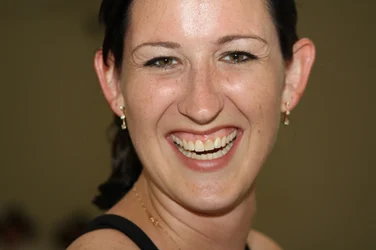
Before

$IMG_3513b.webp
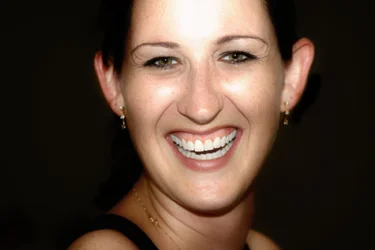
After

This was the MOH at a wedding I attended (as an "Aunt Barbara") awhile ago.

I know the highlight on her head and cheeks is blown, but I can't seem to figure out how to fix it (I use GIMP, fwiw). I've tried the burn/dodge tool, didn't work; cloning looked horrible. Suggestions for improvement are always welcome of course. Aside from that, I'd also love to hear what you think about the rest of the PP.

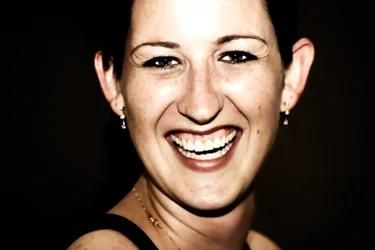
OK- idk why that thumbnail attachment thing is there and I can't make it go away. That was the craptastic original edit when I knew nothing about PP lol
 

Attachments

  • $Heathersmile.webp
    $Heathersmile.webp
    902.4 KB · Views: 121
Honestly the original is better in my opinion, I dislike the edit, it's too contrasty (background blacked out) and her face looks unnaturally smoothed. Are you working with a RAW file or jpg? I'd try cloning again, but not at 100% opacity. You can't fix blown but you can shade it in a little ;)
 
It's a JPEG. Sadly I knew no better at the time and had no RAW conversion software.

The edit was done with a high pass filter, some skin correction and teeth whitening.
 
the original isn't that bad as is.
 
Thanks :) Guess I got it (close to) right in camera. That's a plus!
 
In my opinion there are some good things and some bad things about the processing. I don't think the skin looks overly smoothed (excluding the blown areas, of course). You can still see her freckles and laugh lines. One thing to be mindful of is what "imperfections" you remove. I'm specifically referring to the two spots on her left cheek. In general I don't mind removing transients - pimples which wouldn't normally be there, for example - but I don't remove permanent marks (moles, birthmarks, etc). Such things are visible every time the person looks in the mirror (or in this case, since we're really talking about pictures of the MoH for the bride to see, every time the bride has seen her) and are part of that person's identity and personal image. Just imagine how off a picture of Cindy Crawford would look without her famous mole. What you can do is minimize them if you see fit, by using the clone tool at <<100% as Trevor suggested for the blown areas. I also like your whitening of her teeth - very clean, but not so white as to appear freakishly unnatural. If this were a fashion shot I'd say you nailed it - here I might dial the cleanliness back just a tad. Again, she knows her teeth aren't nearly that white (unless the original has white balance issues and the teeth are whiter than they appear there), but also because you don't want to upstage the bride - make sure her teeth are just barely not quite as white as you make the bride's and the bride will on some level appreciate it.

I agree with Trevor that the background is too black. You've lost all distinction between the background and her hair (and her dress strap, for that matter). It also looks to me like there was some feathering of your mask - there is a gradual shading which follows the contours of the black which removes all sharpness between elements (her skin to the background, and even her dress strap to her shoulder).

Overall I think you're on the right track. Rein in what you did just a touch and I think you'll have a solid image.

 
I missed the cloning part Trevor suggested. I did try this; less opacity with a regular round brush as well as a "fuzzy" brush.

The high pass filter was responsible for blowing out the already bright spots on her head/cheeks; I need to refine my skill with it and I think that would really help. Same goes for the loss of detail with the background. Just pushed that filter a bit too far.

Thank you SO much for your critiques. A lot of help :)
 
As for the teeth... thanks! That was my first time working on that. I'll keep in mind real life vs. fashion/glamor when I do this again.
 
It still looks soft, one for the recycle bin in my opinion
 

Create an account or login to comment

You must be a member in order to leave a comment

Create account

Create an account on our community. It's easy!

Log in

Already have an account? Log in here.

Back
Top Bottom