What's new

Cleaning up high-noise images?

violakat03

TPF Noob!
Joined
Mar 1, 2012
Messages
14
Reaction score
2
Location
Columbus OH
Can others edit my Photos
Photos OK to edit
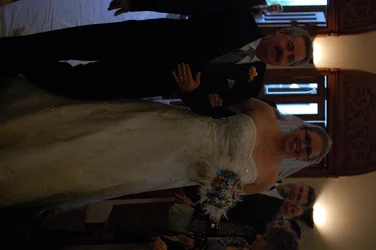
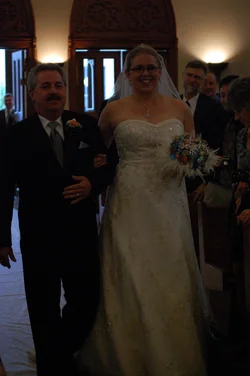
Hi everyone. I was hoping I could get some feedback on how to clean up some images I have from a friend's wedding this past weekend. I definitely do not have the quality of equipment needed to shoot well in the environment (indoor church, no flashes allowed) and the quality of the images definitely reflects this. However, I was hoping to clean up some of the images and give them to the couple on a disc. To make matters even more difficult, I stupidly didn't check all my settings before the ceremony and forgot that I'd handed my camera to a friend last week so she could use my speed light, and she set it to JPG instead of RAW.

This is an example of one of the images: really underexposed and tons of digital noise from the high ISO on a lower end camera (1600 ISO on a Nikon D40). This image hasn't been edited at all.
$DSC_0082.webp

Is there any hope?
 

Attachments

  • $DSC_0082.webp
    $DSC_0082.webp
    808.5 KB · Views: 198
I managed to get this with a few minutes in Lightroom. If you want a poster sized portrait to hang over the fireplace, it ain't going to happen; but if you will settle for 6 x 4s in an album for the couple's memories, you may be in with a chance.

I'm not a Lightroom or PS expert, others may be able to give better advice. I upped the exposure by about 1.5, gave it a tweek of fill light, warmed the tones up and then shoveled on some luminance to counter the noise. This was a quickie job, I could have played around some more but I have things to do today. :)

Good luck!!


DSC_0082A by Freelance_fool, on Flickr

That's a good lesson your friend gave you ;) ... Always check settings before you start (... and maybe, never lend your camera?). And it's a reminder to the rest of us, too.
 
I really like the plugin "topaz denoise", you can get it off the topaz labs website as a free trial as many times as you want or buy it, IMO it does a lot better than the built in denoise system in both ps cs5 and lr4.
 
Iwould render this to a grey scale with the raw converter for photoshop and tone down to orange a lot. As a color image this is pretty much toast. But should still make a decent bw.
 
Actually if you expose for the subject.. and not for the background... you would do much better (Spot meter their faces) although you will probably run into shutter speed issues since you were already at 1/80!
 
Thank you everyone for the help. Granddad, that image looks much better, I appreciate the tips. I don't have Lightroom but the more I hear about it and see it's results the more I'm thinking of getting it.

Also, I'll check out Topaz. DiskoJoe, I wouldn't have thought of B&W, I may take a few of them that direction. I've got a really well-framed shot of their first married kiss that I'd love to frame for them this may be a good option for it. And cgipson, I've only recently started learning how to properly meter, so I will certainly practice with spot metering in the near future!
 
Was this a paid gig? (please say no...)
 
Black and white and increase the exposure, it will get pretty noisy, but you can get away with more noise in black and white.
Hit it with some restrained noise reduction, don't turn the faces to mush, and should get away with it.
 
Was this a paid gig? (please say no...)

Absolutely not. I'm no where near ready to take paid gigs. I was attending as a guest; the bride and groom are good friends of mine.
 

Create an account or login to comment

You must be a member in order to leave a comment

Create account

Create an account on our community. It's easy!

Log in

Already have an account? Log in here.

Back
Top Bottom